Text-to-video AI has gone from a novelty to a real production tool. The best AI video generators can now turn a prompt or a photo into a short cinematic clip with sound, create a talking presenter, or edit your footage for you. This guide is part of our full list of the best AI tools.
Note that OpenAI retired the Sora app in April 2026 and its API in September 2026, so Sora is no longer on this list. Plans and prices were last checked in October 2026.
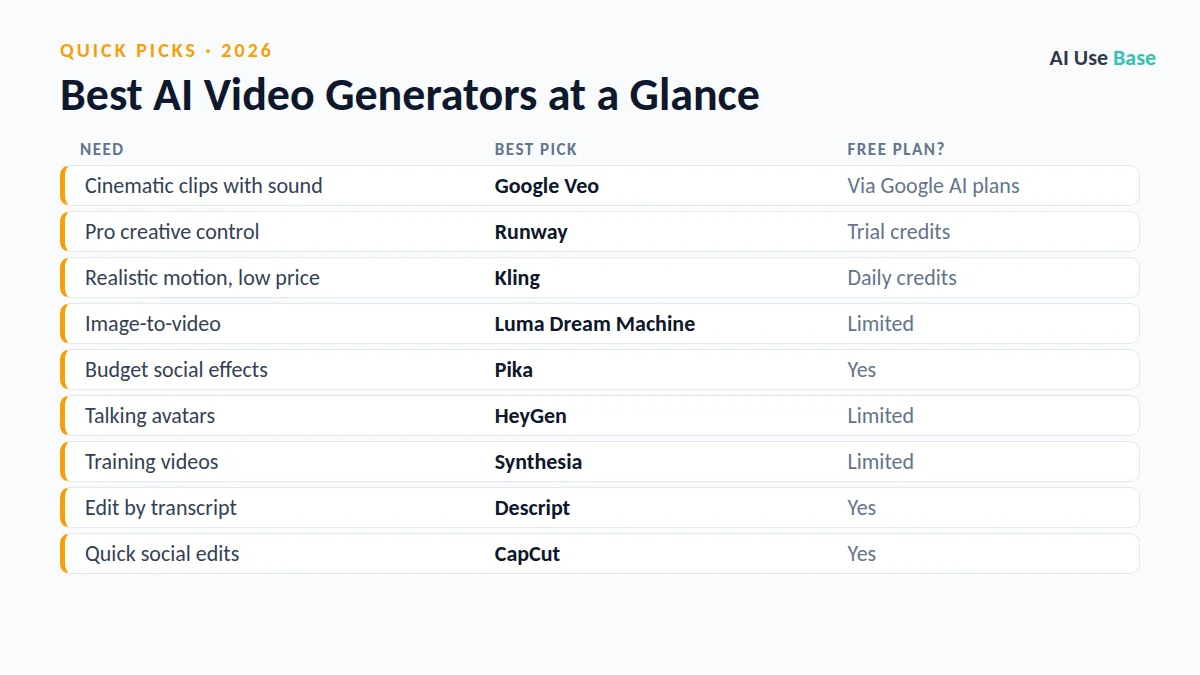
Quick Picks: The Best AI Video Generators at a Glance
| Need | Best pick | Free plan? |
|---|---|---|
| Cinematic clips with sound | Google Veo | Via Google AI plans |
| Pro creative control | Runway | Trial credits |
| Realistic motion, low price | Kling | Daily credits |
| Image-to-video | Luma Dream Machine | Limited |
| Budget social effects | Pika | Yes |
| Talking avatars | HeyGen | Limited |
| Training videos | Synthesia | Limited |
| Edit by transcript | Descript | Yes |
| Quick social edits | CapCut | Yes |
How We Chose the Best AI Video Generators
We picked tools that solve a real, repeated task, are actively maintained, offer a usable free plan or fair price, and clearly lead their category. Prices are US starting prices for individual plans, last checked in October 2026, and can change, so always confirm on the official site.
What Makes the Best AI Video Generators?
We compared the best AI video generators on what matters for real projects:
- Visual quality: realistic motion, lighting and consistency between frames.
- Control: camera moves, editing and the ability to fix a scene.
- Audio: native sound, voices or easy voiceover.
- Rights and price: fair credits, clear commercial-use terms and a free way to try.
No single tool wins everything, which is why this list of the best AI video generators is organized by the kind of video you want to make.
Best AI Video Generators for Short Clips
These are the best AI video generators for turning a text prompt or an image into a short, high-quality clip.
1. Google Veo – Best for cinematic clips with sound
Google’s Veo models generate short clips with native sound and realistic lighting. You can use them in the Gemini app and Google Flow, with limits that depend on your Google AI plan.
- Free plan: Video generation is on paid Google AI plans
- Paid: Google AI Plus $4.99/month, AI Pro $19.99/month
- Website: gemini.google/subscriptions
2. Runway – Best for professional creative control
Runway combines strong video models with editing tools such as motion control, camera moves and inpainting, which makes it a favorite with creators and agencies.
- Free plan: One-time trial credits
- Paid: From about $15/month
- Website: runwayml.com
3. Kling – Best for realistic motion at a low price
Kling is known for lifelike human movement and cinematic short clips at competitive prices. Check the license terms before commercial use.
- Free plan: Daily credits, non-commercial
- Paid: From about $10/month
- Website: klingai.com
4. Luma Dream Machine – Best for image-to-video
Luma produces smooth, natural motion and is especially good at animating a still image into a short scene.
- Free plan: Limited generations
- Paid: From about $30/month
- Website: lumalabs.ai/dream-machine
5. Pika – Best budget option for social clips
Pika focuses on fun effects and quick social videos, with a free plan that allows commercial use at lower resolution.
- Free plan: Yes
- Paid: From about $8/month (annual)
- Website: pika.art
Best AI Video Generators for Avatars and Presenters
If you need a person speaking to the camera, the best AI video generators are avatar tools rather than clip generators.
6. HeyGen – Best for talking avatars and video translation
HeyGen creates realistic talking avatars from a script and can translate and lip-sync your own videos into other languages.
- Free plan: Limited
- Paid: From about $29/month
- Website: www.heygen.com
7. Synthesia – Best for training and corporate videos
Synthesia is built for businesses that produce training, onboarding and explainer videos at scale, with many stock avatars and languages.
- Free plan: Limited
- Paid: From about $18/month
- Website: www.synthesia.io
Best AI Video Editors
Not every project starts from scratch. These are the best AI video generators and editors for improving footage you already have.
8. Descript – Best for editing by transcript
Descript lets you edit video by editing text, removes filler words, cleans up audio and can generate voiceovers.
- Free plan: Yes, with limits
- Website: www.descript.com
9. CapCut – Best for quick social media edits
CapCut offers auto captions, templates, background removal and AI effects that make short-form social videos fast to produce.
- Free plan: Yes
- Paid: Pro plan for advanced features
- Website: www.capcut.com
How to Choose an AI Video Generator
- Short cinematic clips? Try Google Veo, Runway or Kling.
- A presenter speaking? Use HeyGen or Synthesia.
- Editing your own footage? Descript or CapCut is faster.
- Check commercial rights before using clips in ads or client work.
- Budget for credits. Video generation uses credits quickly, so start with a small plan.
Frequently Asked Questions
What is the best AI video generator?
Google Veo is one of the best AI video generators for cinematic clips with sound, Runway is best for professional control, and Kling offers realistic motion at a low price. For talking avatars, HeyGen and Synthesia are the top choices.
Is there a free AI video generator?
Pika has a free plan, Kling gives daily free credits, Runway offers trial credits, and Descript and CapCut have free editing plans. Most high-quality generation requires a paid plan.
Is Sora still available?
No. OpenAI retired the Sora app in April 2026 and shut down the Sora API in September 2026.
Can I use AI-generated videos commercially?
It depends on the tool and plan. Some free plans block commercial use, and some tools grant usage rights rather than ownership, so always check the terms.
Final Thoughts
The best AI video generators are now good enough for real marketing, training and social content. Pick a clip generator for visuals, an avatar tool for presenters and an AI editor for your own footage, and always check the usage rights.
Want the bigger picture? See our complete guide to the best AI tools for every use case, or read our guides on best free AI tools and best AI image generators.