AI has changed how software gets built. The best AI coding tools now read your whole codebase, plan changes, run tests and fix bugs on their own. This guide, part of our full list of the best AI tools, compares AI code editors, coding agents and no-code app builders so you can pick the right one for how you work.
Prices were last checked in October 2026. Most tools now bill by usage, so your real cost depends on how heavily you use premium models.
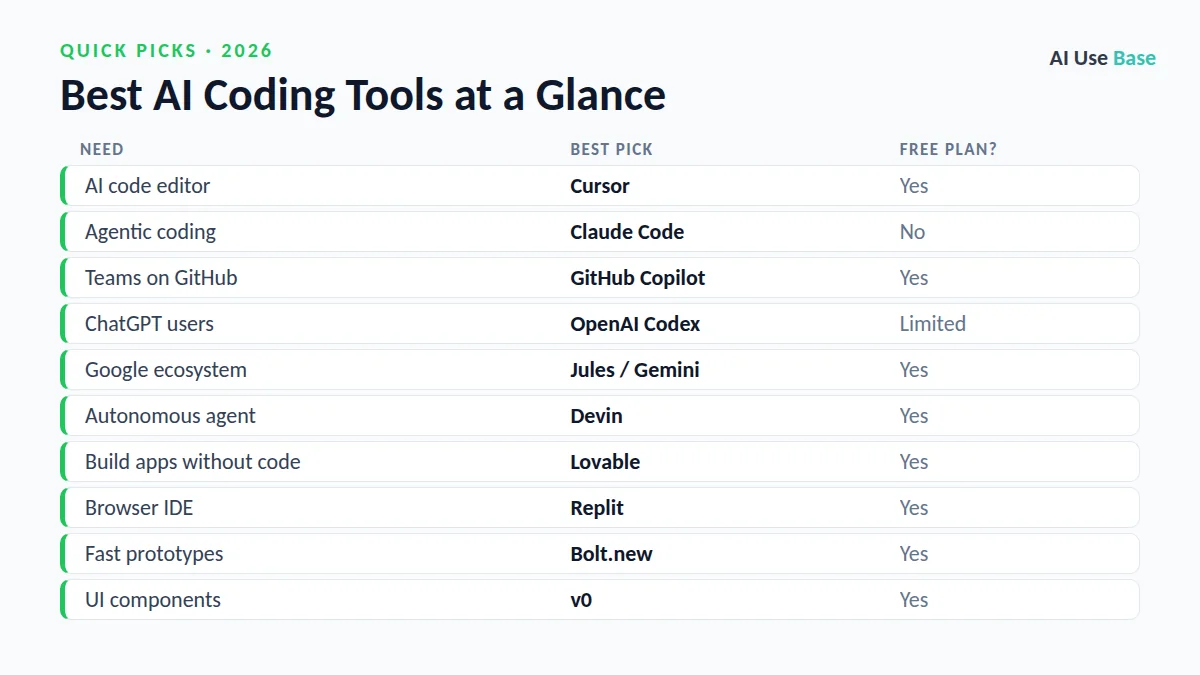
Quick Picks: The Best AI Coding Tools at a Glance
| Need | Best pick | Free plan? |
|---|---|---|
| AI code editor | Cursor | Yes |
| Agentic coding | Claude Code | No |
| Teams on GitHub | GitHub Copilot | Yes |
| ChatGPT users | OpenAI Codex | Limited |
| Google ecosystem | Jules / Gemini | Yes |
| Autonomous agent | Devin | Yes |
| Build apps without code | Lovable | Yes |
| Browser IDE | Replit | Yes |
| Fast prototypes | Bolt.new | Yes |
| UI components | v0 | Yes |
How We Chose the Best AI Coding Tools
We picked tools that solve a real, repeated task, are actively maintained, offer a usable free plan or fair price, and clearly lead their category. Prices are US starting prices for individual plans, last checked in October 2026, and can change, so always confirm on the official site.
What Makes the Best AI Coding Tools?
We judged the best AI coding tools on what matters in real projects:
- Codebase awareness: understands your whole repository, not just one file.
- Agent capability: can plan, edit multiple files and run tests.
- Workflow fit: works in your editor, terminal or GitHub.
- Predictable cost: clear free plans and usage-based pricing you can control.
The best AI coding tools in 2026 combine all four, which is why simple autocomplete plugins did not make this list.
Best AI Code Editors and Assistants
AI code editors and assistants are the best AI coding tools for developers who want help inside the editor they already use.
1. Cursor – Best AI code editor
Cursor is a VS Code–based editor built around AI, with codebase-aware chat, multi-file edits, Tab completions and background agents. You can switch between models from several providers.
- Free plan: Hobby
- Paid: Pro $20/month, Pro+ $60/month, Ultra $200/month
- Tip: Use Auto mode to stretch your usage allowance
- Website: cursor.com/pricing
2. GitHub Copilot – Best for teams already on GitHub
Copilot works in VS Code, JetBrains IDEs and on GitHub itself, with completions, chat, pull request reviews and a coding agent that picks up issues.
- Free plan: Yes, with a monthly allowance
- Paid: Pro $10/month, Pro+ $39/month
- Students: Free Copilot Pro for verified students
- Website: github.com/features/copilot
Best AI Coding Agents
Coding agents go further: you describe a task and they plan, edit files and run tests. These are the best AI coding tools for multi-step engineering work.
3. Claude Code – Best AI coding agent for complex work
Claude Code works in your terminal, IDE, desktop or browser. It reads your repository, plans changes, edits files and runs commands and tests, which makes it strong at refactoring and large features.
- Free plan: No
- Paid: Included with Claude Pro ($20/month) and Max
- Website: claude.com/product/claude-code
4. OpenAI Codex – Best coding agent for ChatGPT users
Codex is included with ChatGPT Plus and works across the ChatGPT app, the terminal and your IDE to write features, fix bugs and review code.
- Free plan: Limited on Go
- Paid: Included with ChatGPT Plus $20/month
- Website: chatgpt.com/pricing
5. Jules and Gemini – Best for the Google ecosystem
Google’s Jules coding agent works on your GitHub repositories in the background, and Gemini models power coding help across Google’s tools.
- Free plan: Yes, limited
- Paid: Higher limits with Google AI Pro
- Website: gemini.google/subscriptions
6. Devin – Best autonomous software engineer agent
Devin (which now includes the former Windsurf product) can take a task, plan it and work through it with less supervision, making it useful for well-defined tickets.
- Free plan: Yes
- Paid: Pro $20/month
- Website: devin.ai
Best AI App Builders (No-Code)
If you are not a developer, these are the best AI coding tools for turning an idea into a working app without writing code yourself.
7. Lovable – Best for building full apps from a prompt
Describe your app in plain English and Lovable builds a working web app with a database and login, which you can then edit by chatting.
- Free plan: Yes, daily credits
- Website: lovable.dev
8. Replit – Best browser-based coding environment
Replit’s AI agent can build, run and deploy apps entirely in your browser, which makes it popular with beginners and quick projects.
- Free plan: Yes
- Website: replit.com
9. Bolt.new – Best for fast full-stack prototypes
Bolt.new spins up full-stack prototypes in your browser in seconds, so you can test an idea before investing in it.
- Free plan: Yes
- Website: bolt.new
10. v0 – Best for UI components
v0 by Vercel is excellent at generating clean React and Tailwind UI components and pages that developers can drop into real projects.
- Free plan: Yes
- Website: v0.app
How to Choose the Right AI Coding Tool
- Developers who live in an editor: start with Cursor or GitHub Copilot.
- For large refactors and multi-step tasks, add a coding agent such as Claude Code or Codex.
- Non-developers building apps: try Lovable, Replit or Bolt.new.
- Watch usage-based billing. Premium models and agents consume credits fast.
- Always review AI code. Run tests and check security before you ship anything.
AI Code Editor, Coding Agent or App Builder: Which Do You Need?
The best AI tool for coding depends less on the brand and more on how you work. Most people fit one of these three groups.
| You are… | Tool type | Start with |
|---|---|---|
| A developer who writes code daily | AI code editor or IDE assistant | Cursor or GitHub Copilot |
| A developer handing off whole tasks | Coding agent | Claude Code or similar agents |
| A non-coder building a simple app | No-code app builder | Lovable, Bolt or Replit |
| A student learning to program | Chat assistant | ChatGPT or Claude free plans |
How to pick an AI code editor
- Stay in your current editor if you like VS Code or JetBrains: an assistant plugin such as GitHub Copilot is the smallest change.
- Switch to an AI-first editor such as Cursor if you want deeper codebase chat and multi-file edits built into the editor.
- Check privacy settings before using any tool on company code, and confirm what your employer allows.
- Test on a real task from your own project for a week rather than relying on benchmarks.
For a head-to-head on the two most popular editors, read Cursor vs GitHub Copilot. To compare chat assistants for code, see ChatGPT vs Claude for coding.
Frequently Asked Questions
What is the best AI coding tool?
Cursor is the best AI code editor for most developers, Claude Code is the strongest coding agent for complex multi-step work, and GitHub Copilot is the easiest choice for teams already on GitHub.
What are the best free AI coding tools?
GitHub Copilot Free, Cursor Hobby, Devin Free, Replit and Lovable all have free plans. Verified students can also get GitHub Copilot Pro free.
Can AI tools build an app without coding?
Yes. App builders like Lovable, Replit and Bolt.new can create working web apps from a text description, though you still need to test them and may need a developer for complex features.
Is ChatGPT or Claude better for coding?
Both are excellent. Claude Code is often preferred for large refactors and careful multi-step work, while Codex fits best if you already use ChatGPT.
Related Guides
- Best free AI tools: no-cost tools for chat, research, design, coding and more
- Best AI writing tools: for blogs, emails, essays, marketing and fiction
- Best AI tools for students: study, research and write smarter
- Best AI image generators: art, photos, posters and marketing graphics
What is the best AI code editor?
For most developers, Cursor is the best AI code editor: it understands your whole project and has a free plan. Teams that work on GitHub often prefer GitHub Copilot, which also has a free tier.
Which AI code editors are priced well?
Most AI code editors have a free plan for trying them, including Cursor and GitHub Copilot. Paid plans are now often billed by usage, so your real cost depends on how much you use the AI. Start free and upgrade only when you hit the limits.
Final Thoughts
The best AI coding tools are now real teammates, not just autocomplete. Pick one editor, add one agent for bigger tasks, and keep reviewing the code yourself. That combination delivers the biggest productivity gains with the fewest surprises.
Want the bigger picture? See our complete guide to the best AI tools for every use case, or read our guides on ChatGPT vs Claude Sonnet 5 for coding and best free AI tools.
1 thought on “10 Best AI Coding Tools in 2026: Editors, Agents & Builders”