Building slides by hand can take hours. The best AI presentation makers turn a prompt, an outline or a whole document into a designed deck in minutes, so you can focus on the message. This guide is part of our full list of the best AI tools.
We compare design quality, editing, PowerPoint export and free plans, last checked in October 2026.
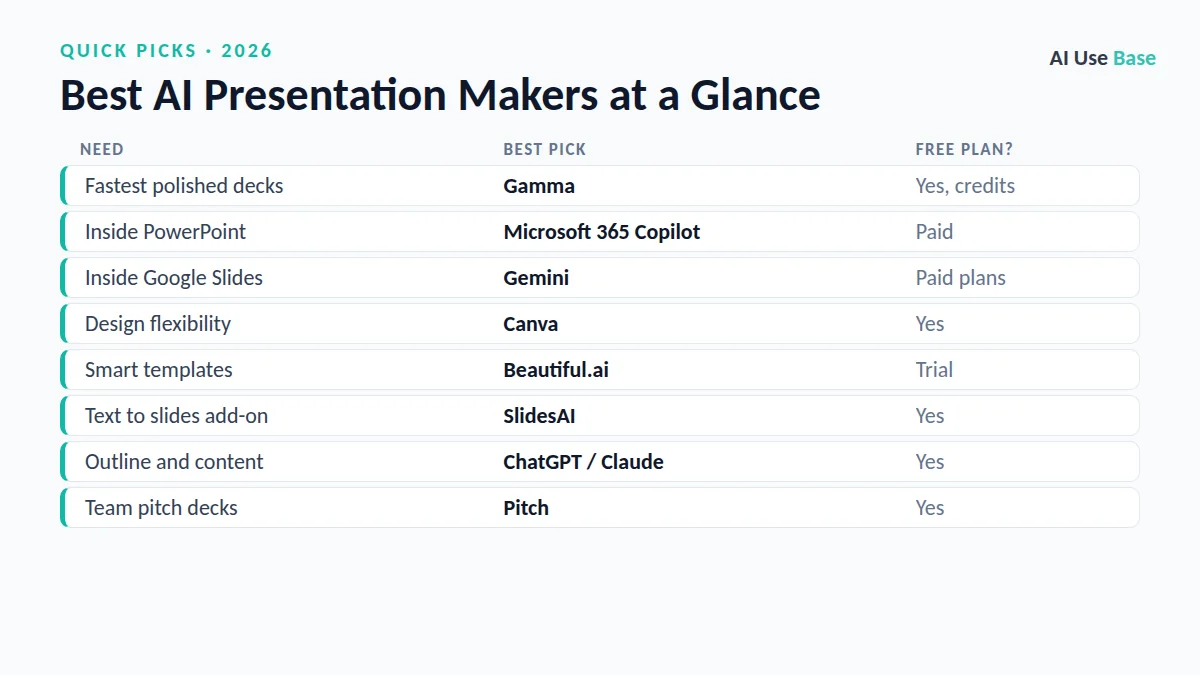
Quick Picks: The Best AI Presentation Makers at a Glance
| Need | Best pick | Free plan? |
|---|---|---|
| Fastest polished decks | Gamma | Yes, credits |
| Inside PowerPoint | Microsoft 365 Copilot | Paid |
| Inside Google Slides | Gemini | Paid plans |
| Design flexibility | Canva | Yes |
| Smart templates | Beautiful.ai | Trial |
| Text to slides add-on | SlidesAI | Yes |
| Outline and content | ChatGPT / Claude | Yes |
| Team pitch decks | Pitch | Yes |
How We Chose the Best AI Presentation Makers
We picked tools that solve a real, repeated task, are actively maintained, offer a usable free plan or fair price, and clearly lead their category. Prices are US starting prices for individual plans, last checked in October 2026, and can change, so always confirm on the official site.
What Makes the Best AI Presentation Makers?
We compared the best AI presentation makers on four things:
- Design quality: clean layouts that need little fixing.
- Editing: easy to change text, layout and images.
- Export: reliable PowerPoint and PDF export.
- Free access: a free plan or trial to test properly.
Tools that produced generic, cluttered slides or locked export behind high prices did not make this list of the best AI presentation makers.
Best AI Presentation Makers for Fast Decks
These are the best AI presentation makers when you need a good-looking deck quickly.
1. Gamma – Best AI presentation maker overall
Gamma turns a prompt or document into a polished deck, web page or document in about a minute, and exports to PowerPoint and PDF.
- Free plan: Yes, with AI credits
- Paid: From about $10/month
- Website: gamma.app
2. Beautiful.ai – Best for smart, consistent templates
Beautiful.ai keeps your slides aligned and on-brand automatically as you add content, which is great for business decks.
- Free plan: Trial
- Paid: From about $12/month (annual)
- Website: www.beautiful.ai
3. Canva – Best for design flexibility
Canva’s AI tools generate slides from a prompt and give you thousands of templates, images and brand controls to customize them.
- Free plan: Yes
- Paid: Canva Pro
- Website: www.canva.com
Best AI Presentation Makers Inside Office Apps
If your company works in Microsoft or Google apps, the best AI presentation makers may already be built in.
4. Microsoft 365 Copilot in PowerPoint – Best for PowerPoint users
Copilot can create a draft deck from a prompt or a Word document, summarize long presentations and suggest designs inside PowerPoint.
- Free plan: No
- Paid: Included in some Microsoft 365 plans or as an add-on
- Website: www.microsoft.com/microsoft-365/copilot
5. Gemini in Google Slides – Best for Google Workspace users
Gemini helps you generate slide content and images directly in Google Slides on supported Google plans.
- Free plan: Limited
- Paid: Google AI and Workspace plans
- Website: gemini.google/subscriptions
6. SlidesAI – Best add-on for Google Slides
SlidesAI converts text into a slide deck inside Google Slides and PowerPoint, handy if you already have notes or an article.
- Free plan: Yes, limited decks per year
- Paid: From about $8.33/month
- Website: www.slidesai.io
Best AI Presentation Makers for Content and Teams
Great slides start with a clear story. These options cover the writing and team side of presentations.
7. ChatGPT and Claude – Best for outlines and speaker notes
Use ChatGPT or Claude to turn a document into a slide-by-slide outline with speaker notes, then paste it into Gamma, Canva or PowerPoint.
- Free plan: Yes
- Website: chatgpt.com
8. Pitch – Best for collaborative pitch decks
Pitch is built for teams that create decks together, with real-time collaboration, templates and AI generation.
- Free plan: Yes
- Website: pitch.com
How to Choose an AI Presentation Maker
- Need a deck fast? Start with Gamma.
- Your company uses PowerPoint? Try Copilot first.
- Want full design control? Use Canva.
- Start with a clear outline from ChatGPT or Claude for better slides.
- Always review facts and visuals before presenting.
Frequently Asked Questions
What is the best AI presentation maker?
Gamma is the best AI presentation maker for most people because it creates polished decks quickly and exports to PowerPoint. Microsoft 365 Copilot is best if you work in PowerPoint, and Canva is best for design flexibility.
Is there a free AI presentation maker?
Yes. Gamma, Canva, SlidesAI and Pitch have free plans, and ChatGPT or Claude can write slide outlines for free.
Can AI turn a Word document into slides?
Yes. Copilot in PowerPoint, Gamma and Canva can turn a document into a draft deck. Read our guide on turning a Word document into slides with AI for step-by-step instructions.
Can I edit AI-generated slides in PowerPoint?
Most tools, including Gamma, export to PowerPoint so you can edit slides normally, though some formatting may need small fixes.
Final Thoughts
The best AI presentation makers save hours on layout so you can focus on the story. Draft your outline with an AI assistant, generate the deck with Gamma, Canva or Copilot, then review every slide before you present.
Want the bigger picture? See our complete guide to the best AI tools for every use case, or read our guides on Word to PowerPoint with AI and best free AI tools.