Used the right way, the best AI tools for students work like a personal tutor, research assistant and study planner in one. Used the wrong way, they can get you in trouble. This guide, part of our full list of the best AI tools, shows the tools that genuinely help you learn, most of them free or discounted for students.
Free plans and student offers were last checked in October 2026. Always follow your school’s rules on AI use.
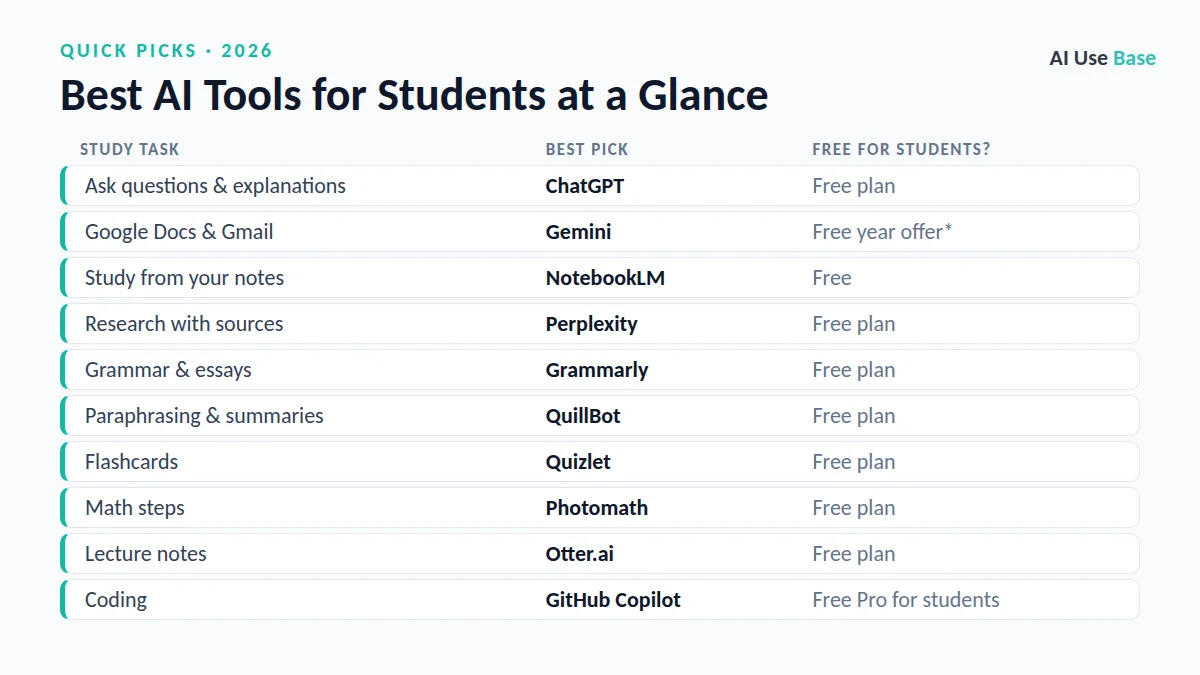
Quick Picks: The Best AI Tools for Students at a Glance
| Study task | Best pick | Free for students? |
|---|---|---|
| Ask questions & explanations | ChatGPT | Free plan |
| Google Docs & Gmail | Gemini | Free year offer* |
| Study from your notes | NotebookLM | Free |
| Research with sources | Perplexity | Free plan |
| Grammar & essays | Grammarly | Free plan |
| Paraphrasing & summaries | QuillBot | Free plan |
| Flashcards | Quizlet | Free plan |
| Math steps | Photomath | Free plan |
| Lecture notes | Otter.ai | Free plan |
| Coding | GitHub Copilot | Free Pro for students |
How We Chose the Best AI Tools for Students
We picked tools that solve a real, repeated task, are actively maintained, offer a usable free plan or fair price, and clearly lead their category. Prices are US starting prices for individual plans, last checked in October 2026, and can change, so always confirm on the official site.
What Makes the Best AI Tools for Students?
The best AI tools for students should help you learn, not just hand you answers. We looked for:
- Learning support: step-by-step explanations, quizzes and practice.
- Reliable sources: citations or answers grounded in your own materials.
- Student pricing: free plans or student discounts.
- Academic integrity: features that support your own work rather than replace it.
That is why every pick on this list of the best AI tools for students has a free plan or a student offer.
Best AI Tools for Students: Learning and Research
These are the best AI tools for students who want to understand topics faster and research assignments properly.
1. ChatGPT – Best AI tutor for any subject
Ask ChatGPT to explain a concept step by step, quiz you, or check your reasoning. The free plan offers unlimited text chats, which is plenty for daily studying.
- Free plan: Unlimited text chats
- Tip: Ask it to quiz you instead of giving answers
- Website: chatgpt.com
2. Google Gemini – Best for students using Google apps
Gemini works in Docs, Gmail and Drive and includes Deep Research and study notebooks. Eligible college students can get one year of Google AI Pro (US) or Google AI Plus (140+ countries) free, through December 31, 2026.
- Free plan: Yes
- Student offer: Free year of AI Plus or AI Pro for eligible students
- Website: gemini.google/subscriptions
3. NotebookLM – Best AI tool for studying your own materials
Upload lecture slides, readings and notes, then ask questions, create study guides or listen to an Audio Overview. Answers stay grounded in your sources.
- Free plan: Yes
- Website: notebooklm.google
4. Perplexity – Best for research with citations
Perplexity gives answers with sources you can click and cite, making it a strong starting point for assignments and literature searches.
- Free plan: Yes
- Website: www.perplexity.ai
Best AI Tools for Students: Writing and Languages
Writing is where students use AI most. These are the best AI tools for students who want better essays without breaking academic rules.
5. Grammarly – Best for polishing essays
Grammarly catches grammar, clarity and tone issues in essays, emails and applications, and works in Google Docs and Word.
- Free plan: Yes
- Website: www.grammarly.com
6. QuillBot – Best for paraphrasing and summarizing
QuillBot helps you rephrase your own sentences, summarize readings and build citations. Use it to improve your writing, not to disguise copied text.
- Free plan: Yes
- Website: quillbot.com
7. Duolingo Max – Best AI tool for language learning
Duolingo’s AI features explain your mistakes and let you practice real conversations in the language you are learning.
- Free plan: Core app is free; AI features are in Max
- Website: www.duolingo.com
Best AI Tools for Students: Math, Notes and Coding
The best AI tools for students also cover math practice, revision, lecture notes and programming classes.
8. Photomath – Best for step-by-step math
Point your camera at a math problem and Photomath shows the solution step by step, so you can understand the method rather than just the answer.
- Free plan: Yes
- Website: photomath.com
9. Quizlet – Best for flashcards and revision
Quizlet turns your notes into flashcards and practice tests, using spaced repetition to help you remember more.
- Free plan: Yes
- Website: quizlet.com
10. Otter.ai – Best for lecture transcription
Otter records and transcribes lectures and creates summaries, so you can focus on listening in class.
- Free plan: Yes, monthly minutes
- Website: otter.ai
11. GitHub Copilot – Best AI tool for computer science students
Copilot suggests code and explains errors inside your editor. Verified students can get Copilot Pro free through GitHub Education.
- Free plan: Yes
- Student offer: Free Copilot Pro for verified students
- Website: github.com/features/copilot
How to Use AI Tools as a Student (the Right Way)
- Check your school’s AI policy before using AI on any graded assignment.
- Use AI to understand, not to copy. Ask for explanations, examples and practice questions.
- Verify facts and citations. AI can invent sources, so always open and check them.
- Write in your own words. Use AI for feedback on drafts, then revise yourself.
- Claim student offers. Google AI and GitHub Copilot both have free plans for eligible students.
Students who research and write in the browser all day should also check the best AI Chrome extensions.
Frequently Asked Questions
What is the best AI tool for students?
NotebookLM is the best AI tool for studying your own course materials, while ChatGPT and Gemini are the best all-round AI tutors. All three have free plans.
Are there free AI tools for students?
Yes. ChatGPT, Gemini, NotebookLM, Perplexity, Grammarly, QuillBot, Quizlet and Photomath all have free plans, and eligible students can get a free year of Google AI Plus or AI Pro and free GitHub Copilot Pro.
Is using AI for homework cheating?
It depends on how you use it and your school’s rules. Using AI to explain concepts, quiz yourself or check grammar is usually fine; submitting AI-written work as your own usually is not.
Can teachers detect AI-written essays?
AI detectors are unreliable, but teachers often notice writing that does not match a student’s usual style or contains wrong facts and fake citations. The safest approach is to write your own work and use AI for feedback.
Related Guides
- Best free AI tools: no-cost tools for chat, research, design, coding and more
- Best AI writing tools: for blogs, emails, essays, marketing and fiction
- Best AI coding tools: editors, coding agents and app builders
- Best AI image generators: art, photos, posters and marketing graphics
Final Thoughts
The best AI tools for students help you understand faster, practice more and write better, as long as the learning stays yours. Start with NotebookLM and one AI tutor, claim the student offers you qualify for, and always follow your school’s rules.
Want the bigger picture? See our complete guide to the best AI tools for every use case, or read our guides on best free AI tools and how to use Gemini.
Related guides: you may also like our guides to best AI research tools, free English shadowing tool and best AI detectors.
3 thoughts on “11 Best AI Tools for Students in 2026 (Most Are Free)”