An AI mind map generator turns a topic, your notes, a PDF or even a YouTube video into a visual map of the main ideas in seconds. For students, NotebookLM is the best free pick because it builds mind maps from your own sources; Mapify is the most flexible for videos and web pages; and Xmind or Miro suit people who want to keep editing.
Here are eight tools worth trying, with free plans and starting prices (last checked October 2026).
Quick Picks: Best AI Mind Map Generator Tools
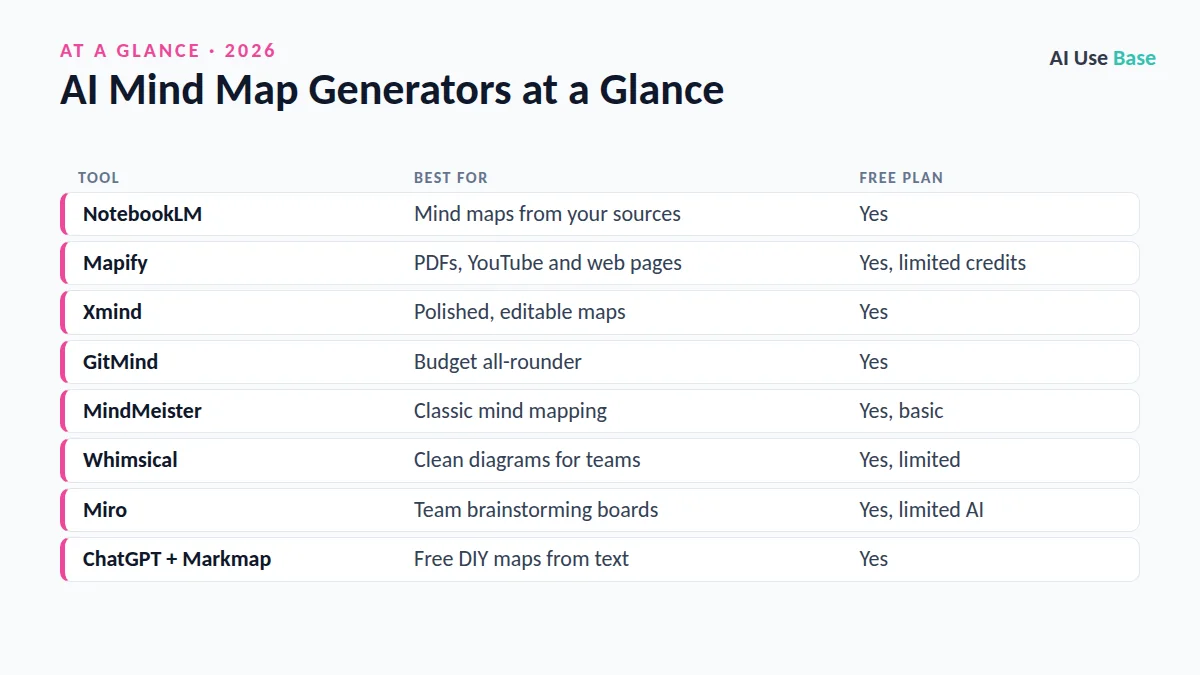
| Tool | Best for | Free plan |
|---|---|---|
| NotebookLM | Mind maps from your sources | Yes |
| Mapify | PDFs, YouTube and web pages | Yes, limited credits |
| Xmind | Polished, editable maps | Yes |
| GitMind | Budget all-rounder | Yes |
| MindMeister | Classic mind mapping | Yes, basic |
| Whimsical | Clean diagrams for teams | Yes, limited |
| Miro | Team brainstorming boards | Yes, limited AI |
| ChatGPT + Markmap | Free DIY maps from text | Yes |
How We Chose
We looked at input options (text, documents, video, web), how editable the result is, export formats, collaboration and price. We checked official product pages. The ranking reflects editorial judgment for typical student and work use.
What Makes a Good AI Mind Map Generator?
- Flexible inputs: the best tools accept a topic, pasted notes, PDFs, web pages and video links.
- Editable output: you should be able to move, rename and delete branches, not just view a picture.
- Useful exports: PNG or PDF for sharing, plus formats such as Markdown or OPML so you are not locked in.
- Source grounding: tools that show where each idea came from make checking much faster.
- Fair limits: credit-based free plans can run out quickly if you map long documents.
Best AI Mind Map Generator for Studying
1. NotebookLM
- Best for: students turning readings into a map of key concepts
- Free plan: yes
- Paid from: higher limits with Google AI Pro
- Standout: the map is based only on the sources you upload, and clicking a node opens an explanation
Add PDFs, Google Docs, websites or YouTube links, then choose Mind Map. Because answers come from your own sources, mistakes are easier to check. Try it at NotebookLM.
2. Mapify
- Best for: summarizing long videos, articles and PDFs visually
- Free plan: yes, limited credits
- Paid from: about $6 to $10/month depending on billing
- Standout: paste a YouTube or web link and get a structured map
See Mapify for current plans.
Best for Editing and Presenting
3. Xmind
- Best for: detailed maps you will keep refining
- Free plan: yes
- Paid from: about $5/month billed yearly
- Standout: AI expands branches, and maps look professional out of the box
4. GitMind
- Best for: an affordable all-rounder on web and mobile
- Free plan: yes
- Paid from: about $4/month billed yearly
- Standout: generates maps from text, files and images
5. MindMeister
- Best for: people who want a mature, classic mind mapping app
- Free plan: yes, up to a few maps
- Paid from: paid plans add unlimited maps and AI features
- Standout: easy sharing and presentation mode
MindMeister has been around for years, so it feels stable and familiar. It is a good choice if you want to share maps with classmates or colleagues who are not comfortable with newer AI tools.
Best for Teams
6. Whimsical
- Best for: clean mind maps, flowcharts and wireframes in one tool
- Free plan: yes, limited
- Paid from: per-user team plans
- Standout: AI suggests ideas to branch out from any node
7. Miro
- Best for: live brainstorming with a group
- Free plan: yes, with limited AI credits
- Paid from: per-user team plans
- Standout: turn sticky notes into a mind map and cluster ideas with AI
Details are on Miro mind maps.
Free DIY Option
8. ChatGPT + Markmap
- Best for: a free map from any text
- Free plan: yes
- Paid from: free
- Standout: works with any chat assistant
Ask ChatGPT or Claude: “Turn these notes into a Markdown outline with headings and bullet levels for a mind map.” Paste the result into the free Markmap web tool or import it into Xmind.
How to Use an AI Mind Map Generator Well
- Feed it good sources. An AI mind map generator is only as accurate as what you give it.
- Keep the center specific. “Causes of World War I” works better than “History.”
- Edit the branches. Merge duplicates, rename vague nodes and add your own examples.
- Use it to revise. Hide branches and try to recall them, then check.
- Check facts. AI can misplace ideas or invent connections, especially from long videos.
Which AI Mind Map Generator Should You Pick?
Studying from readings: NotebookLM. Summarizing videos and articles: Mapify. Building maps you will polish: Xmind. Brainstorming with a team: Miro or Whimsical. Zero budget and any text: ChatGPT plus Markmap.
For more study help, see our AI tools for students, the best AI note takers and our AI research tools guide. The full best AI tools hub covers every category.
Frequently Asked Questions
What is the best free AI mind map generator?
NotebookLM is the best free option for studying because it builds maps from your own sources. GitMind, Xmind and Mapify also have useful free plans.
Can AI make a mind map from a PDF?
Yes. NotebookLM, Mapify and GitMind can turn PDFs into mind maps. Check the map against the document, especially for numbers and definitions.
Can I make a mind map from a YouTube video?
Mapify and NotebookLM can create mind maps from YouTube links when a transcript is available.
Can ChatGPT create mind maps?
ChatGPT can produce a structured outline or Mermaid code, which you can paste into Markmap, Xmind or other tools to view as a visual mind map.
Is an AI mind map generator good for studying?
Yes, as a starting point. Edit the map yourself and use it for active recall, since simply reading an AI-made map is less effective than building and testing it.
Final Thoughts
A good AI mind map generator saves the slow first step of organizing ideas, so you can spend your time understanding and connecting them. Start with a free tool, check the map against your sources, and edit it until it reflects how you think.