The best AI productivity tools do not just answer questions. They write your emails, take meeting notes, plan your week and move data between apps for you. This guide, part of our full list of the best AI tools, focuses on tools that save real time at work.
We grouped them by the job they do, with free plans noted. Details were last checked in October 2026.
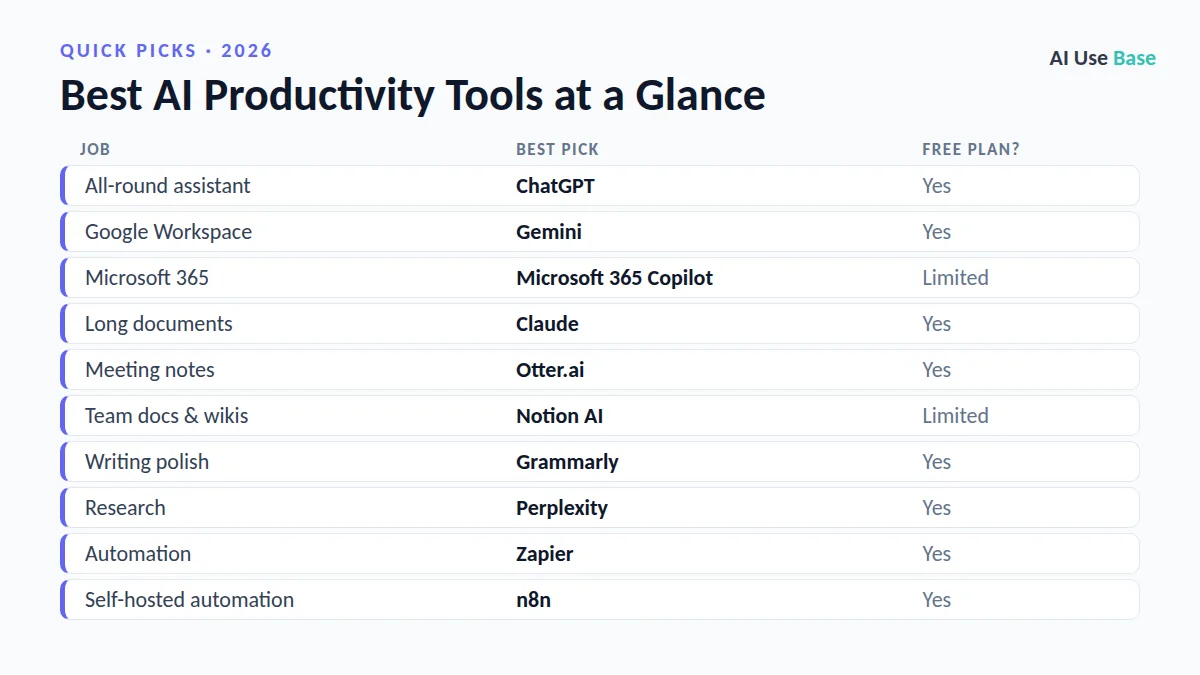
Quick Picks: The Best AI Productivity Tools at a Glance
| Job | Best pick | Free plan? |
|---|---|---|
| All-round assistant | ChatGPT | Yes |
| Google Workspace | Gemini | Yes |
| Microsoft 365 | Microsoft 365 Copilot | Limited |
| Long documents | Claude | Yes |
| Meeting notes | Otter.ai | Yes |
| Team docs & wikis | Notion AI | Limited |
| Writing polish | Grammarly | Yes |
| Research | Perplexity | Yes |
| Automation | Zapier | Yes |
| Self-hosted automation | n8n | Yes |
How We Chose the Best AI Productivity Tools
We picked tools that solve a real, repeated task, are actively maintained, offer a usable free plan or fair price, and clearly lead their category. Prices are US starting prices for individual plans, last checked in October 2026, and can change, so always confirm on the official site.
What Makes the Best AI Productivity Tools?
We judged the best AI productivity tools on how much real time they save:
- Fits your apps: works inside email, documents and chat you already use.
- Reliable output: needs little correction.
- Automation: can run tasks without constant prompting.
- Privacy controls: business plans that protect company data.
Tools that look impressive in demos but add extra steps to your day did not make this list of the best AI productivity tools.
Best AI Productivity Tools: Assistants
A general AI assistant is the foundation of any productivity stack. These are the best AI productivity tools to start with.
1. ChatGPT – Best all-round AI assistant
ChatGPT drafts emails, summarizes documents, analyzes spreadsheets and, on paid plans, can run longer tasks and scheduled tasks for you.
- Free plan: Unlimited text chats
- Paid: Go $8/month, Plus $20/month
- Website: chatgpt.com
2. Gemini – Best for Gmail, Docs and Drive
Gemini works inside Google Workspace and can summarize email threads, draft replies and turn your inbox and calendar into a Daily Brief.
- Free plan: Yes
- Paid: Google AI Plus $4.99/month, AI Pro $19.99/month
- Website: gemini.google/subscriptions
3. Microsoft 365 Copilot – Best for Word, Excel, Outlook and Teams
Copilot brings AI into the Microsoft apps many offices already use, from drafting in Word to summarizing Teams meetings.
- Free plan: Limited Copilot features
- Paid: Included in some Microsoft 365 plans or as an add-on
- Website: www.microsoft.com/microsoft-365/copilot
4. Claude – Best for long documents and careful writing
Claude handles long reports, contracts and research with clear, well-structured answers, and Projects keep related files together.
- Free plan: Yes
- Paid: Pro $20/month
- Website: claude.ai
Best AI Productivity Tools for Meetings, Notes and Writing
Meetings and documents eat most of the workday. These are the best AI productivity tools for getting that time back.
5. Otter.ai – Best AI meeting assistant
Otter joins your meetings, transcribes them and produces summaries and action items you can share with the team.
- Free plan: Yes, monthly minutes
- Website: otter.ai
6. Notion AI – Best for team notes and wikis
Notion AI searches, summarizes and drafts inside your Notion workspace, so knowledge stays in one place.
- Free plan: Limited AI
- Paid: Included in higher Notion plans
- Website: www.notion.com/product/ai
7. Grammarly – Best for polishing what you write
Grammarly fixes grammar, clarity and tone in email, documents and chat apps, and can rewrite sentences for a different audience.
- Free plan: Yes
- Paid: From about $12/month (annual)
- Website: www.grammarly.com
8. Perplexity – Best for fast research with sources
Perplexity answers questions with citations, which makes it ideal for quick research before meetings or reports.
- Free plan: Yes
- Paid: Pro about $20/month
- Website: www.perplexity.ai
Best AI Productivity Tools for Automation
The biggest time savings come from work that runs without you. These are the best AI productivity tools for automation.
9. Zapier – Best no-code automation
Zapier connects thousands of apps and lets you add AI steps and agents, for example to summarize new leads and update your CRM automatically.
- Free plan: Yes, limited tasks
- Website: zapier.com
10. n8n – Best flexible automation for technical users
n8n is a visual workflow builder you can self-host for free, with AI agent nodes and custom code for complex workflows.
- Free plan: Free when self-hosted
- Website: n8n.io
How to Build Your AI Productivity Stack
- Pick one assistant that matches your office suite: Gemini for Google, Copilot for Microsoft, or ChatGPT.
- Add a meeting assistant if you spend hours in calls.
- Automate one repetitive task with Zapier or n8n.
- Measure the time saved for two weeks before paying for more tools.
- Use business plans for company data. They typically do not train on your data by default.
Want AI help without switching tabs? Our list of the best AI Chrome extensions puts these assistants right inside your browser. If you work mostly in Microsoft 365, read ChatGPT vs Copilot before you pick one.
Frequently Asked Questions
What are the best AI productivity tools?
The best AI productivity tools are a general assistant (ChatGPT, Gemini or Microsoft 365 Copilot), a meeting assistant such as Otter.ai, a writing tool such as Grammarly, and an automation tool such as Zapier.
Which AI tool saves the most time at work?
For most people, the biggest time savings come from an AI assistant built into their email and documents, plus automating one or two repetitive workflows.
Are AI productivity tools safe for company data?
Business and enterprise plans from major providers typically do not use your data for training by default. Avoid pasting confidential data into personal accounts.
Are there free AI productivity tools?
Yes. ChatGPT, Gemini, Claude, Otter.ai, Grammarly, Perplexity and Zapier all have free plans, and n8n is free when self-hosted.
Final Thoughts
The best AI productivity tools pay off when they disappear into your workflow. Start with the assistant that fits your office apps, add one tool for meetings or automation, and keep only what saves measurable time.
Want the bigger picture? See our complete guide to the best AI tools for every use case, or read our guides on best free AI tools and how to use ChatGPT.
Related guides: you may also like our guides to best AI presentation makers and best AI note takers.