The best AI Chrome extensions in 2026 are Gemini in Chrome for most people, ChatGPT or Claude if you already pay for one of them, Grammarly for writing, and Perplexity for quick sourced answers. Each one adds an assistant to your browser so you can summarize pages, draft replies, and ask questions without switching tabs.
The right choice depends on which AI account you already have and how much page access you are comfortable giving. Below you will find a quick picks table, short reviews of eight tools, and privacy tips that apply to every extension on this list.
Quick Picks: Best AI Chrome Extensions
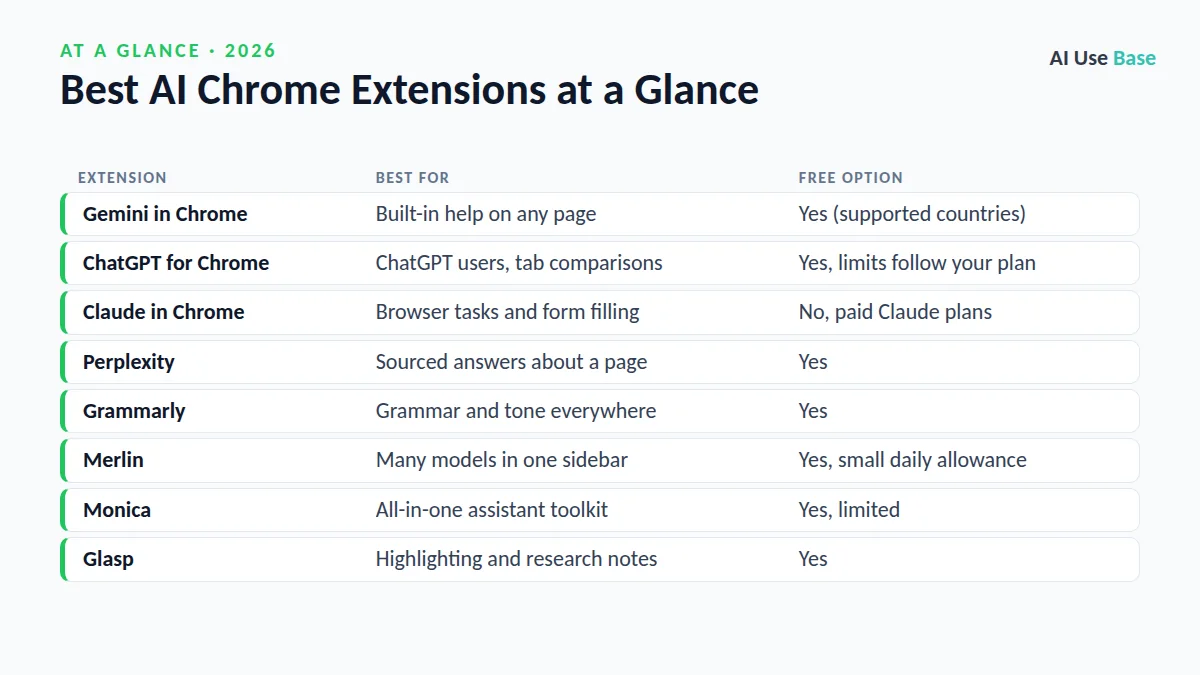
| Extension | Best for | Free option |
|---|---|---|
| Gemini in Chrome | Built-in help on any page | Yes (supported countries) |
| ChatGPT for Chrome | ChatGPT users, tab comparisons | Yes, limits follow your plan |
| Claude in Chrome | Browser tasks and form filling | No, paid Claude plans |
| Perplexity | Sourced answers about a page | Yes |
| Grammarly | Grammar and tone everywhere | Yes |
| Merlin | Many models in one sidebar | Yes, small daily allowance |
| Monica | All-in-one assistant toolkit | Yes, limited |
| Glasp | Highlighting and research notes | Yes |
How We Chose These Extensions
We picked the best AI Chrome extensions using official product pages, help centers, and pricing pages rather than personal testing claims. Prices last checked October 2026. We looked at three things:
- Usefulness: Does it save time on everyday browsing, writing, or research?
- Free access: Can you try it meaningfully without paying?
- Trust: Is it published by a known company with clear permission controls?
If you want tools beyond the browser, our guide to the best AI tools covers chatbots, image generators, and more.
The 8 Best AI Chrome Extensions in 2026
1. Gemini in Chrome
Gemini in Chrome is not a separate extension, yet it belongs among the best AI Chrome extensions because it is built into Chrome and opens from the toolbar, so you can ask about the page you are reading, compare open tabs, or summarize a long article. Google rolled it out in the US in January 2026 and has since expanded to more countries, though availability still varies by region and account type.
- Best for: Anyone who uses Chrome and a personal Google account
- Free plan: Core features are free where available
- Paid from: Google AI Pro ($19.99/month) for higher limits; agentic auto browse is a US preview for AI Pro and Ultra
- Standout: Skills, saved prompts you can rerun with a slash command
Official page: Gemini in Chrome. New to Gemini? Start with our Gemini beginner guide.
2. ChatGPT for Chrome
OpenAI’s official extension opens ChatGPT in a side panel next to the page. You can highlight text and choose “Ask ChatGPT,” mention other open tabs to compare them, and ask questions about a YouTube video you are watching. OpenAI shut down its Atlas browser in August 2026 and moved those browsing features into this extension and the desktop app.
- Best for: People who already live in ChatGPT
- Free plan: Yes; model access and limits follow your ChatGPT account
- Paid from: ChatGPT Go, with Plus at $20/month
- Standout: Per-site permissions with “Allow once” options
Plans: ChatGPT pricing. See our ChatGPT beginner guide for prompt basics.
3. Claude in Chrome
Claude in Chrome goes further than reading pages. It can click, type, navigate, and fill out forms, and you can drag several tabs into its group so it works across them. It became generally available to paid plans in August 2026. It pauses to ask for approval on sensitive steps, and Anthropic is upfront that browser agents still carry risk.
- Best for: Repetitive browser tasks and research across many tabs
- Free plan: No; requires Pro, Max, Team, or Enterprise
- Paid from: Claude Pro, $17/month billed annually or $20 monthly
- Standout: Scheduled tasks and saved shortcuts
Setup help: Get started with Claude in Chrome.
4. Perplexity
Perplexity’s extension adds a sidebar that reads the active page, summarizes it, and answers follow-up questions with clickable sources. Of the best AI Chrome extensions, it is the one to pick when you want to check claims rather than just get a summary. Perplexity also makes its own AI browser, Comet.
- Best for: Research with citations
- Free plan: Yes, with daily limits
- Paid from: Pro at $17/month billed annually
- Standout: Source links on every answer
Plans: Perplexity pricing.
5. Grammarly
Grammarly is one of the oldest and best AI Chrome extensions for writing. It checks spelling, grammar, and tone in almost any text box, from Gmail to LinkedIn. Its AI features can also rewrite, shorten, or draft text in place. For a broader look at writing assistants, see our list of the best AI writing tools.
- Best for: Clean, professional writing everywhere you type
- Free plan: Yes, including 100 AI prompts per month
- Paid from: Pro at $12/month
- Standout: Works inside existing text fields
Plans: Grammarly plans.
6. Merlin
Merlin puts several AI models in one sidebar and adds shortcuts for summarizing pages, YouTube videos, and PDFs. It is one of the best AI Chrome extensions for comparing models without paying for each service. Watch the fair-use rules on paid plans, since “unlimited” access has limits.
- Best for: Trying multiple models in one place
- Free plan: Yes, a small daily allowance
- Paid from: Paid Pro and Teams plans are available
- Standout: One-click summaries for videos and pages
Official site: Merlin AI.
7. Monica
Monica is an all-in-one assistant with chat, page summaries, translation, writing help, and image tools in one sidebar. It offers access to several popular models under one subscription.
- Best for: Users who want many AI tools in one extension
- Free plan: Yes, with limited daily use
- Paid from: Pro, Pro Plus, and Unlimited tiers are available
- Standout: Built-in translation and writing shortcuts
Plans: Monica pricing.
8. Glasp
Glasp is a social highlighter. You highlight text on web pages and PDFs, and it saves everything to one searchable library you can export. Our roundup of AI tools for students lists more study helpers.
- Best for: Saving and organizing what you read
- Free plan: Yes
- Paid from: A low-cost Premium tier adds more features
- Standout: Highlights from YouTube transcripts and articles in one place
Official site: Glasp.
Privacy Tips for AI Chrome Extensions
Even the best AI Chrome extensions often ask to “read and change all your data on all websites.” That access lets them see email, banking, and work tools. A few habits keep you safer:
- Install only from the official publisher. Search the Chrome Web Store carefully, because copycat extensions use similar names and logos.
- Prefer per-site access. In Chrome, open the extension’s details and set site access to “On click” or “On specific sites.”
- Keep sensitive tabs separate. Use a different Chrome profile for banking, health, or confidential work.
- Review data settings. Check whether your chats are used for model training and turn that off if you prefer.
- Supervise agents. Browser agents like Claude in Chrome can take actions, so watch them on forms and payments.
How to Choose the Best AI Chrome Extensions for You
- Start with what you already pay for. If you have ChatGPT Plus or Claude Pro, their official extensions add the most value at no extra cost.
- Try the built-in option first. Gemini in Chrome needs no install where it is available.
- Pick one writing helper. Grammarly covers most typing needs; running two grammar tools at once causes conflicts.
- Add a research tool if you need sources. Perplexity is the strongest choice for cited answers.
- Limit yourself to two or three. The best AI Chrome extensions overlap a lot, so a small set is easier to manage and safer.
Want more free picks beyond the best AI Chrome extensions? Our list of best free AI tools covers options that cost nothing.
Frequently Asked Questions
What is the best AI Chrome extension for free?
Gemini in Chrome is the strongest free option where it is available, because it is built into the browser and needs no install. Perplexity and Grammarly also have useful free tiers. The ChatGPT extension is free to install, but limits depend on your ChatGPT plan.
Are AI Chrome extensions safe to use?
Extensions from established companies are generally safe, but they often need broad access to the pages you visit. Install only from the official publisher, limit site access in Chrome settings, and avoid using them on banking or confidential pages.
Is there an official ChatGPT Chrome extension?
Yes. OpenAI offers an official extension that opens ChatGPT in a side panel, can compare open tabs, and answers questions about YouTube videos. It replaced the browsing features of OpenAI’s Atlas browser, which shut down in August 2026.
Can Claude control my browser?
Yes. Claude in Chrome can click, type, navigate, and fill forms on paid Claude plans. It asks for approval on sensitive actions, but you should still supervise it, especially on forms and payments.
Which of the best AI Chrome extensions is good for students?
Glasp is great for highlighting and organizing reading, while Gemini in Chrome and Perplexity help summarize and question articles. Follow your school’s rules on AI use.
Final Thoughts
For most people, the best AI Chrome extensions are the ones tied to an assistant you already use: Gemini in Chrome for Google users, ChatGPT for Chrome for ChatGPT fans, and Claude in Chrome if you want an agent that can take actions. Add Grammarly for writing and Perplexity for sourced research, and you have a strong setup.
Whichever of the best AI Chrome extensions you install, grant page access carefully and remove extensions you no longer need.