Cursor vs GitHub Copilot is the most common question developers ask when picking an AI coding tool. Both now offer agents that plan, edit many files and run commands, both let you choose between top models, and both start at a free tier. The real differences are where they run, how they bill and how much they cost.
The quick verdict on Cursor vs GitHub Copilot: Copilot is the better value and the safer choice if you want to stay in your current editor, from VS Code to JetBrains, Visual Studio, Xcode or Neovim. Cursor is the better pick if you want an AI-first editor built around agents, with a polished workspace for running several agents locally and in the cloud.
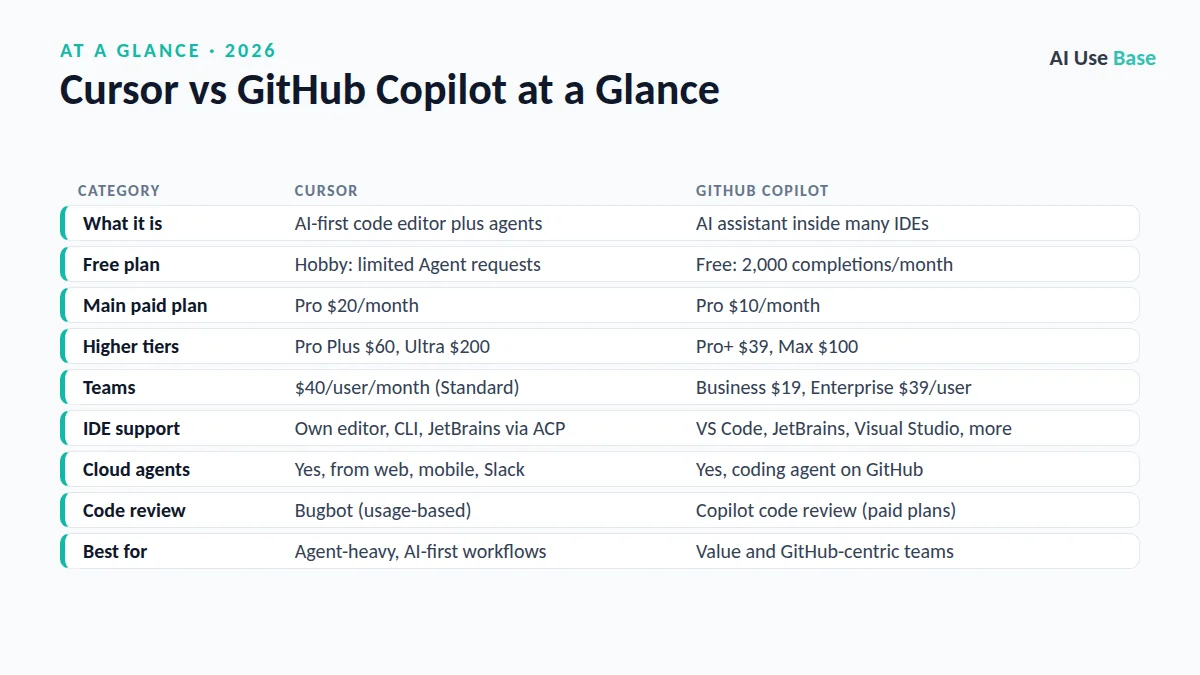
Cursor vs GitHub Copilot at a Glance
| Category | Cursor | GitHub Copilot |
|---|---|---|
| What it is | AI-first code editor plus agents | AI assistant inside many IDEs |
| Free plan | Hobby: limited Agent requests | Free: 2,000 completions/month |
| Main paid plan | Pro $20/month | Pro $10/month |
| Higher tiers | Pro Plus $60, Ultra $200 | Pro+ $39, Max $100 |
| Teams | $40/user/month (Standard) | Business $19, Enterprise $39/user |
| IDE support | Own editor, CLI, JetBrains via ACP | VS Code, JetBrains, Visual Studio, more |
| Cloud agents | Yes, from web, mobile, Slack | Yes, coding agent on GitHub |
| Code review | Bugbot (usage-based) | Copilot code review (paid plans) |
| Best for | Agent-heavy, AI-first workflows | Value and GitHub-centric teams |
Prices last checked October 2026. For a wider look at the category, see our list of the best AI coding tools.
What Are Cursor and GitHub Copilot?
Cursor
Cursor is a standalone code editor built for AI. It started as a fork of VS Code, so extensions and shortcuts feel familiar. Cursor 3, released in April 2026, added an Agents Window where local and cloud agents sit side by side, plus a diff view for staging, committing and managing pull requests. Cursor also ships a CLI, an iOS app in beta, and its own coding model, Composer.
GitHub Copilot
GitHub Copilot is an AI assistant that plugs into the editor you already use. It offers code completions, next edit suggestions, chat, agent mode in the editor, a cloud coding agent that works on GitHub issues in the background, AI code review, the Copilot CLI and a desktop app for managing agent work.
Cursor vs GitHub Copilot Agent Features
Agents are where the Cursor vs GitHub Copilot race is closest. Both can read your codebase, plan changes, edit multiple files, run terminal commands and iterate on errors.
Cursor agents
- Agents Window to run many agents across repos at once.
- Cloud agents you can start from the browser, phone, Slack, GitHub or Linear, which return demos and screenshots of their work.
- Move a session between cloud and local, so work continues when your laptop is closed.
- Subagents that explore your codebase in parallel, plus rules, MCP servers, hooks and skills.
Copilot agents
- Agent mode inside VS Code and other supported IDEs.
- Cloud coding agent: assign an issue and get a pull request back, starting on the Pro plan.
- Third-party agents (in preview) on Pro+ and Max.
- Copilot CLI and a Copilot app on every plan, including Free.
In our editorial judgment, Cursor’s agent interface is more refined and more ambitious, while Copilot’s agent is more tightly tied to GitHub issues, pull requests and Actions, which many teams already rely on.
Cursor vs GitHub Copilot: Models and AI Quality
In Cursor vs GitHub Copilot, both tools give you access to frontier models from several labs. Cursor’s model picker includes models from OpenAI, Anthropic, Google and xAI, plus its own Composer model. Copilot’s model list includes models from Anthropic, OpenAI, Google, xAI, Microsoft and others, and it is the same list across individual plans.
Because the underlying models overlap so much, output quality is often similar. The difference is the context and tooling each wraps around the model. Cursor is known for strong codebase indexing and fast Tab predictions; Copilot benefits from deep knowledge of your GitHub repos, issues and pull requests.
IDE and Platform Support
This is the clearest split in Cursor vs GitHub Copilot. Copilot works in Visual Studio Code, Visual Studio, JetBrains IDEs, Xcode, Neovim, Eclipse and more, plus on github.com and GitHub Mobile.
Cursor is mainly its own editor. It now also runs inside JetBrains IDEs through the Agent Client Protocol (paid plans only, via the AI Assistant plugin), and its CLI works in any terminal. If your team uses Visual Studio or Xcode, Copilot is the practical option.
Cursor vs GitHub Copilot Pricing
| Plan | Cursor | GitHub Copilot |
|---|---|---|
| Free | Hobby: limited Agent requests, Composer access | Free: 2,000 completions, limited chat and agent use |
| Entry paid | Pro: $20/month | Pro: $10/month ($15 in AI credits) |
| Power user | Pro Plus: $60/month | Pro+: $39/month ($70 in AI credits) |
| Top individual | Ultra: $200/month | Max: $100/month ($200 in AI credits) |
| Teams | $40 Standard / $120 Premium per user | Business $19 / Enterprise $39 per user |
Both now use usage-based billing on top of included allowances. Copilot gives each plan a monthly pool of AI credits (1 credit equals $0.01) for chat and agent work, while code completions and next edit suggestions do not use credits. Cursor includes extended agent limits and lets you add on-demand usage at API rates. See GitHub’s plan docs for the latest details. Verified students, teachers and popular open source maintainers may get Copilot at no cost.
On price alone, Cursor vs GitHub Copilot is not close: Copilot Pro costs half as much as Cursor Pro.
Which Should You Choose: Cursor vs GitHub Copilot?
Choose Cursor if…
- You want an editor designed around AI agents from the ground up.
- You like running several agents in parallel and moving them between cloud and local.
- You are happy to switch editors, or already use VS Code.
- You want Cursor’s fast Tab predictions and Composer model.
Choose GitHub Copilot if…
- You want the lowest price for a capable AI coding assistant.
- You use JetBrains, Visual Studio, Xcode, Neovim or Eclipse.
- Your team lives in GitHub issues, pull requests and Actions.
- You are a student or teacher who may qualify for free access.
Comparing broader assistants for code? Read ChatGPT vs Claude for coding, and browse the best AI tools for other categories.
Frequently Asked Questions
Is Cursor better than GitHub Copilot?
Cursor is often preferred for agent-heavy, AI-first workflows inside its own editor. GitHub Copilot is cheaper, works in more IDEs and integrates deeply with GitHub. The better choice depends on your editor and budget.
How much does Cursor cost compared to GitHub Copilot?
Cursor Pro is $20 per month, with Pro Plus at $60 and Ultra at $200. GitHub Copilot Pro is $10 per month, with Pro+ at $39 and Max at $100. Both have free plans. Prices last checked October 2026.
Can I use Cursor and GitHub Copilot together?
Technically you can install the Copilot extension in Cursor, but you would pay for two overlapping AI subscriptions. Most developers pick one primary tool to avoid conflicting suggestions.
Does Cursor work in JetBrains IDEs?
Yes. Cursor’s agent can run inside JetBrains IDEs through the Agent Client Protocol. It requires a paid Cursor plan and the JetBrains AI Assistant plugin, version 2025.1 or later.
Is GitHub Copilot free for students?
Verified students can use the Copilot Student plan at no cost, and verified teachers and maintainers of popular open source projects may get Copilot Pro free.
Final Thoughts
Cursor vs GitHub Copilot comes down to editor and budget. Copilot is the value pick that meets you in almost any IDE and fits naturally into GitHub. Cursor is the premium, agent-first workspace for developers who want the most advanced AI editing experience.
The best way to settle Cursor vs GitHub Copilot for yourself is simple. Both have free tiers, so try each on a real task in your own codebase for a week. Pick the one that saves you more time, not the one with the longest feature list.