The best AI tools are not the ones with the loudest launch. They are the ones that save you real hours every week. With thousands of AI apps on the market, the hard part is no longer finding a tool. It is picking the right one for the job in front of you.
This guide groups the best AI tools by use case: everyday assistants, research, coding, images and design, video and audio, presentations, and automation. For each tool you get what it does best, who it is for, whether there is a free plan, and the starting price at the time of writing.
Quick Picks: The Best AI Tools at a Glance
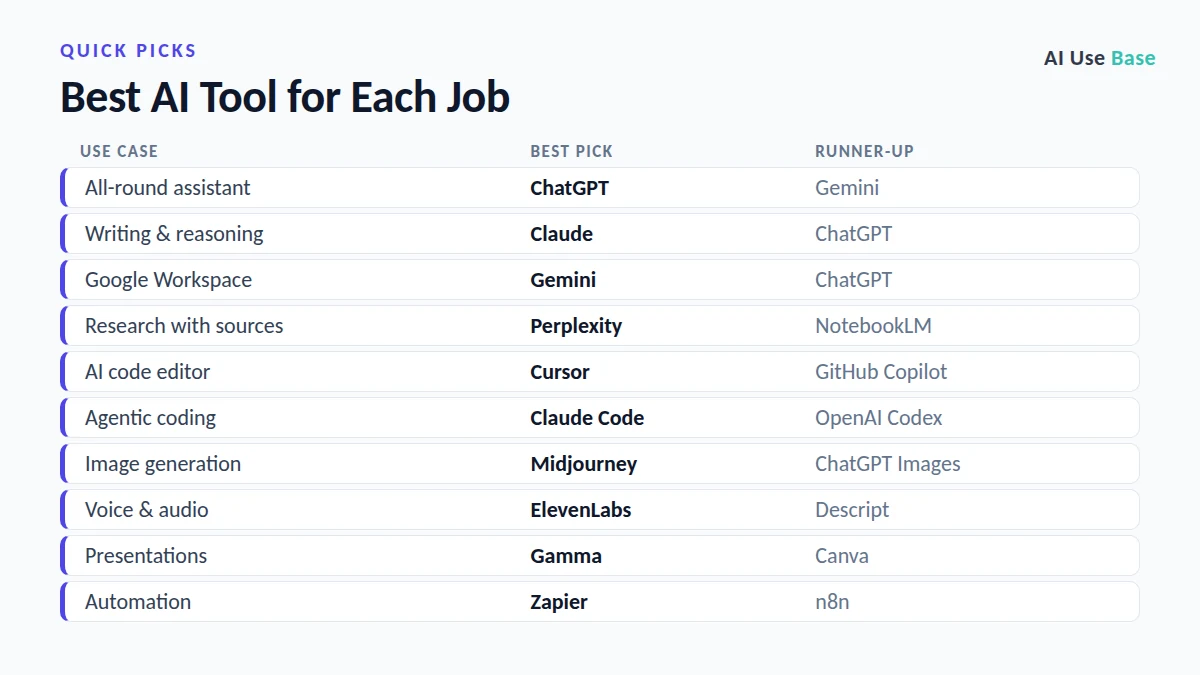
If you only have 30 seconds, here are the best AI tools for each job:
| Use case | Best pick | Runner-up | Free plan? |
|---|---|---|---|
| All-round AI assistant | ChatGPT | Gemini | Yes |
| Long-form writing & reasoning | Claude | ChatGPT | Yes |
| Google Workspace users | Gemini | ChatGPT | Yes |
| Research with citations | Perplexity | NotebookLM | Yes |
| Studying your own documents | NotebookLM | Claude Projects | Yes |
| AI code editor | Cursor | GitHub Copilot | Yes |
| Agentic coding in the terminal | Claude Code | OpenAI Codex | Paid |
| AI image generation | Midjourney | ChatGPT Images | No (Midjourney) |
| Everyday design | Canva Magic Studio | Adobe Firefly | Yes |
| AI voice & audio | ElevenLabs | Descript | Yes |
| Video editing | Descript | CapCut | Yes |
| Presentations | Gamma | Canva | Yes |
| Workflow automation | Zapier | n8n | Yes |
How We Chose the Best AI Tools
Every one of the best AI tools on this list had to pass four simple tests:
- Real, repeatable value: it solves a task people do every week, not a one-off demo.
- Reliability: the product is mature, actively maintained, and backed by a company likely to be around next year.
- Fair pricing: a usable free plan or a paid tier that pays for itself quickly.
- Clear strengths: it is the best (or close to the best) option in its category, not just a wrapper around another model.
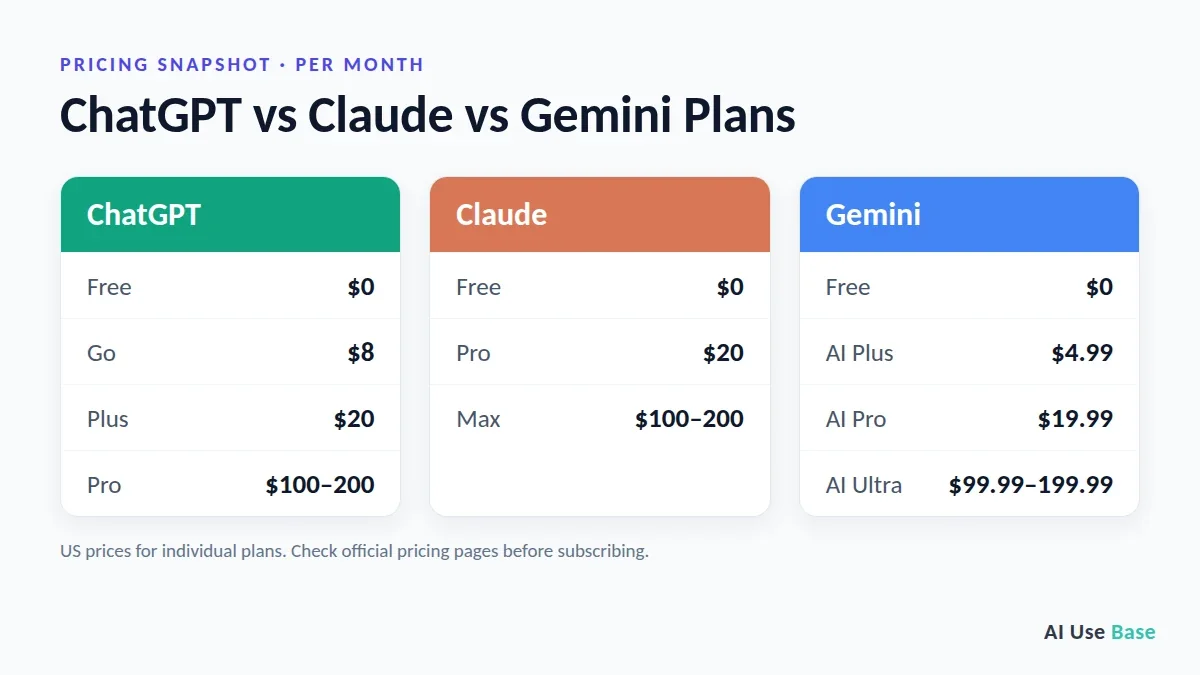
Prices below are the US starting prices for individual plans (last checked: September 2026). AI pricing changes often, so always confirm on the official pricing page before you subscribe.
Best AI Assistants (Chatbots)
General-purpose assistants are the best AI tools to start with. The big three are ChatGPT, Claude, and Gemini, and for most daily work, one of them will cover 80% of what you need.
1. ChatGPT – Best Overall AI Tool for Most People
ChatGPT is still the most versatile AI tool you can use. It handles quick questions, writing, file analysis, image generation, voice conversations, deep research, and agent-style tasks in one app. Its memory features also make it feel more personal the longer you use it.
- Best for: anyone who wants one AI app that does a bit of everything well.
- Standout features: Deep Research, image generation, voice mode, custom GPTs, Agent mode, Codex for coding.
- Free plan: Yes (ad-supported in some regions).
- Pricing: Go from $8/month, Plus $20/month, Pro from $100/month.
- Watch out for: the cheaper Go plan does not include the strongest reasoning models, Deep Research, or Agent mode. If you work with AI daily, Plus is the real starting point.
2. Claude – Best AI for Writing, Reasoning, and Long Documents
Claude, built by Anthropic, is a favorite among writers, analysts, and developers. It tends to follow detailed instructions closely, handles long documents and large files well, and produces writing that needs less editing. Artifacts let you turn a chat into a live document, mini app, or interactive page.
- Best for: long-form writing, editing, reports, analysis, and complex multi-step tasks.
- Standout features: Projects for organizing work, Artifacts, file and data analysis, Claude Code for developers, desktop and Chrome integrations on paid plans.
- Free plan: Yes.
- Pricing: Pro $20/month, Max from $100/month.
- Watch out for: no low-cost tier under $20, and heavy users on Pro can hit usage limits.
Want a head-to-head breakdown for developers? Read our ChatGPT vs Claude Sonnet 5 for coding comparison.
3. Google Gemini – Best AI for Google Workspace Users
Gemini’s biggest advantage is not just the model. It is the integration. Gemini lives inside Gmail, Docs, Sheets, Drive, Android, and Chrome, so it can work directly with the files and emails you already have. Paid plans also bundle large amounts of Google storage and Veo video generation.
- Best for: people and teams who already live in Google’s ecosystem.
- Standout features: Gemini in Gmail and Docs, Deep Research, very long context on paid plans, Veo video generation, Gems (custom assistants).
- Free plan: Yes, and one of the most generous.
- Pricing: Google AI Plus $4.99/month, Google AI Pro $19.99/month, AI Ultra from $99.99/month.
- Watch out for: usage limits are compute-based, so heavy features like Deep Research drain your allowance faster than plain chat.
Still deciding between the two most popular assistants? See ChatGPT vs Gemini: Which AI Assistant Should You Use?
Best AI Tools for Research
The best AI tools for research do more than summarize. They show where every answer comes from, so you can check it yourself.
4. Perplexity – Best AI Search Engine with Sources
Perplexity works like a search engine that writes the answer for you, with numbered citations you can click to check every claim. That makes it one of the best AI tools for research, fact-checking, and staying on top of fast-moving topics.
- Best for: students, journalists, marketers, and anyone who needs answers they can verify.
- Standout features: cited answers, focus modes (academic, social, video), Deep Research, Spaces for saving research.
- Free plan: Yes.
- Pricing: Pro around $20/month.
- Watch out for: answers are only as good as the sources it finds. Always open the key citations.
5. NotebookLM – Best AI for Studying Your Own Documents
Google’s NotebookLM answers questions using only the sources you upload: PDFs, Google Docs, websites, YouTube videos, and more. Because it stays grounded in your material, it is excellent for studying, summarizing research papers, and preparing for meetings. Its Audio Overviews turn your notes into a podcast-style conversation.
- Best for: students, researchers, and professionals working with large sets of documents.
- Standout features: source-grounded answers, Audio Overviews, mind maps, study guides.
- Free plan: Yes. Higher limits come with Google AI plans.
Best AI Coding Tools
AI coding tools have moved far beyond autocomplete. The best AI tools for developers now read your whole codebase, plan changes, run tests, and complete multi-step tasks on their own.
6. Cursor – Best AI Code Editor
Cursor is a VS Code–based editor built around AI. It understands your project, suggests multi-line edits, and runs agents that can refactor code across many files. It lets you switch between models from different providers in one place.
- Best for: developers who want AI deeply built into their editor.
- Standout features: codebase-aware chat, Tab autocomplete, background agents, multi-model support.
- Free plan: Yes (Hobby).
- Pricing: Pro $20/month, Pro+ $60/month, Ultra $200/month.
- Watch out for: usage-based billing. Manually choosing premium models burns through your allowance quickly, so stick with Auto mode for routine work.
7. Claude Code – Best for Agentic Coding
Claude Code is Anthropic’s coding agent. It works in your terminal, IDE, desktop, or browser, reads your repository, plans a change, edits files, and runs commands and tests. It shines on larger tasks such as refactoring, debugging tricky issues, or building features end to end.
- Best for: experienced developers and teams handling complex, multi-step engineering work.
- Free plan: No. Included with Claude Pro and Max plans, or billed via the API.
8. GitHub Copilot – Best for Teams Already on GitHub
GitHub Copilot works inside VS Code, JetBrains IDEs, and GitHub itself. It offers code completion, chat, pull request summaries, and a coding agent that can pick up GitHub issues. For companies already standardized on GitHub, it is the easiest AI coding tool to roll out.
- Best for: engineering teams using GitHub and enterprise IDEs.
- Free plan: Yes, with monthly limits.
Best AI Tools for Images and Design
For visuals, the best AI tools fall into two groups: pure image generators and design apps with AI built in.
9. Midjourney – Best AI Image Generator for Visual Quality
Midjourney remains the go-to tool for striking, artistic images. It is especially strong at style, lighting, and composition, which is why designers and marketers use it for concept art, mood boards, and campaign visuals.
- Best for: creatives who care about aesthetics above all.
- Free plan: No. Paid plans start at around $10/month.
- Tip: if you need readable text inside images or quick edits of an existing photo, ChatGPT’s and Gemini’s built-in image tools are often easier.
10. Canva Magic Studio – Best AI Design Tool for Non-Designers
Canva puts AI into a design tool millions already know. You can generate images, remove backgrounds, resize designs for every social platform, and write copy without leaving the editor. For social posts, thumbnails, and simple marketing assets, it is the fastest route from idea to finished design.
- Best for: small businesses, social media managers, and content creators.
- Free plan: Yes. The full AI toolset is in Canva Pro.
Best AI Tools for Video and Audio
For creators, the best AI tools for video and audio cut hours of recording, editing, and voiceover work.
11. ElevenLabs – Best AI Voice Generator
ElevenLabs produces some of the most natural-sounding AI voices available. Use it for voiceovers, audiobooks, podcasts, dubbing into other languages, or cloning your own voice for consistent narration.
- Best for: YouTubers, course creators, podcasters, and localization teams.
- Free plan: Yes, with a monthly character limit. Paid plans start at around $5/month.
12. Descript – Best AI Video and Podcast Editor
Descript lets you edit audio and video by editing the transcript, like a text document. Delete a sentence and it disappears from the video. AI features remove filler words, clean up audio, and fix eye contact, making it one of the most practical AI tools for content creators.
- Best for: podcasters, YouTubers, and anyone recording talking-head videos.
- Free plan: Yes, with limits.
Best AI Tool for Presentations
13. Gamma – Best AI Presentation Maker
Gamma turns a prompt, outline, or document into a polished slide deck, web page, or document in about a minute. It handles layout and design so you can focus on the message, and you can export to PowerPoint or PDF. If you build decks every week, it is one of the best AI tools for saving time.
- Best for: founders, consultants, teachers, and anyone who builds decks under time pressure.
- Free plan: Yes, with AI credits.
Best AI Tools for Automation and Agents
Chatbots answer questions. The best AI tools for automation actually do the work: moving data between apps, sending follow-ups, and running tasks on a schedule.
14. Zapier – Best No-Code AI Automation
Zapier connects thousands of apps and lets you add AI steps and AI agents to your workflows without writing code. You can, for example, summarize every new lead, draft a reply, and update your CRM automatically. It also connects to assistants like ChatGPT and Claude so they can take actions in your other apps.
- Best for: small businesses and non-technical teams automating repetitive work.
- Free plan: Yes, with limited tasks.
15. n8n – Best Flexible Automation for Technical Users
n8n is a visual workflow builder that you can self-host or use in the cloud. It gives developers more control than Zapier, including custom code, AI agent nodes, and lower costs at high volume.
- Best for: developers, agencies, and teams with complex or high-volume workflows.
- Free plan: Yes, if you self-host the community edition.
Best Free AI Tools
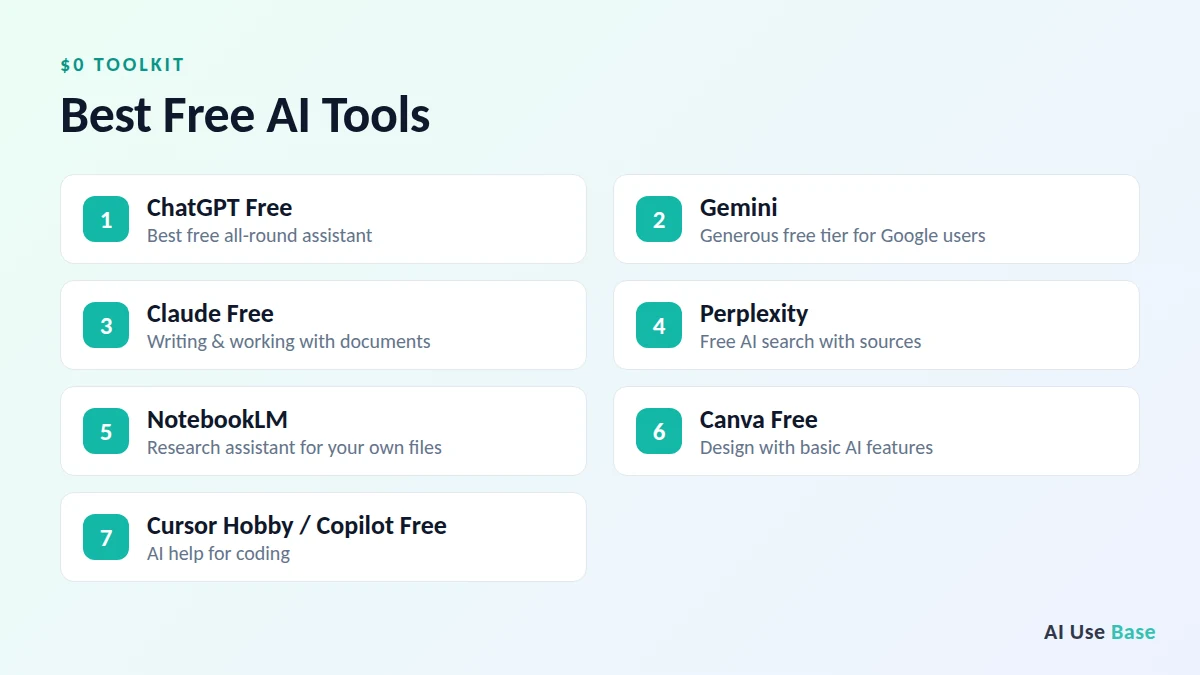
Many of the best AI tools have a free plan, so you can build a powerful toolkit without paying anything. The strongest free options right now are:
- ChatGPT Free – the best free all-round assistant.
- Gemini – a very generous free tier, especially for Google users.
- Claude Free – great for writing and working with documents.
- Perplexity – free AI search with sources.
- NotebookLM – free research assistant for your own files.
- Canva Free – design with basic AI features.
- Cursor Hobby or GitHub Copilot Free – for coding.
Free plans usually limit how many messages, images, or files you can use, and they often run on smaller models. Upgrade only when you consistently hit those limits.
How to Choose the Right AI Tool for You
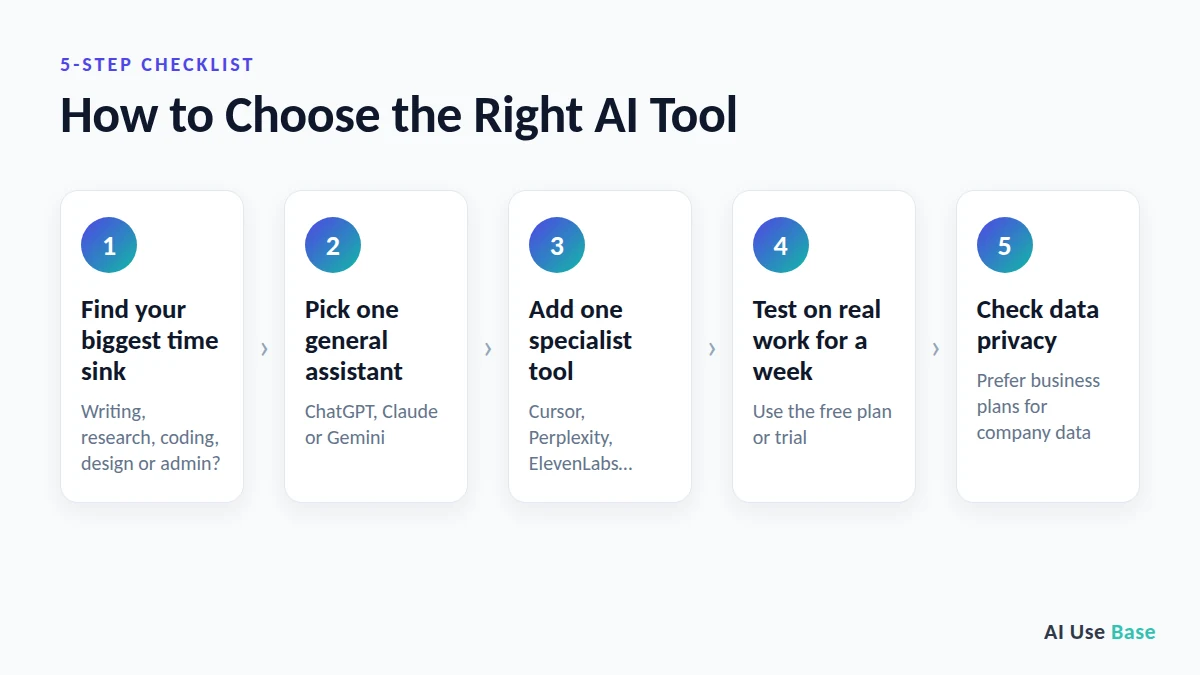
There is no single list of best AI tools that fits everyone. The right choice depends on the job. Use this simple process:
- Start with your biggest time sink. Which task costs you the most hours each week? Writing, research, coding, design, or admin?
- Pick one general assistant. ChatGPT, Claude, or Gemini. Paying for more than one of the best AI tools is rarely necessary at first.
- Add one specialist tool for your main workload, such as Cursor for code, Perplexity for research, or ElevenLabs for voice.
- Test on real work for a week. Toy prompts tell you very little. Use the free plan or trial on actual tasks.
- Check data privacy. For business use, prefer business or enterprise plans that do not train on your data by default.
More Guides to the Best AI Tools by Use Case
Want to go deeper? These guides break down the best AI tools for specific jobs, with free plans, prices and quick picks:
- Best free AI tools: no-cost tools for chat, research, design, coding and more
- Best AI writing tools: for blogs, emails, essays, marketing and fiction
- Best AI tools for students: study, research and write smarter
- Best AI coding tools: editors, coding agents and app builders
- Best AI image generators: art, photos, posters and marketing graphics
- Best AI productivity tools: assistants, meeting notes and automation that save hours every week
- Best AI tools for small business: affordable picks for marketing, customer service and admin
- Best AI video generators: for text-to-video, avatars and editing
- Best AI presentation makers: for slides and pitch decks in minutes
- Best AI research tools: for papers, sources and literature reviews
- Free ChatGPT alternatives: free chatbots compared by limits
- Best AI note takers: for meeting notes and transcripts
- Best AI detectors: how accurate AI checkers really are
Next steps: compare the two biggest everyday assistants in ChatGPT vs Copilot, or add AI to your browser with the best AI Chrome extensions.
Comparing assistants or plans? Read Claude vs Gemini, Claude vs ChatGPT for writing, is ChatGPT Plus worth it and Canva AI vs Microsoft Designer. New to AI? Start with how to use ChatGPT, and teachers can save hours with our ChatGPT lesson plans guide.
Frequently Asked Questions
What is the best AI tool right now?
For most people, ChatGPT is the best overall AI tool because it combines writing, research, image generation, voice, and agent features in one app. Claude is the stronger choice for long-form writing and complex reasoning, while Gemini is best if you already use Google Workspace.
What is the best free AI tool?
ChatGPT Free and Gemini offer the most complete free experience. Perplexity is the best free option for research with sources, and NotebookLM is the best free tool for studying your own documents.
Which AI tool is best for coding?
Cursor is the best AI code editor for most developers, Claude Code is the strongest choice for agentic, multi-step coding tasks, and GitHub Copilot is the easiest option for teams already on GitHub.
Is ChatGPT better than Claude and Gemini?
Not in every case. ChatGPT is the most versatile, Claude is often preferred for writing quality and following complex instructions, and Gemini wins on Google integration and storage value. Many power users keep one as their main assistant and use the others for specific tasks.
What are the best AI tools for beginners?
The best AI tools for beginners are ChatGPT or Gemini for everyday questions and writing, Perplexity for research, and Canva for simple designs. All four have free plans and need no technical skills.
How much do AI tools cost?
Most leading AI tools have a free plan. The standard paid tier for major assistants such as ChatGPT Plus, Claude Pro, and Google AI Pro costs about $20 per month, with power-user plans from $100 to $200 per month.
Are AI tools safe to use for work?
Generally yes, if you choose the right plan. Business and enterprise plans from major providers typically do not use your data to train models by default. On consumer plans, check the privacy settings and avoid pasting sensitive company or customer data.
Final Thoughts
The best AI tools are the ones that fit your workflow. Start with one strong assistant, such as ChatGPT, Claude, or Gemini, then add a specialist tool for the work that takes most of your time. Give each tool a real week of use before deciding, and revisit your list of best AI tools every few months, because this market changes fast.
Want to go deeper on the best AI tools in each category? Browse our AI Guides for detailed reviews and head-to-head breakdowns.
6 thoughts on “15 Best AI Tools in 2026: Ranked by Use Case (Free & Paid)”