In the NotebookLM vs ChatGPT comparison, NotebookLM is the better tool for studying and researching from your own sources, because every answer is grounded in the files you upload and linked to exact citations. ChatGPT is the better all-round assistant when you need web search, flexible writing, coding, images or help beyond your own documents.
One update first: in July 2026, Google renamed NotebookLM to Gemini Notebook. It is the same tool at the same address, and notebooks now also open inside the Gemini app. We use the familiar name here, so NotebookLM vs ChatGPT and Gemini Notebook vs ChatGPT mean the same thing.
Quick Verdict
- Choose NotebookLM for exam prep, literature reviews and research where accuracy and citations matter, plus Audio Overviews you can listen to.
- Choose ChatGPT for brainstorming, drafting, web research, coding, data analysis and anything that goes beyond your uploaded material.
NotebookLM vs ChatGPT at a Glance
| Feature | NotebookLM (Gemini Notebook) | ChatGPT |
|---|---|---|
| Maker | OpenAI | |
| Answers based on | Your sources, with citations | Model knowledge, web, your files |
| Source types | PDFs, Docs, Slides, sites, YouTube | Files, images, web, connected apps |
| Audio summaries | Audio Overviews, podcast style | Voice chat, no podcast generator |
| Study tools | Flashcards, quizzes, mind maps | Study mode, quizzes on request |
| Free plan | Yes, generous | Yes, with usage limits |
| Main paid plan | Google AI Pro, $19.99/month | ChatGPT Plus, $20/month |
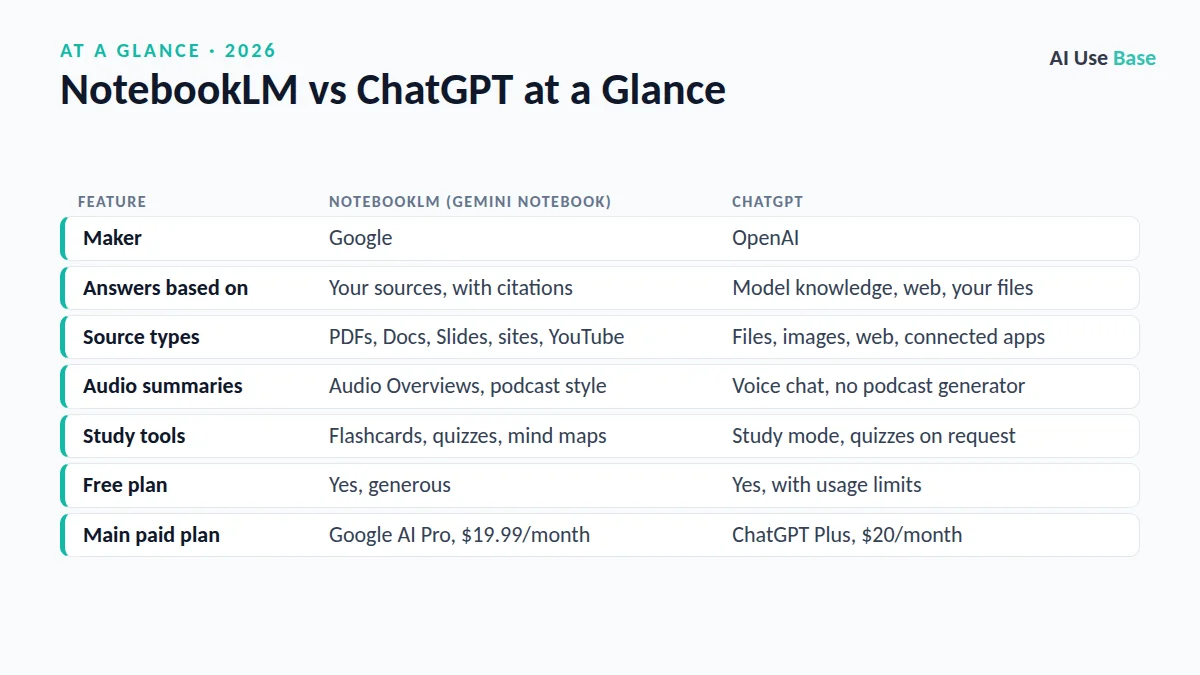
Prices are US monthly rates, last checked October 2026.
What Changed: NotebookLM Is Now Gemini Notebook
Google announced the rename on its official blog in July 2026. Existing notebooks and links still work, the standalone site remains, and you can now create and open notebooks inside Gemini with changes syncing between the two. Google also added code execution for data analysis, starting with its top paid plan. If you are new to the tool, our guide on how to use Gemini covers the wider app.
NotebookLM vs ChatGPT: Grounding and Accuracy
Grounding is the biggest difference. NotebookLM answers mainly from the sources in your notebook, and each claim links to the passage it came from. Click a citation and you see the original text, which makes checking facts fast and helps you avoid confident but wrong answers.
ChatGPT can also read uploaded files and cite them, and it can search the web with links. However, it blends your files with its general knowledge, so it may add outside information you did not provide. That is helpful for broad explanations, but less ideal when a teacher or client wants answers strictly from the assigned material.
Source limits
NotebookLM supports PDFs, Google Docs, Slides and Sheets, Word files, web pages, public YouTube videos, audio and more. Google’s help pages list up to 500,000 words or 200MB per source, and the free plan allows up to 50 sources per notebook. ChatGPT handles many file types too, with limits that vary by plan and file size.
NotebookLM vs ChatGPT: Audio Overviews and Study Tools
This round of NotebookLM vs ChatGPT clearly goes to Google. Audio Overviews turn your sources into a podcast-style discussion between AI hosts, in several formats and many languages, and in English you can join the conversation and ask questions. NotebookLM also creates Video Overviews, mind maps, reports, flashcards, quizzes and slide decks from the same material.
ChatGPT offers study mode, which guides you step by step with questions instead of handing over answers, and it can create quizzes or flashcards when you ask. Its voice mode is excellent for talking through a topic, but it does not generate a ready-made podcast from your files. For more study helpers, see our list of the best AI tools for students.
Flexibility and Everyday Use in NotebookLM vs ChatGPT
On flexibility, NotebookLM vs ChatGPT is an easy call. ChatGPT is far more flexible. It writes essays and emails, explains concepts from scratch, writes and runs code, analyzes spreadsheets, creates images, runs deep research across the web and remembers your preferences across chats. Projects let you keep files and instructions together for ongoing work.
NotebookLM is deliberately focused. It is a research notebook, not a general assistant, and that focus is what makes it reliable. For many students and researchers, the best setup is NotebookLM vs ChatGPT as a team: NotebookLM to understand the sources, then ChatGPT to brainstorm and draft. Our how to use ChatGPT guide explains Projects and file uploads.
NotebookLM vs ChatGPT Pricing
| Tier | NotebookLM (Gemini Notebook) | ChatGPT |
|---|---|---|
| Free | $0: up to 100 notebooks and 50 sources each, daily limits on chats and Audio Overviews | $0: limited access to OpenAI’s latest model, file uploads and search |
| Budget | Google AI Plus, $4.99/month: higher limits | ChatGPT Go, $8/month: more usage |
| Standard | Google AI Pro, $19.99/month: much higher limits plus Gemini and storage perks | ChatGPT Plus, $20/month: more usage, reasoning models, deep research |
| Power user | Google AI Ultra: highest limits and newest features | ChatGPT Pro: highest usage and top models |
See the details on Google’s Google AI subscriptions page and the ChatGPT pricing page. Students should also check for education discounts, which both companies have offered in some regions.
NotebookLM vs ChatGPT: Which Should You Choose?
Choose NotebookLM if…
- You study from lecture slides, textbooks or papers and want cited answers.
- You learn well by listening and want Audio Overviews.
- You need flashcards, quizzes and mind maps built from your own material.
- You want a strong free plan.
Choose ChatGPT if…
- You need answers that go beyond your documents, including web research.
- You write, code or analyze data regularly.
- You want images, voice conversations and memory in one app.
- You want one assistant for school, work and personal tasks.
Want more options? Our roundup of AI PDF readers covers other ways to chat with documents, and the pillar guide to the best AI tools compares the wider field.
Frequently Asked Questions
Is NotebookLM better than ChatGPT for studying?
For studying from your own materials, yes. NotebookLM answers from your sources with clickable citations and builds Audio Overviews, flashcards and quizzes. ChatGPT is better when you need explanations, writing help or research beyond your documents.
Is NotebookLM now called Gemini Notebook?
Yes. Google renamed NotebookLM to Gemini Notebook in July 2026. The standalone site and existing notebooks still work, and notebooks can now also be used inside the Gemini app.
Is NotebookLM free?
Yes. The free plan includes up to 100 notebooks with up to 50 sources each, with daily limits on chats and Audio Overviews. Google AI Plus, Pro and Ultra subscriptions raise those limits.
Can ChatGPT make audio overviews like NotebookLM?
Not in the same way. ChatGPT can read answers aloud and hold voice conversations, but it does not generate a podcast-style discussion from your files. NotebookLM’s Audio Overviews are built for that.
Can I use NotebookLM and ChatGPT together?
Yes, and many students do. Use NotebookLM to understand and cite your sources, then use ChatGPT to brainstorm, outline or improve your own writing, following your school’s AI rules.
Final Thoughts
NotebookLM vs ChatGPT is not really a fight between rivals. NotebookLM, now called Gemini Notebook, is the best free tool for studying and researching from your own sources, while ChatGPT is the better general assistant for everything around that work.
If you can only pick one for coursework built on assigned readings, choose NotebookLM. If you need a do-everything helper, choose ChatGPT, and keep NotebookLM’s free plan for your source-heavy projects.