The best free AI photo enhancers in 2026 are Upscayl for unlimited offline upscaling, Canva and Adobe Express for quick fixes inside a design app, Picsart and Let’s Enhance for sharp web upscales, and Remini for faces and old family photos. Photoshop’s Generative upscale is the pro option when free tools are not enough.
“Free” means different things across free AI photo enhancers. Some tools are fully free, while others give you a few credits, a watermark, or a low-resolution download. The table and reviews below explain exactly what you get before you pay.
Quick Picks: Free AI Photo Enhancers
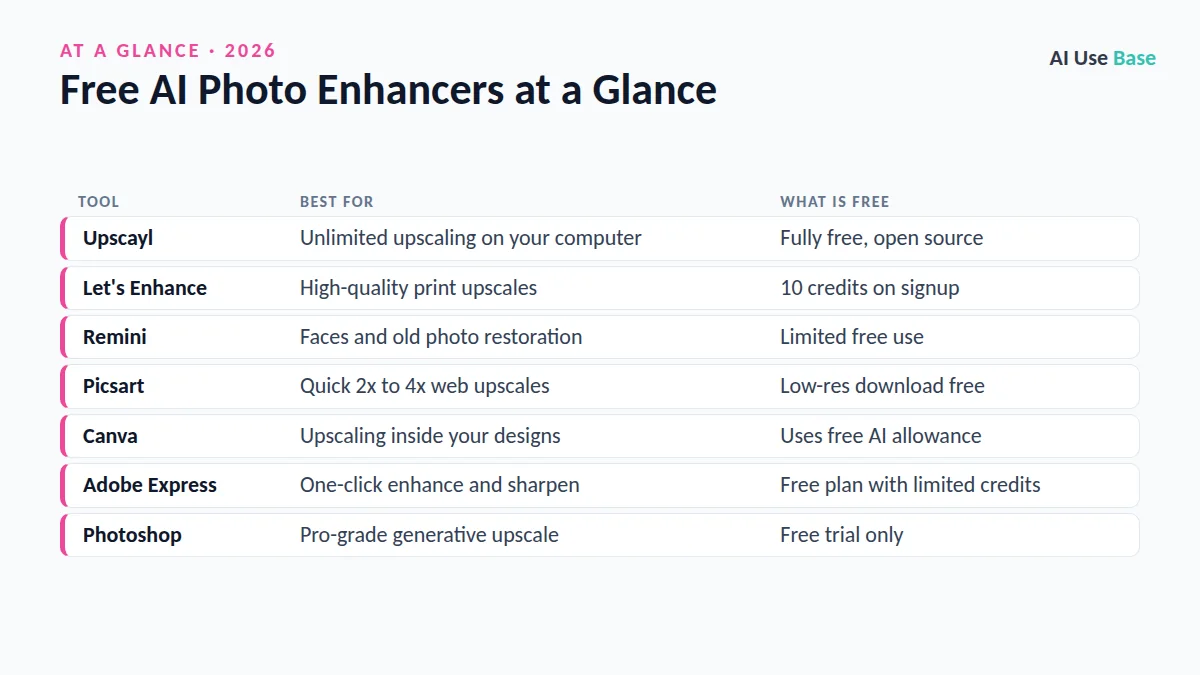
| Tool | Best for | What is free |
|---|---|---|
| Upscayl | Unlimited upscaling on your computer | Fully free, open source |
| Let’s Enhance | High-quality print upscales | 10 credits on signup |
| Remini | Faces and old photo restoration | Limited free use |
| Picsart | Quick 2x to 4x web upscales | Low-res download free |
| Canva | Upscaling inside your designs | Uses free AI allowance |
| Adobe Express | One-click enhance and sharpen | Free plan with limited credits |
| Photoshop | Pro-grade generative upscale | Free trial only |
How We Chose These Free AI Photo Enhancers
We built this list from official product pages, help docs, and pricing pages, not personal testing claims. Prices last checked October 2026. Our criteria:
- Real free value: You can enhance at least some photos without paying.
- Quality: The tool uses modern AI upscaling or restoration, not simple resizing.
- Ease of use: Beginners can get a result in a few clicks.
- Privacy: The provider is established, or the tool runs locally.
The 7 Best Free AI Photo Enhancers in 2026
1. Upscayl
Upscayl is a desktop app that upscales images using open-source AI models. Because it runs on your own computer, there are no credits, watermarks, or uploads, which makes it the most private of all free AI photo enhancers. A reasonably modern graphics card speeds things up considerably.
- Best for: Batch upscaling and privacy-conscious users
- Free plan: Completely free and open source (Windows, macOS, Linux)
- Paid from: An optional paid Upscayl Cloud service is available
- Standout: Unlimited use with no uploads
Download: Upscayl.
2. Let’s Enhance
Let’s Enhance is one of the more polished free AI photo enhancers on the web, built for large, print-ready images. It can enlarge photos, fix compression artifacts, and adjust color and lighting automatically. The free credits are enough to try it on your most important images.
- Best for: Printing, e-commerce, and real estate photos
- Free plan: 10 free credits on signup, no card required
- Paid from: $9/month for 100 credits
- Standout: Very large output sizes
Official site: Let’s Enhance.
3. Remini
Among free AI photo enhancers for portraits, Remini is best known for sharpening faces and restoring old, blurry, or scratched photos. It is popular for family archives and selfies. Be aware that face enhancement can subtly change features, so compare the result with the original before you share it.
- Best for: Portraits and old family photos
- Free plan: Limited free use
- Paid from: A subscription unlocks more enhancements
- Standout: Strong face restoration
Official site: Remini photo restorer.
4. Picsart
Picsart’s upscaler enlarges images by 2x or 4x, or to a custom size, right in your browser or phone. You can preview and download a lower-resolution result for free, while full-resolution downloads need a paid plan. Picsart also offers related tools for unpixelating images and restoring old photos.
- Best for: Social media and quick mobile edits
- Free plan: Yes, with low-resolution downloads
- Paid from: Pro at $10.50/month billed yearly
- Standout: Batch upscaling on paid plans
Try it: Picsart image upscaler.
5. Canva
Canva is one of the most convenient free AI photo enhancers for designers. Its Upscale tool sharpens blurry or pixelated JPG and PNG images inside your design, automatically choosing a 4x or 16x level. It is ideal if you already make social posts, slides, or flyers in Canva and want a photo to look crisper without switching apps.
- Best for: Canva users making designs
- Free plan: Yes, each use draws from your free AI allowance
- Paid from: Canva Pro, where Upscale does not use your AI allowance
- Standout: Output up to 50 megapixels
Help: Upscale images in Canva. For more design tips, see our Canva AI vs Microsoft Designer comparison.
6. Adobe Express
Adobe Express offers free one-click photo enhancement, sharpening, and background removal in a browser or mobile app. Generative features such as removing objects use credits, and the free plan includes a limited monthly supply. Adobe’s Firefly web app also has a free online image upscaler.
- Best for: Quick fixes plus simple graphic design
- Free plan: Yes, with limited generative credits
- Paid from: Adobe Express Premium adds more credits
- Standout: Enhance, sharpen, and remove objects in one place
Try it: Adobe Express image enhancer.
7. Photoshop Generative Upscale
Photoshop’s Generative upscale enlarges images 2x or 4x and lets you pick a model: Firefly Upscaler to keep the photo’s identity, Topaz Gigapixel for faithful detail, or Topaz Bloom for creative texture on AI-generated images. It is not free, but a trial lets you test it on a tough image.
- Best for: Photographers and designers who need control
- Free plan: Free trial only
- Paid from: Photoshop plans with generative credits
- Standout: Choice of Firefly and Topaz models
Help: Generative upscale in Photoshop.
Tips for Better Results with Free AI Photo Enhancers
- Start with the best source. Scan old prints at a high resolution instead of photographing them with a phone.
- Upscale once. Repeated upscaling adds artificial texture and plastic-looking skin.
- Crop first. Remove borders and empty space so the AI focuses on what matters.
- Check faces and text. AI can invent details, change eye shapes, or garble lettering.
- Keep the original. Save an untouched copy in case you prefer it later.
- Be honest about edits. Do not present heavily restored images as untouched historical records.
Need a clean cutout after enhancing? Our guide to the free AI background removers covers the best options.
How to Choose a Free AI Photo Enhancer
- Many photos or private images? Use Upscayl on your own computer.
- Old family photos or portraits? Try Remini first.
- Printing large? Spend your free credits on Let’s Enhance.
- Already designing in Canva or Adobe Express? Use their built-in tools.
- Professional work? Try Photoshop’s Generative upscale.
For generating new images rather than fixing old ones, see our list of the best AI image generators or the full guide to the best AI tools.
Frequently Asked Questions
What is the best free AI photo enhancer?
Upscayl is the best fully free option because it runs on your computer with no credits or watermarks. For faces and old photos, Remini is a strong choice, while Canva and Adobe Express are convenient if you already use them for design.
Can AI restore old photos for free?
Yes, within limits. Remini, Picsart, and Adobe Express offer free restoration or enhancement, though free downloads may be limited or lower resolution. Scan the print at high resolution first for the best result.
Are free AI photo enhancers safe to use?
Established tools are generally safe, but online enhancers upload your photos to their servers. Read the privacy policy, avoid uploading sensitive images, or use Upscayl, which processes images locally.
Does upscaling an image really add detail?
AI upscalers predict and generate plausible detail rather than recovering lost information. Results often look sharper, but the AI may invent textures or alter faces and text, so check the output carefully.
Which free AI photo enhancers have no watermark?
Upscayl has no watermark or limits. Canva and Adobe Express let you download enhanced images on their free plans, while some tools such as Picsart limit free downloads to lower resolution.
Final Thoughts
Free AI photo enhancers can rescue blurry, small, or faded pictures in seconds. Upscayl is the best fully free option, Remini is the go-to for faces and restoration, and Canva or Adobe Express are the easiest choices if you already design there.
Use free credits on the photos that matter most, keep your originals, and review every result closely before you print or share.