The best AI image prompts describe a subject, a setting, a style, lighting, composition, and format in one clear sentence or two. That simple structure works in ChatGPT, Gemini, and Midjourney, and it is the fastest way to stop getting generic, plastic-looking results.
Below you’ll find a reusable prompt formula, 40 example AI image prompts grouped by style (photography, illustration, logos, and product shots), and tips for tweaking each tool. Swap the [brackets] for your own details.
The AI Image Prompts Formula
| Element | What to describe | Example |
|---|---|---|
| Subject | Who or what is in the image | An elderly baker |
| Action | What the subject is doing | Dusting flour on bread |
| Setting | Place, time, weather | Small bakery at dawn |
| Style | Photo, watercolor, 3D, flat vector | Documentary photo |
| Lighting | Light source and mood | Warm window light |
| Composition | Camera angle, framing, lens | Close-up, shallow depth |
| Color | Palette or color grade | Soft golds and creams |
| Format | Aspect ratio and use | Vertical, for a poster |
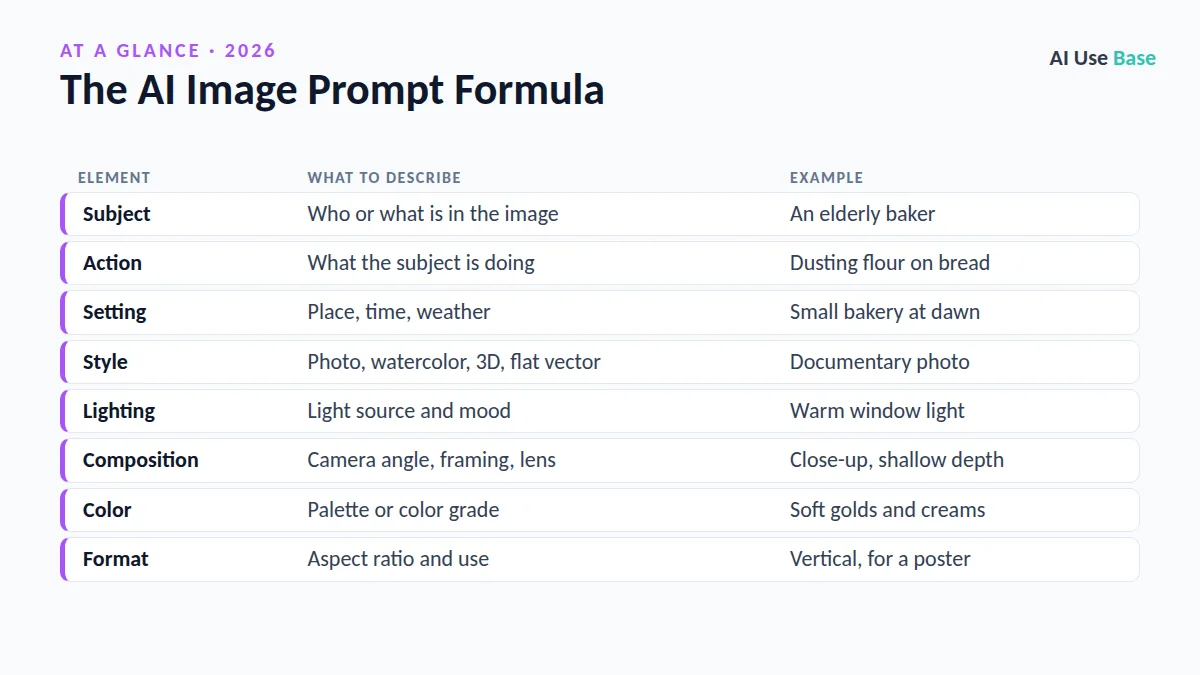
Put together: “Documentary photo of an elderly baker dusting flour on bread in a small bakery at dawn, warm window light, close-up with shallow depth of field, soft golds and creams, vertical format.” You don’t need every element every time, but the more you specify, the less the AI has to guess.
How AI Image Prompts Differ by Tool
ChatGPT
ChatGPT creates images right in the chat, and it understands conversational follow-ups like “make the background darker” or “add text that says [words].” Full sentences work well, and it is generally good at following detailed instructions. Our how to use ChatGPT guide covers the basics.
Gemini
Gemini can generate and edit images from text, and you can upload a photo and describe changes. Natural language works best here too. See our guide on how to use Gemini for more.
Midjourney
Midjourney responds well to shorter, descriptive phrases and supports parameters such as --ar 16:9 for aspect ratio and --no to exclude elements. Check the official Midjourney model documentation for current versions and settings. If you’d rather not pay, look at our free Midjourney alternatives.
Photography AI Image Prompts
Photo-style AI image prompts get more realistic when you mention camera terms like lens, angle, depth of field, and lighting.
- “Candid street photo of [subject] crossing a rainy city street at night, neon reflections on wet pavement, 35mm lens, cinematic color grade.”
- “Professional headshot of a [age] [profession] in a modern office, soft natural light, neutral background, shallow depth of field.”
- “Golden-hour landscape photo of [location], wide angle, low sun casting long shadows, vivid but natural colors.”
- “Overhead food photo of [dish] on a rustic wooden table, natural daylight, linen napkin, minimal props.”
- “Wildlife photo of a [animal] in [habitat], telephoto lens, sharp eyes, blurred background, early morning mist.”
- “Black-and-white portrait of [subject], dramatic side lighting, high contrast, film grain.”
- “Cozy interior photo of a [room type] with [style] decor, warm lamp light, eye-level wide shot.”
- “Macro photo of dew drops on a [plant], extreme close-up, soft bokeh background, cool morning tones.”
- “Fitness photo of [subject] running on a coastal trail at sunrise, motion blur in the background, energetic mood.”
- “Aerial drone photo of [location], top-down view, geometric patterns, bright midday light.”
Illustration and Art Prompts
For illustration-style AI image prompts, name the medium (watercolor, gouache, ink, 3D render) and the mood. Avoid copying living artists by name; describe the style instead.
- “Children’s book illustration of [character] exploring [place], soft watercolor, gentle pastel colors, whimsical.”
- “Flat vector illustration of [scene] for a website hero image, bold shapes, limited palette of [colors], lots of white space.”
- “Isometric 3D illustration of [office / city block / workspace], clean lines, soft shadows, bright colors.”
- “Fantasy concept art of [setting], epic scale, dramatic clouds, detailed matte painting style.”
- “Retro travel poster of [city], mid-century style, bold typography area left blank, warm sunset palette.”
- “Ink and wash drawing of [subject], loose expressive lines, sepia tones, textured paper.”
- “Cute sticker design of a [animal] [doing something], thick white outline, kawaii style, transparent-looking background.”
- “Pixel art scene of [setting], 16-bit video game style, vibrant colors, side view.”
- “Paper-cut layered illustration of [landscape], depth with shadows, [color] palette.”
- “Editorial illustration about [topic] for a magazine article, conceptual, minimal, two-color print style.”
Logo and Icon Prompts
Logo AI image prompts are useful for early concepts, but treat the results as sketches. Recreate the final mark as a vector and check for trademark conflicts before using it.
- “Minimal logo for [business name], a [type of business], simple geometric icon, flat design, [color] on white.”
- “Wordmark logo for [brand name] in a modern sans-serif style, clean spacing, black on white.”
- “Mascot logo of a friendly [animal] for a [business type], bold outlines, two colors.”
- “Monogram logo combining the letters [X] and [Y], elegant, luxury feel, gold on dark navy.”
- “Emblem logo for [club / café / brewery] with a circular badge shape, vintage style, [colors].”
- “Set of 6 flat app icons for [features], consistent line weight, rounded corners, [color] accent.”
- “Negative-space logo for [business] combining [object A] and [object B], minimal, one color.”
- “Playful hand-drawn logo for [kids’ brand], bright primary colors, friendly rounded letters.”
- “Tech startup logo for [name], abstract symbol suggesting [idea], gradient from [color] to [color].”
- “Favicon-style icon of [simple symbol], readable at small sizes, solid shape, high contrast.”
Product Photo AI Image Prompts
Product AI image prompts work best with a clean background description, specific lighting, and the angle you’d use in a real studio. Tools that let you upload a reference photo of your actual product give the most accurate results.
- “Studio product photo of [product] on a seamless white background, soft box lighting, subtle shadow, e-commerce style.”
- “Lifestyle shot of [product] on a marble kitchen counter, morning light, fresh herbs in the background.”
- “Flat lay of [product] surrounded by [related items], pastel backdrop, top-down view.”
- “Skincare bottle [product] on a wet stone with water splashes, fresh and clean mood, cool tones.”
- “Sneaker [product] floating mid-air with dynamic shadows, bold [color] background, high-energy ad style.”
- “Coffee bag [product] on a café table with steam rising from a cup, warm cozy tones.”
- “Tech gadget [product] on a dark desk with subtle blue rim lighting, sleek premium feel.”
- “Jewelry close-up of [product] on velvet, sparkle highlights, macro lens, luxury look.”
- “Candle [product] in a cozy living room at dusk, soft glow, blurred fairy lights.”
- “Seasonal promo image of [product] with [holiday] decorations, space at the top for text, square format.”
Tips for Better AI Image Prompts
- Be specific, not long. Concrete details beat a pile of adjectives like “beautiful, stunning, amazing.”
- Edit in steps. In ChatGPT and Gemini, change one thing per follow-up so you can see what works.
- Specify aspect ratio. Say “square,” “vertical 9:16,” or “wide 16:9” based on where the image will go.
- Keep text short. Ask for only a few words in quotes; longer text can still come out garbled.
- Save winners. Keep a swipe file of AI image prompts that worked so you can reuse the structure.
Want to compare generators? See our ranking of the best AI image generators.
Cautions
- Real people. Don’t create misleading images of real people; most tools restrict this.
- Copyright and trademarks. Avoid prompts that copy brands, characters, or a specific artist’s work.
- Commercial use. Check each tool’s terms before using images in ads or products. Plan limits differ too; see the ChatGPT pricing page for its current details.
- Disclose when it matters. Label AI-generated images in journalism, education, or anywhere viewers could be misled.
Frequently Asked Questions
How do you write a good AI image prompt?
Describe the subject, what it is doing, the setting, the style, the lighting, the composition, and the format. Specific details work better than vague adjectives, and you can refine the image with short follow-up instructions.
Do the same AI image prompts work in ChatGPT, Gemini, and Midjourney?
Mostly, yes. All three understand descriptive prompts, but ChatGPT and Gemini handle conversational edits well, while Midjourney also supports parameters like aspect ratio and exclusions.
Can I use AI-generated images commercially?
It depends on the tool’s terms and your plan, so read the official terms before using images in ads or products. Avoid prompts that copy trademarks, characters, or a specific artist’s work.
Why does AI get text in images wrong?
Image models have improved at rendering text, but longer phrases can still come out misspelled or garbled. Keep text to a few words in quotes and check it carefully, or add text afterward in a design tool.
Can AI make a logo for my business?
AI image tools can produce useful logo concepts quickly. Treat them as drafts, recreate the final design as a vector file, and check for trademark conflicts before using it.
Final Thoughts
Great AI image prompts follow a simple pattern: subject, action, setting, style, lighting, composition, and format. Start with the 40 examples above, tweak them for ChatGPT, Gemini, or Midjourney, and refine in small steps until the image matches what you pictured.
For more creative and productivity tools, explore our guide to the best AI tools.