The best AI note takers in 2026 are Otter for live transcription, Fireflies for searchable team meeting archives, Fathom for a generous free plan, tl;dv for video highlights, and Granola for bot-free personal notes. If your company already pays for Zoom, Google Workspace, Microsoft 365, or Notion, the built-in AI notes may be all you need.
All of these tools record or listen to a conversation, turn it into a transcript, and write a summary with action items. The differences are in how they join your call, how much the free plan allows, and where your notes end up. This guide compares the main options so you can pick one in a few minutes.
Quick Picks: Best AI Note Takers
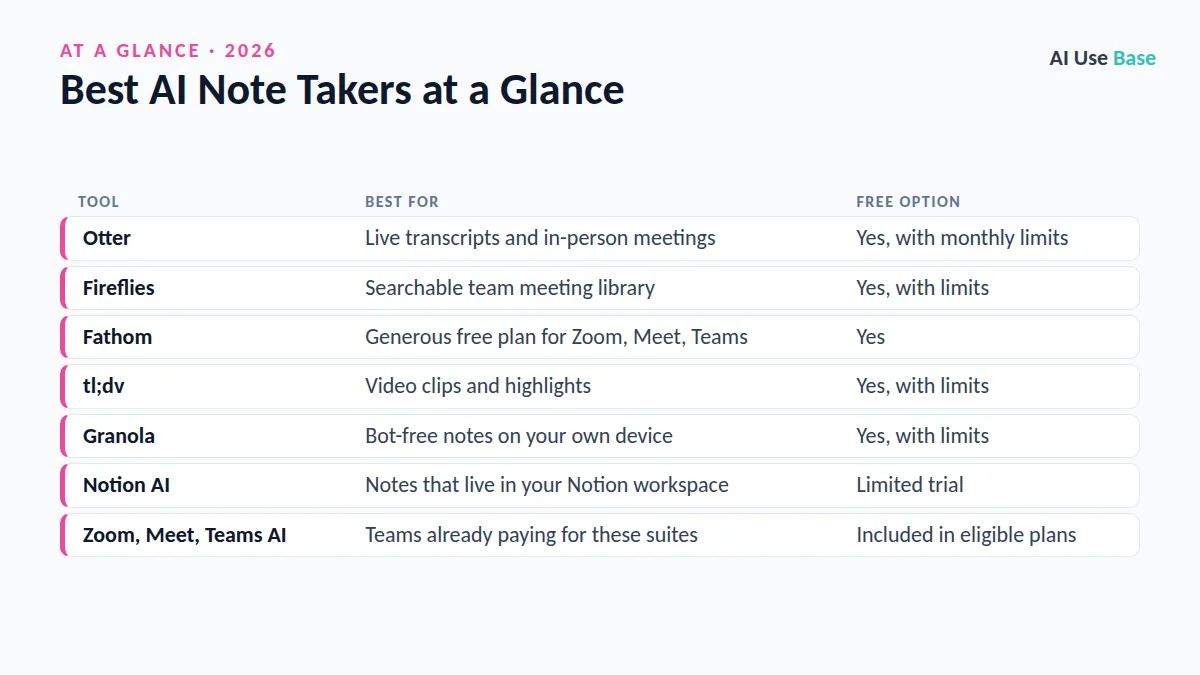
| Tool | Best for | Free option |
|---|---|---|
| Otter | Live transcripts and in-person meetings | Yes, with monthly limits |
| Fireflies | Searchable team meeting library | Yes, with limits |
| Fathom | Generous free plan for Zoom, Meet, Teams | Yes |
| tl;dv | Video clips and highlights | Yes, with limits |
| Granola | Bot-free notes on your own device | Yes, with limits |
| Notion AI | Notes that live in your Notion workspace | Limited trial |
| Zoom, Meet, Teams AI | Teams already paying for these suites | Included in eligible plans |
How We Chose the Best AI Note Takers
We compared tools using official product pages, help docs, and pricing pages, not personal testing claims. Plans change often, so prices last checked October 2026 are described in general terms; always confirm on each official page. Our criteria:
- Accuracy and summaries: Clear transcripts, useful action items, and the ability to ask questions about past meetings.
- Platform support: Zoom, Google Meet, Microsoft Teams, and in-person recording.
- Free plan value: How far you can get before paying.
- Privacy and control: Consent notices, admin settings, and data retention options.
The 7 Best AI Note Takers in 2026
1. Otter
Otter is one of the oldest names among the best AI note takers. Its assistant can join Zoom, Google Meet, and Teams calls automatically, and the mobile app records in-person lectures and interviews. Transcripts appear live, and Otter’s AI chat lets you ask questions across your meeting history.
- Best for: Students, journalists, and anyone who needs live transcripts
- Free plan: Yes, with monthly transcription minute and length limits
- Paid from: Pro plan, with Business and Enterprise tiers
- Standout: Real-time transcription you can highlight as you go
Plans: Otter pricing.
2. Fireflies
Fireflies sends a bot to your calls, then builds a searchable library of transcripts, summaries, and topics. Among the best AI note takers for sales and customer teams, it stands out because it connects to CRMs and work apps, and its AI assistant can answer questions about what was said across many meetings.
- Best for: Teams that want a shared, searchable meeting archive
- Free plan: Yes, with storage and AI feature limits
- Paid from: Pro plan per seat, with Business and Enterprise tiers
- Standout: Many integrations and cross-meeting search
Plans: Fireflies pricing.
3. Fathom
Fathom earns a place among the best AI note takers mainly for its free plan, which is generous compared with most rivals. It records Zoom, Meet, and Teams calls, writes summaries shortly after the meeting ends, and lets you copy notes into email, Slack, or a CRM. Paid tiers add more advanced AI and team features.
- Best for: Individuals and small teams who want strong free notes
- Free plan: Yes
- Paid from: Premium and Team plans
- Standout: Fast, clean summaries with little setup
Plans: Fathom pricing.
4. tl;dv
tl;dv (short for “too long; didn’t view”) records video calls and makes it easy to timestamp key moments and share short clips. That makes it one of the best AI note takers for product teams, user interviews, and anyone who sends highlights to colleagues who missed the call. It supports many languages for transcripts and summaries.
- Best for: Sharing video highlights and research calls
- Free plan: Yes, with limits on AI notes and history
- Paid from: Pro plan, with Business tiers
- Standout: Timestamps and clips you can share in seconds
Plans: tl;dv pricing.
5. Granola
Granola works differently from most of the best AI note takers: no bot joins your meeting. It captures audio on your own computer while you jot quick notes, then uses AI to expand them into clean, structured notes. People who dislike visible recording bots, or who switch between many call apps, often prefer this approach.
- Best for: Founders, consultants, and personal note taking
- Free plan: Yes, with limited note history
- Paid from: Paid individual and Business plans
- Standout: Bot-free notes that build on what you type
Plans: Granola pricing.
6. Notion AI Meeting Notes
If your team already lives in Notion, its AI Meeting Notes block can transcribe and summarize a meeting directly inside a page. Notes sit next to your projects and docs, so you can ask Notion AI questions across both. Full Notion AI access is tied to higher-tier workspace plans, while lower tiers get only a limited trial.
- Best for: Teams that already run their work in Notion
- Free plan: Limited AI trial
- Paid from: Business plan (check current tiers)
- Standout: Meeting notes linked to your wiki and tasks
Plans: Notion pricing.
7. Built-in: Zoom, Google Meet, and Microsoft Teams
Before paying for one of the best AI note takers as a separate app, check what you already have. Zoom AI Companion can summarize meetings on eligible paid Zoom plans. Google Meet’s “Take notes for me” uses Gemini to create a notes doc on eligible Workspace plans. Microsoft Teams offers AI recaps through Teams Premium or a Microsoft 365 Copilot license.
- Best for: Organizations standardized on one meeting platform
- Free plan: Included with eligible paid plans
- Paid from: Depends on your existing suite license
- Standout: No extra bot, vendor, or data processor
Learn more: Take notes for me in Google Meet and Zoom AI Companion.
Bot vs. Bot-Free: How the Best AI Note Takers Join Calls
Most tools join your call as a visible participant. That is transparent, because everyone sees that the meeting is being recorded, but some clients find it distracting. Bot-free tools like Granola record from your device instead, which feels lighter but puts more responsibility on you to tell others.
Either way, recording laws vary. Some US states require every participant to consent, so announce that you are using AI notes and follow your company policy.
How to Choose Among the Best AI Note Takers
- Check your existing tools first. Zoom, Workspace, Microsoft 365, or Notion may already include AI notes.
- Match your meeting platform. Confirm support for every app you use, including in-person recording if needed.
- Decide bot or bot-free. Consider how your clients and colleagues feel about visible recorders.
- Test the free plan on real meetings. Compare summary quality and how easily notes move to email, Slack, or your CRM.
- Review privacy settings. Look for admin controls, retention options, and whether your data is used for training.
For more ways to save time at work, see our roundup of the best AI productivity tools, our list of AI tools for small business, and the full guide to the best AI tools. Students can also check our best AI tools for students.
Frequently Asked Questions
What is the best AI note taker for free?
Fathom is often recommended for its generous free plan, and Otter, Fireflies, tl;dv, and Granola also offer free tiers with limits. If your company pays for Zoom, Google Workspace, or Microsoft 365, check whether built-in AI notes are already included before signing up for anything new.
Are AI note takers accurate?
Most of the best AI note takers produce good transcripts in clear audio, but accuracy drops with crosstalk, accents, background noise, and technical jargon. Always check names, numbers, and action items before sending a summary to others.
Is it legal to use an AI note taker in meetings?
It depends on where participants are located and on your company policy. Some US states require consent from everyone on a call, so the safest approach is to announce that you are recording and let people opt out.
Can AI note takers record in-person meetings?
Yes, some can. Otter’s mobile app records in-person conversations, and Granola captures audio on your device. Bot-based tools that only join video calls are less suited to in-person meetings.
Do AI note takers use my meetings to train AI?
Policies differ by vendor and plan. Read each provider’s privacy and security pages, and look for business plans with admin controls, data retention settings, and clear statements about model training.
What is an AI note taker?
An AI note taker is an app that records or listens to a meeting, turns the speech into a written transcript, and then writes a summary with key points and action items. Some join your call as a bot, while others capture audio on your device without joining the call.
How does AI note taking work?
The tool captures the meeting audio, uses speech recognition to create a transcript with speaker names, and then uses an AI model to summarize decisions and tasks. Accuracy is best with clear audio, one person speaking at a time and a good microphone.
Final Thoughts
The best AI note takers save you from typing during calls and help you remember decisions weeks later. For most people, Fathom or Otter is the easiest free starting point, Fireflies suits teams that want a searchable archive, and Granola fits anyone who wants notes without a bot.
Whatever you pick, always review the AI summary before sharing it. Transcripts can mishear names and numbers, and a quick human check keeps your notes trustworthy.