In the ChatGPT vs Copilot comparison, ChatGPT is the stronger standalone assistant for writing, reasoning, images and deep research, while Microsoft Copilot is the better fit if you work in Word, Excel, PowerPoint and Outlook every day. Both have free versions, and their main paid plans cost about $20 per month.
The real ChatGPT vs Copilot question is where you work. If your documents live in Microsoft 365, Copilot brings AI into those apps; if you want one flexible AI workspace, ChatGPT usually wins. Here is how they compare on models, Office integration, free tiers and prices.
Quick Verdict
- Choose ChatGPT for the most capable general assistant, more control over models, advanced deep research and creative work.
- Choose Copilot if you already pay for Microsoft 365 or want AI built directly into Office apps and Windows.
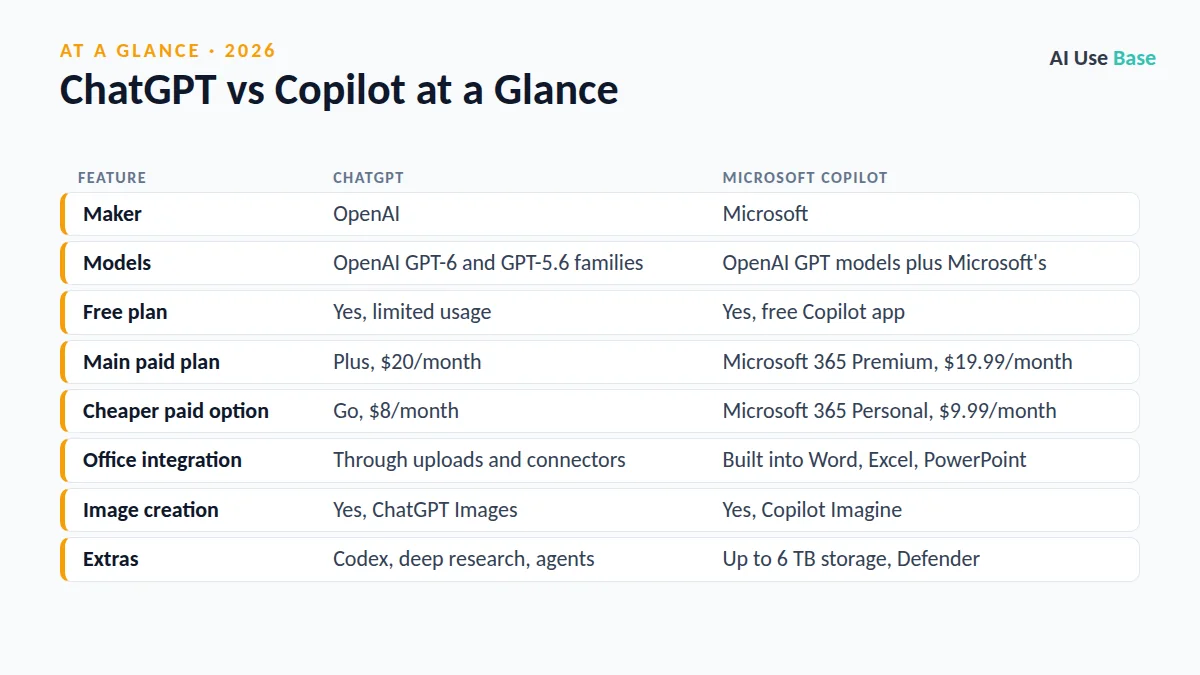
ChatGPT vs Copilot at a Glance
| Feature | ChatGPT | Microsoft Copilot |
|---|---|---|
| Maker | OpenAI | Microsoft |
| Models | OpenAI GPT-6 and GPT-5.6 families | OpenAI GPT models plus Microsoft’s |
| Free plan | Yes, limited usage | Yes, free Copilot app |
| Main paid plan | Plus, $20/month | Microsoft 365 Premium, $19.99/month |
| Cheaper paid option | Go, $8/month | Microsoft 365 Personal, $9.99/month |
| Office integration | Through uploads and connectors | Built into Word, Excel, PowerPoint |
| Image creation | Yes, ChatGPT Images | Yes, Copilot Imagine |
| Extras | Codex, deep research, agents | Up to 6 TB storage, Defender |
ChatGPT vs Copilot: Models and Answer Quality
ChatGPT runs on OpenAI’s newest models. According to the ChatGPT pricing page, Free users get unlimited text chats with GPT-6, while Plus adds advanced reasoning models and Pro unlocks OpenAI’s top Pro reasoning. You can pick the model yourself on paid plans.
Copilot also uses OpenAI technology; Microsoft’s business pricing page highlights priority access to the latest GPT-5.X models, alongside a “model choice” feature for organizations. In our editorial judgment, both give strong everyday answers, but ChatGPT offers more depth and control for complex reasoning, long writing and research.
Office and Windows Integration
This is where Copilot shines in the ChatGPT vs Copilot matchup. With Microsoft 365 Personal, Family or Premium, Copilot works inside desktop Word, Excel, PowerPoint, Outlook and OneNote. You can draft a document from notes, summarize a long email thread, analyze a spreadsheet or turn a Word file into slides without leaving the app.
ChatGPT can do similar work, but usually outside Office: you upload a file, get the result and paste it back. That is fine for occasional tasks but slower for daily office work. If slide decks are your main need, our guide to converting Word to PowerPoint with AI shows both approaches.
Copilot is also built into Windows and the Edge browser, with an opt-in “Hey Copilot” wake word on Windows. ChatGPT offers desktop apps, but it is not woven into the operating system in the same way.
Free Tiers Compared
On a zero budget, ChatGPT vs Copilot is a fair fight. The free Copilot app runs on Windows, Mac, iOS, Android and the web. It offers web answers with sources, image creation with Copilot Imagine, Vision, voice, memory and group conversations. It does not include Copilot inside the Office desktop apps; that requires a Microsoft 365 subscription.
ChatGPT Free gives you GPT-6 chats, web search, limited image creation, limited voice and limited deep research. For pure chatting and writing, many people find ChatGPT Free the more capable of the two free options. You can learn the basics in our how to use ChatGPT guide.
ChatGPT vs Copilot Pricing
Prices last checked October 2026 (US). Note that Microsoft no longer sells Copilot Pro to new customers, per Microsoft Support; Microsoft 365 Premium is now the main option for heavy Copilot use.
| Tier | ChatGPT | Microsoft Copilot |
|---|---|---|
| Free | $0: GPT-6 chats, search, limited images and deep research | $0: Copilot app with chat, Imagine, Vision and voice |
| Entry paid | Go, $8/month | Microsoft 365 Personal, $9.99/month or $99.99/year (Copilot in Office apps, 1 TB) |
| Family | Not offered | Microsoft 365 Family, $12.99/month or $129.99/year (AI for the owner only) |
| Main AI plan | Plus, $20/month | Microsoft 365 Premium, $19.99/month or $199.99/year |
| Power user | Pro, from $100/month | No higher consumer tier |
| Business | Business, $25/user monthly or $20/user annually | Microsoft 365 Copilot Business add-on, $21/user/month annual commitment |
On paper, ChatGPT vs Copilot pricing looks almost identical at the $20 level. Microsoft 365 Premium also bundles the Office apps, up to 6 TB of cloud storage for up to six people and Microsoft Defender, so its value depends on whether you would pay for Microsoft 365 anyway. Copilot features have usage limits on every plan. Businesses should also know that Copilot Chat is included at no extra cost with eligible Microsoft 365 business plans, according to Microsoft’s Copilot pricing page.
ChatGPT vs Copilot: Which Should You Choose?
Settling ChatGPT vs Copilot comes down to your daily tools and budget.
Choose ChatGPT if…
- You want the most capable all-purpose AI assistant.
- You care about choosing models, deep research and coding with Codex.
- You use Google Workspace, Apple apps or a mix of tools rather than Office.
- You want a cheap upgrade like ChatGPT Go.
Choose Copilot if…
- You spend your day in Word, Excel, PowerPoint and Outlook.
- You already pay for Microsoft 365, so Copilot comes at little or no extra cost.
- You want AI built into Windows and Edge.
- You want one subscription for a family that also covers storage and security.
Running a team? Our list of the best AI tools for small business covers both, and the best AI tools guide compares more assistants.
If you go with ChatGPT, set up ChatGPT Projects to keep the files, instructions and chats for each piece of work in one place.
Frequently Asked Questions
Is Copilot the same as ChatGPT?
No. Both use OpenAI technology, but Microsoft Copilot is Microsoft’s own product with different features, limits and integrations. Copilot focuses on Windows and Microsoft 365 apps, while ChatGPT is OpenAI’s standalone assistant.
Is Microsoft Copilot free?
Yes. The Copilot app is free on Windows, Mac, iOS, Android and the web. Using Copilot inside Word, Excel, PowerPoint and Outlook requires a Microsoft 365 Personal, Family or Premium subscription.
Is Copilot Pro still available?
Microsoft no longer sells Copilot Pro to new customers. Microsoft 365 Premium, at $19.99 per month, is now the main consumer plan for heavy Copilot use.
Which is better for Excel and Word, ChatGPT or Copilot?
Copilot is more convenient because it works directly inside Word and Excel with a Microsoft 365 subscription. ChatGPT can analyze uploaded files well, but you have to move results back into Office yourself.
Should I pay for ChatGPT Plus or Microsoft 365 Premium?
Pick ChatGPT Plus if you want the strongest general AI assistant. Pick Microsoft 365 Premium if you also need Office apps, cloud storage and Copilot inside your documents.
Final Thoughts
ChatGPT vs Copilot is really a question of workflow. ChatGPT is the better choice as a standalone AI partner for thinking, writing and creating, while Copilot is the natural pick for people who live in Microsoft 365 and want AI exactly where their files are.
Start with both free versions, try the same task in each, and pay only for the one that saves you the most time.
2 thoughts on “ChatGPT vs Copilot (2026): Which AI Assistant Should You Use?”