Claude Code vs Cursor is really a question of workflow: do you want an AI agent you delegate tasks to, or an AI-powered editor you code inside? Claude Code is Anthropic’s agentic coding tool that started in the terminal, while Cursor is a full code editor built around AI agents and autocomplete.
The quick verdict on Claude Code vs Cursor: choose Claude Code if you like describing a task and letting an agent plan, edit, test and commit across your repo, and you already pay for Claude. Choose Cursor if you want to stay hands-on in an editor with fast completions, visual diffs and a choice of models from several AI labs. Many developers use both, and Claude Code even installs as an extension inside Cursor.
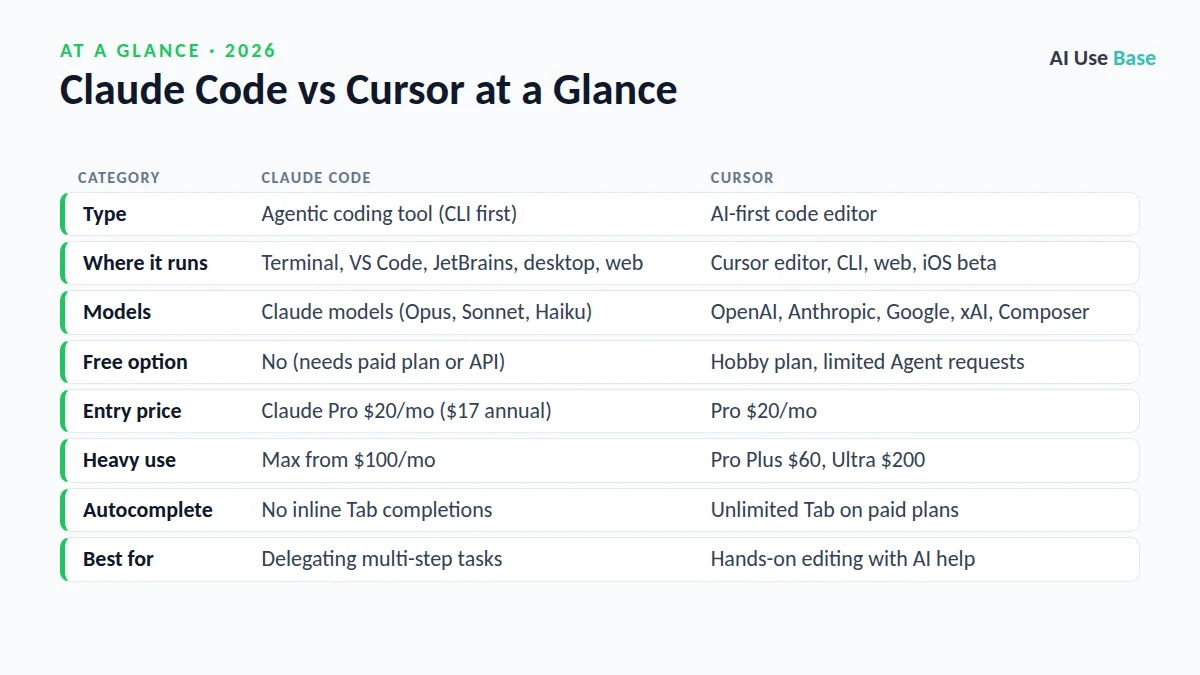
Claude Code vs Cursor: Quick Comparison
| Category | Claude Code | Cursor |
|---|---|---|
| Type | Agentic coding tool (CLI first) | AI-first code editor |
| Where it runs | Terminal, VS Code, JetBrains, desktop, web | Cursor editor, CLI, web, iOS beta |
| Models | Claude models (Opus, Sonnet, Haiku) | OpenAI, Anthropic, Google, xAI, Composer |
| Free option | No (needs paid plan or API) | Hobby plan, limited Agent requests |
| Entry price | Claude Pro $20/mo ($17 annual) | Pro $20/mo |
| Heavy use | Max from $100/mo | Pro Plus $60, Ultra $200 |
| Autocomplete | No inline Tab completions | Unlimited Tab on paid plans |
| Best for | Delegating multi-step tasks | Hands-on editing with AI help |
Prices last checked October 2026. To see where both fit in the wider market, read our guide to the best AI coding tools.
What Is Claude Code?
Claude Code is an agentic coding tool that reads your codebase, edits files, runs commands and works with git. You install it with one command, open a project and type a request such as “write tests for the auth module, run them, and fix any failures.”
It now runs in more places than the terminal: a VS Code extension (which also works in Cursor), a JetBrains plugin, the Claude desktop app’s Code tab, the web at claude.ai/code, and the Claude mobile app for starting and monitoring cloud sessions. Key features include CLAUDE.md project instructions, auto memory, MCP connections, skills, hooks, subagents, scheduled routines and GitHub Actions for automated pull request reviews.
What Is Cursor?
Cursor is a code editor based on VS Code with AI built into every layer. It offers Tab predictions as you type, an Agent that plans and edits across files, and, since Cursor 3 in April 2026, an Agents Window for running local and cloud agents side by side. Cursor also has a CLI, rules, MCP support, Bugbot code review and its own Composer model.
Claude Code vs Cursor Workflow: Terminal Agent vs AI IDE
This is the heart of Claude Code vs Cursor. With Claude Code, you mostly describe outcomes and review results. The agent plans, works through many steps, runs tests and can create commits and pull requests. It is composable too: you can pipe logs into it or run it headless in CI scripts.
With Cursor, you stay closer to the code. You type, accept Tab suggestions, highlight a block and ask for a change, or hand bigger jobs to the Agent while watching diffs appear in the editor. It feels like a supercharged IDE rather than a teammate in a terminal.
Which workflow suits you?
- Comfortable in the terminal: Claude Code feels natural and fast.
- Prefer visual editing: Cursor, or Claude Code through its desktop app or VS Code extension.
- Want parallel background work: both now support cloud sessions that keep running when you disconnect.
Claude Code vs Cursor Pricing and Plans
| Plan | Price (US) | Notes |
|---|---|---|
| Claude Free | $0 | Chat only, Claude Code not included |
| Claude Pro | $20/mo, or $17/mo billed annually | Includes Claude Code; limits shared with Claude chat |
| Claude Max | From $100/mo | 5x or 20x Pro usage per session |
| Cursor Hobby | $0 | Limited Agent requests, Composer access |
| Cursor Pro | $20/mo | Extended Agent limits, unlimited Tab, cloud agents |
| Cursor Pro Plus / Ultra | $60 / $200 per month | Higher usage on all models |
Claude plans use a usage limit that resets every five hours, plus a weekly limit, and both apply across Claude chat and Claude Code. Pro and Max users can turn on usage credits to keep working past the limit, or use an API key billed at API rates. Check Claude’s pricing page for current details.
On cost, Claude Code vs Cursor is nearly even at the entry level. Cursor’s paid plans include agent usage with on-demand overage at API rates. Teams start at $40 per user per month. One practical upside of Claude Pro: the same $20 also gets you the Claude chat app, Research and projects.
Claude Code vs Cursor: Strengths and Weaknesses
Claude Code strengths
- Excellent at long, multi-step tasks across large codebases.
- Runs anywhere: terminal, IDEs, desktop, web, CI and Slack.
- Highly scriptable, with hooks, skills, subagents and the Agent SDK.
- Bundled with a Claude subscription you may already have.
Claude Code weaknesses
- Claude models only, and no free tier for coding.
- No inline autocomplete while you type.
- The terminal can intimidate beginners, though the desktop app helps.
Cursor strengths
- Fast Tab completions and a polished visual editor.
- Model choice across several AI labs, including Claude.
- Free Hobby plan to try it out.
Cursor weaknesses
- You need to switch editors (JetBrains support requires a paid plan).
- Usage-based costs can climb with heavy agent use.
Who Should Use Claude Code vs Cursor?
Choose Claude Code if…
- You want an agent to handle whole tasks: features, refactors, tests and commits.
- You work in the terminal, on remote servers or in CI pipelines.
- You already pay for Claude Pro or Max.
- You use JetBrains or VS Code and do not want to switch editors.
Choose Cursor if…
- You want AI woven into every keystroke with Tab completions.
- You like switching between models from different companies.
- You prefer reviewing changes visually as you code.
- You want to start free before paying.
For a model-level comparison, see ChatGPT vs Claude for coding, and explore our pillar list of the best AI tools.
Frequently Asked Questions
Is Claude Code better than Cursor?
Neither is better for everyone. Claude Code is stronger for delegating multi-step tasks to an agent, while Cursor is stronger for hands-on editing with fast completions and model choice. Many developers use both.
Can I use Claude Code inside Cursor?
Yes. Anthropic’s Claude Code extension for VS Code can also be installed in Cursor, and you can always run the Claude Code CLI in Cursor’s built-in terminal.
Is Claude Code free?
No. Claude Code is not included in Claude’s free plan. You need a Claude Pro, Max, Team or Enterprise plan, or an Anthropic Console account billed at API rates.
How much do Claude Code vs Cursor cost?
Claude Code comes with Claude Pro at $20 per month, or $17 per month billed annually, and Max starts at $100 per month. Cursor Pro is $20 per month, with Pro Plus at $60 and Ultra at $200. Prices last checked October 2026.
Which is better for beginners?
Cursor is usually easier for beginners because it looks like a normal code editor and has a free plan. Claude Code’s desktop app and VS Code extension make it friendlier, but it shines most once you are comfortable reviewing an agent’s work.
Final Thoughts
Claude Code vs Cursor is less a rivalry than a choice of working style. Claude Code is the stronger delegate: give it a goal and it carries the task through. Cursor is the stronger cockpit: you drive, and AI speeds up every step.
If you are still torn on Claude Code vs Cursor, start with Cursor’s free plan to feel AI-assisted editing, then try Claude Code on a Claude Pro plan for bigger tasks. Running Claude Code inside Cursor gives you a taste of both.
1 thought on “Claude Code vs Cursor: Terminal Agent or AI IDE? (2026)”