AI email assistants draft replies, summarize long threads, sort your inbox and remind you to follow up. If you use Gmail, Gemini is the natural first step; Outlook users get Copilot with Microsoft 365. For a faster inbox overall, dedicated apps like Superhuman, Shortwave and Spark add smarter triage on top.
Here are eight options compared by price, email provider and best use (prices last checked October 2026).
Quick Picks: Best AI Email Assistants
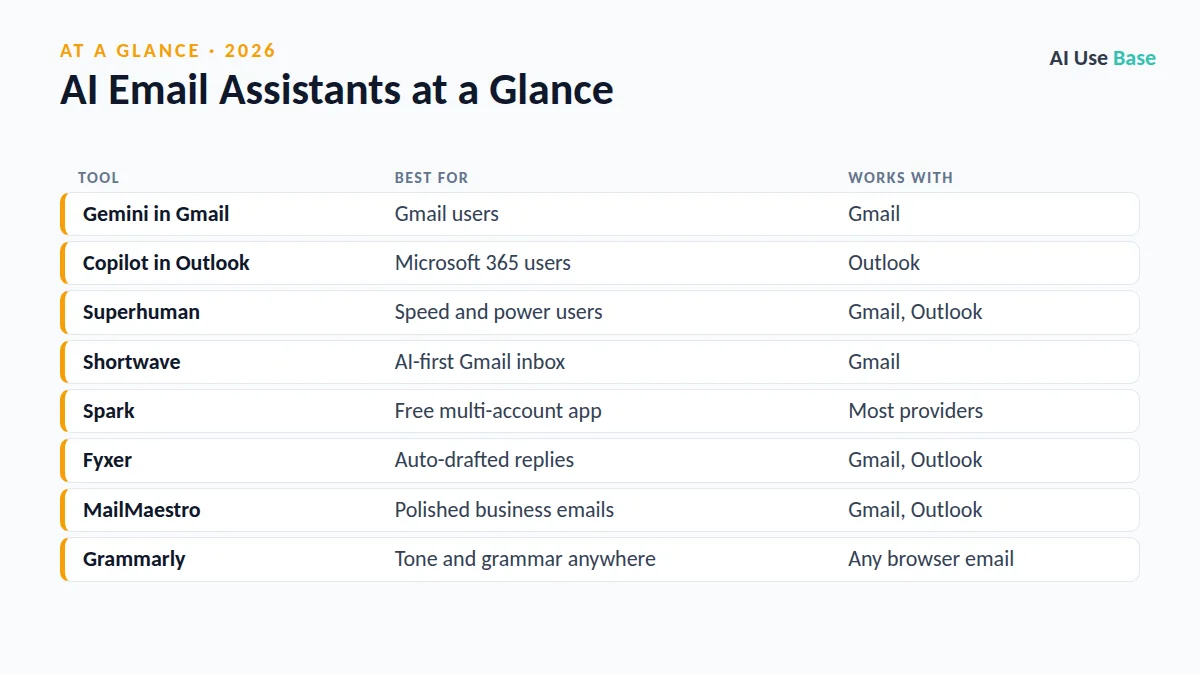
| Tool | Best for | Works with |
|---|---|---|
| Gemini in Gmail | Gmail users | Gmail |
| Copilot in Outlook | Microsoft 365 users | Outlook |
| Superhuman | Speed and power users | Gmail, Outlook |
| Shortwave | AI-first Gmail inbox | Gmail |
| Spark | Free multi-account app | Most providers |
| Fyxer | Auto-drafted replies | Gmail, Outlook |
| MailMaestro | Polished business emails | Gmail, Outlook |
| Grammarly | Tone and grammar anywhere | Any browser email |
How We Chose These AI Email Assistants
We compared drafting quality, thread summaries, inbox sorting, supported email providers, privacy options and cost. We relied on official product pages and current pricing; rankings are editorial.
Built-In AI Email Assistants
1. Gemini in Gmail
- Best for: anyone already living in Gmail
- Free plan: some features with limits on personal accounts
- Paid from: Google AI Pro at $19.99/month or a Workspace plan with Gemini
- Standout: “Help me write,” thread summaries and questions across your inbox
Ask Gemini “What did the landlord say about the lease renewal?” and it searches your mail for you. See Gemini in Gmail help.
2. Copilot in Outlook
- Best for: Microsoft 365 subscribers
- Free plan: no; included with Microsoft 365 Personal and Family with AI limits
- Paid from: $9.99/month (Microsoft 365 Personal)
- Standout: drafts with tone controls and summaries that link back to source messages
Comparing Microsoft and OpenAI’s assistants? Read ChatGPT vs Copilot.
The main limit of built-in tools is that they help you write but do little to reduce how many emails you have to read. That is where dedicated apps come in.
Dedicated AI Email Apps
3. Superhuman
- Best for: people who send and triage a lot of email
- Free plan: trial only
- Paid from: about $25/user/month billed yearly
- Standout: keyboard-first speed, split inbox and AI replies in your voice
Superhuman became part of Grammarly’s product family after a 2025 acquisition. Plans are on Superhuman plans.
4. Shortwave
- Best for: an AI-first Gmail client
- Free plan: yes
- Paid from: low-cost personal plans, higher for business
- Standout: bundles, AI filters and an assistant that can search and act on your mail
Shortwave suits people who like Gmail but want more automation, such as grouping newsletters and asking the assistant to find and summarize every message about a project.
5. Spark
- Best for: a free app for several email accounts
- Free plan: yes, with a short AI preview
- Paid from: about $10/user/month for AI features
- Standout: smart inbox that separates people from newsletters and notifications
Spark is one of the few good free email apps that works with Gmail, Outlook, iCloud and other providers at once. Plans are on Spark pricing.
AI Writing Add-Ons
6. Fyxer
- Best for: busy professionals who want replies drafted before they open email
- Free plan: 7-day trial
- Paid from: about $22/user/month
- Standout: sorts your inbox and prepares draft replies and meeting follow-ups
Fyxer learns from how you usually reply, so drafts improve over the first few weeks. It is pricier than other AI email assistants, which makes it best for people whose time is clearly worth the cost.
7. MailMaestro
- Best for: writing clear business emails from short notes
- Free plan: trial
- Paid from: about $12/user/month
- Standout: turns bullet points into polished emails in Gmail or Outlook
MailMaestro is helpful for non-native English speakers who want emails that sound professional without spending ages on wording.
8. Grammarly
- Best for: catching tone and grammar issues in any email
- Free plan: yes
- Paid from: Pro plans for full AI rewriting
- Standout: works in the browser across Gmail, Outlook web and other sites
For more writing help, see our list of the best AI writing tools.
Privacy: What to Check Before Connecting Your Inbox
AI email assistants need access to your messages, so read the permissions carefully. Prefer tools that state they do not train on your email, offer admin controls for work accounts, and let you disconnect and delete data easily. For work email, ask IT which tools are approved before connecting anything.
How to Choose Among AI Email Assistants
- Start with what you have. Gemini for Gmail, Copilot for Outlook.
- Find your real problem. Too many emails: try Superhuman, Shortwave or Spark. Slow writing: try MailMaestro or Grammarly. Both: Fyxer.
- Test for two weeks. Measure time spent in your inbox before and after.
- Edit AI drafts. Add personal details and check facts, dates and names before sending.
Looking beyond email? Our AI productivity tools list and the main best AI tools guide cover calendars, notes and more.
Frequently Asked Questions
What is the best free AI email assistant?
Spark and Shortwave have free plans, and personal Gmail accounts get some Gemini features with limits. Grammarly’s free plan also helps with tone and grammar in any email.
Does Gmail have a built-in AI assistant?
Yes. Gemini in Gmail can draft replies, summarize threads and answer questions about your inbox. Full access comes with Google AI Pro or eligible Workspace plans.
Is Copilot in Outlook free?
No. Copilot in Outlook is included with Microsoft 365 Personal, Family and Premium subscriptions, with monthly AI usage limits.
Are AI email assistants safe for work email?
They can be, if your company approves them. Check whether the tool trains on your data, where it stores messages and whether admins can control access.
Can AI email assistants send emails automatically?
Most draft replies for you to review rather than sending automatically. That is safer, because AI can misread context or include wrong details.
Final Thoughts
The best AI email assistants give you back time without sounding like a robot. Most people should start with the assistant built into their email provider, then try a dedicated app if inbox volume is the real problem. Whatever you choose, keep a human eye on anything important before you hit send.