To use ChatGPT to write lesson plans, give it four things: the grade and subject, the learning objective or standard, the lesson length, and what your students already know. Then ask for a structured plan with a hook, main activity, check for understanding and exit ticket. You get a solid first draft in under a minute; spend the rest of your 10 minutes adapting it to your class and checking the content.
Last updated: October 1, 2026.
This guide walks you through a 5-step process, 7 prompts you can copy, a real example, and the mistakes that make AI lesson plans feel generic.
What a Good AI Lesson Plan Includes
Use this checklist to judge what ChatGPT gives you:
| Part | What it should contain | Typical time (45 min) |
|---|---|---|
| Objective | One clear, measurable goal (“Students will be able to…”) | – |
| Hook | A question, image or short task that sparks interest | 5 min |
| Direct instruction | The key idea, with an example | 10 min |
| Guided or group practice | An activity where students apply the idea | 15 min |
| Check for understanding | Quick questions, mini whiteboards, thumbs up/down | 5 min |
| Independent practice or exit ticket | 2-3 questions that show who got it | 10 min |
| Differentiation | Support for struggling learners, challenge for advanced ones | Throughout |
How to Write a Lesson Plan with ChatGPT in 5 Steps
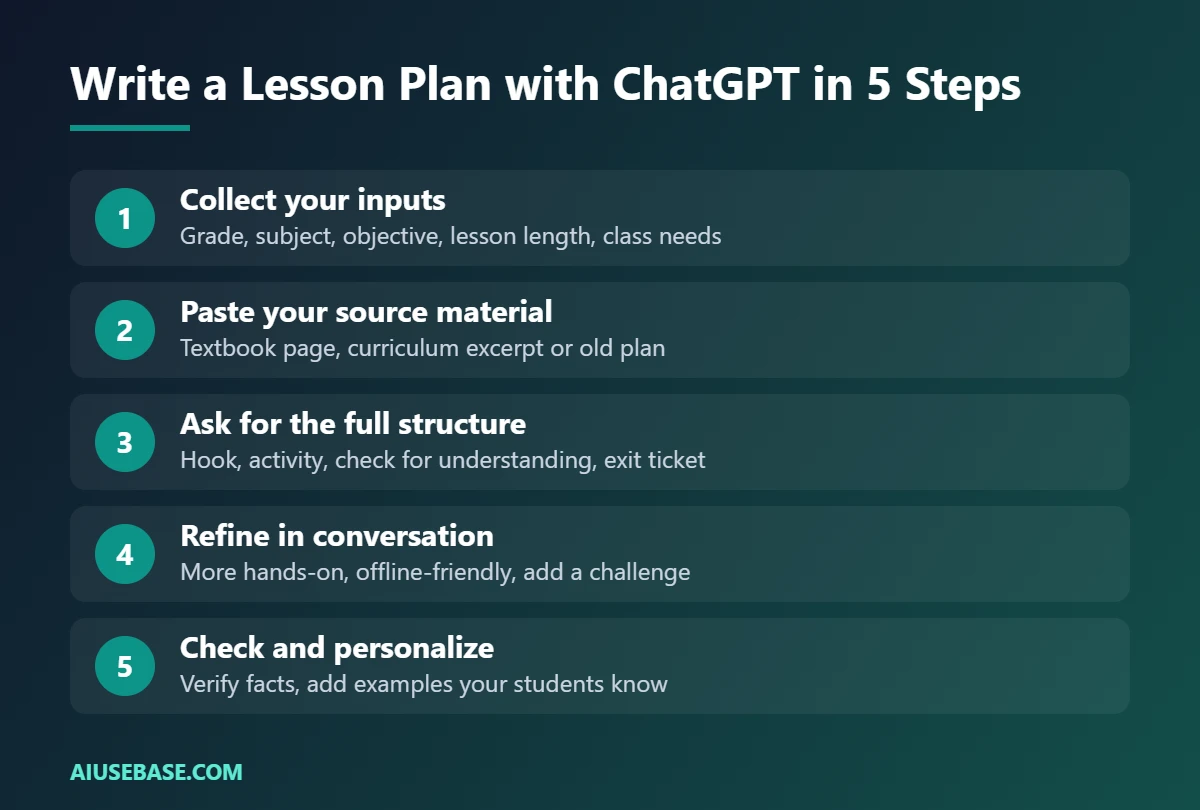
- Collect your inputs. Grade, subject, topic, objective or standard, lesson length, class size, and anything special about your group (English learners, mixed abilities, limited devices).
- Paste your source material. A textbook page, a curriculum excerpt or your old plan. ChatGPT is more accurate when it works from your content rather than its memory.
- Ask for the full structure. Use prompt 1 below. Request timings and materials so the plan is ready to teach.
- Refine in conversation. “Make the activity more hands-on”, “replace the video with something that works offline”, “add a challenge question”.
- Check and personalize. Verify every fact and answer, swap in examples your students know, and save the final version in your own format.
7 ChatGPT Prompts for Lesson Plans
1. Complete Lesson Plan
You are an experienced [grade] [subject] teacher. Write a [length]-minute lesson plan on [topic] for [number] students. Include: a measurable learning objective, a 5-minute hook, direct instruction with one worked example, a group activity, a check for understanding, and a 3-question exit ticket with answers. List the materials needed. Present it as a table with timings.
2. Lesson Plan from Your Textbook
Here is the textbook section I am teaching: [paste text]. Create a [length]-minute lesson for [grade] based only on this content. Do not add facts that are not in the text. Include an activity that gets students talking in pairs.
3. Differentiated Activities
For the lesson above, create the main activity at three levels: support (for students who read below grade level), core, and challenge. Keep the same learning objective for all three.
4. Hook Ideas
Give me 5 different hooks to start a [grade] lesson on [topic]: a surprising fact, a question, a short story, an image prompt and a quick game. Each must take under 5 minutes and need no special materials.
5. Unit Plan
Create a 2-week unit plan for [grade] [subject] on [topic], 5 lessons per week, [length] minutes each. For each lesson give the objective, the main activity and the homework. Include one summative assessment at the end.
6. Lesson for Mixed-Language Classrooms
Adapt this lesson plan for a class where a third of students are English learners: add key vocabulary with simple definitions, sentence starters for discussion, and visual supports. Lesson: [paste plan]
7. Turn the Plan into Slides
Turn this lesson plan into an outline for 8 slides: title, objective, hook, key idea, example, activity instructions, check for understanding, exit ticket. Maximum 5 bullets per slide. Lesson: [paste plan]
To build the actual slides, see how to convert Word to PowerPoint with AI.
A Real Example: Grade 7 Water Cycle
We ran prompt 1 in ChatGPT’s free plan for a 45-minute Grade 7 science lesson on the water cycle with 30 students. Here is the start of what it returned:
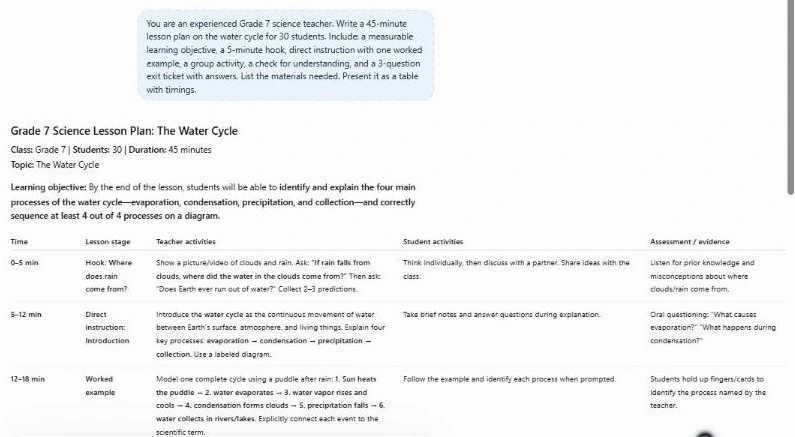
Notice what is good (clear timings, a measurable objective, a ready exit ticket) and what still needs a teacher: the activity assumes materials you may not have, and the examples are generic until you add your local context.
Mistakes to Avoid
- Vague prompts. “Write a lesson on fractions” gets a generic plan. Grade, objective, length and context make the difference.
- Trusting the content blindly. AI can state wrong dates, formulas or definitions confidently. Check everything you will teach.
- Too much in one lesson. AI often packs in more than students can do in the time. Cut activities rather than rushing.
- Ignoring your students. The plan does not know about the student who needs extra time or the class that loves competitions. Add that yourself.
- Pasting student data. Lesson planning never needs student names or records.
Copy-Paste ChatGPT Lesson Plan Template
If you only save one prompt from this guide, save this one. It gives ChatGPT everything it needs to write a usable lesson plan on the first try. Replace the parts in brackets and paste it into a new chat.
“You are an experienced [subject] teacher. Write a lesson plan for [grade/age], [number] students, [lesson length] minutes, on [topic]. Students already know [prior knowledge]. Learning objective: by the end, students can [measurable objective]. Include: 1) a 5-minute hook, 2) direct instruction with 2 worked examples, 3) guided practice in pairs, 4) independent practice, 5) a 3-question exit ticket with answers, 6) materials list, 7) one support idea for students who struggle and one extension for fast finishers. Use a table with columns Time, Activity, Teacher does, Students do. Keep language simple and realistic for a normal classroom.”
Three useful variations
- 5E model: add “Organize the lesson using the 5E model: Engage, Explore, Explain, Elaborate, Evaluate.”
- Standards-aligned: add “Align the objective to [standard code and text] and explain the link in one sentence.”
- Unit plan: replace the first line with “Plan a [number]-lesson unit on [topic]” and ask for one line per lesson before expanding each one.
After you get the plan, ask follow-ups such as “Make the guided practice more hands-on” or “Turn the exit ticket into a 10-question quiz.” For quizzes, our list of the best AI quiz generators for teachers can save more time, and our ChatGPT prompts for teachers cover feedback, report comments and parent emails.
Hands-On Test: Our Lesson Plan Template in ChatGPT Free
We pasted the copy-paste template from this guide into the free version of ChatGPT on October 18, 2026, filled in for a grade 6 science lesson on the water cycle (30 students, 45 minutes).
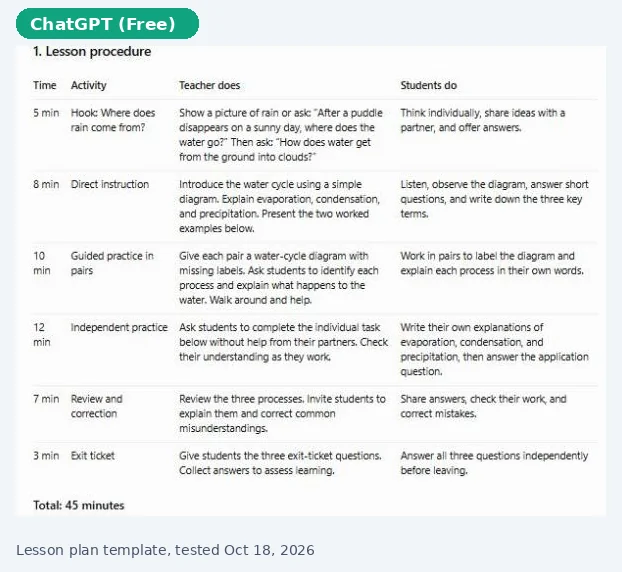
- It followed the brief: the plan included all seven parts we asked for, from the 5-minute hook to the exit ticket, materials list, support idea and extension.
- Timing added up: the activities totaled exactly 45 minutes (5, 8, 10, 12, 7 and 3 minutes).
- It added a step we did not ask for: a 7-minute “review and correction” block before the exit ticket. Sensible, but check it fits your lesson.
- It pulled in diagrams from other websites to illustrate the water cycle. Check the source and permission before printing or sharing those images.
Our verdict: the template produced a usable first draft in under a minute, with realistic timings. Expect to spend 10 to 15 minutes adapting the activities to your class and checking the science. Want a second opinion on the plan? Compare tools in ChatGPT vs Gemini for teachers.
Frequently Asked Questions
Can ChatGPT write a lesson plan for any subject?
Yes, from early years literacy to high school physics. Accuracy is highest when you paste your own source material and lowest for niche or very recent topics, so always check facts.
Is ChatGPT free for teachers?
The free ChatGPT plan is enough for lesson planning. Verified U.S. K-12 teachers can also get ChatGPT for Teachers free through June 2028, which adds unlimited access to the flagship model, file uploads and collaboration features.
Can ChatGPT follow my curriculum standards?
It can if you paste the standard or curriculum text into the prompt. Do not rely on it to recall standard codes from memory, as it may mix them up.
How long does it take to write a lesson plan with ChatGPT?
The first draft takes under a minute. Plan on 5 to 10 minutes to refine it, check the content and adapt it to your class.
Should I use ChatGPT or Gemini for lesson plans?
Both work well. If your school uses Google Classroom, Gemini can create plans right inside it. See our full comparison of ChatGPT vs Gemini for teachers.
What is the best ChatGPT prompt for a lesson plan?
The best prompts include the subject, grade, class size, lesson length, learning objective and the sections you want, such as a hook, activities, exit ticket and differentiation. The copy-paste template in this guide includes all of these, so you only fill in your details.
Can ChatGPT make a lesson plan template I can reuse?
Yes. Ask ChatGPT to create a blank lesson plan template in your school format, save it, and paste it back with each new topic. You can also ask for the plan as a table so it is easy to copy into Word or Google Docs.
Final Thoughts
Using ChatGPT to write lesson plans turns an hour of blank-page planning into ten minutes of editing. Feed it your objective and materials, ask for a complete structure, and spend your time on what AI cannot do: knowing your students. For more classroom uses, see our AI for teachers guide and 50 ChatGPT prompts for teachers.
Looking for more step-by-step tutorials? Browse our AI Guides.
2 thoughts on “How to Use ChatGPT to Write Lesson Plans in 10 Minutes (+7 Prompts)”