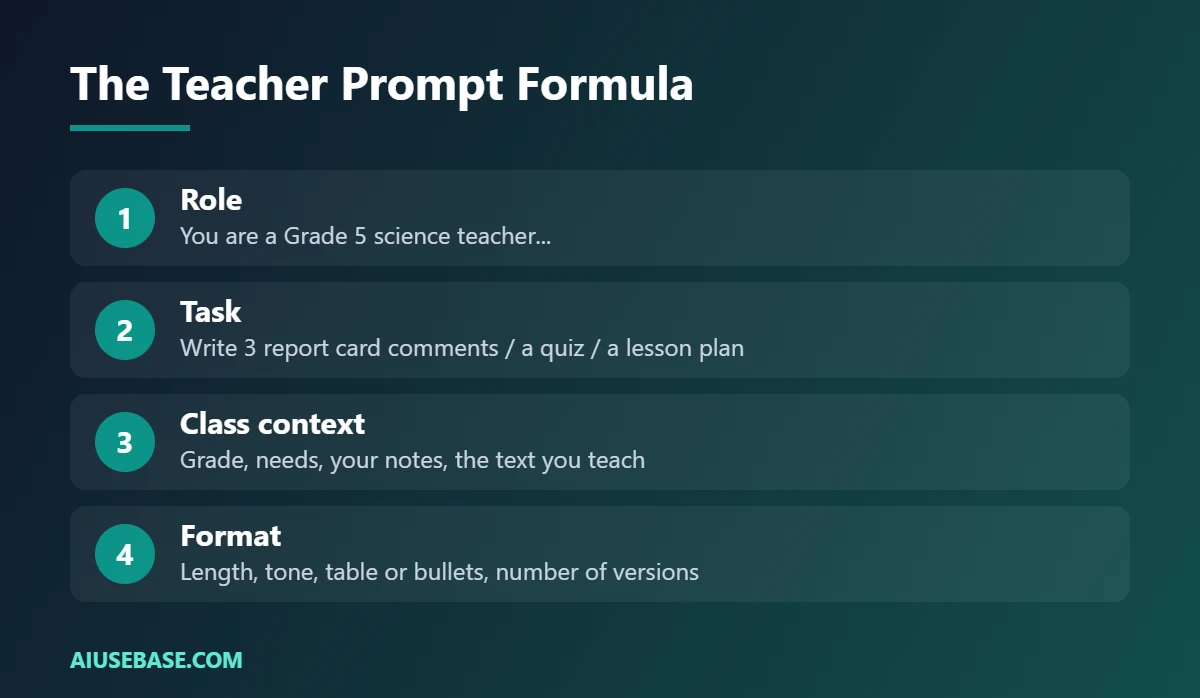
The best ChatGPT prompts for teachers follow one simple formula: role + task + class context + format. For example: “You are a Grade 5 teacher. Write three report card comments for a student who [notes]. Warm, specific, under 60 words each.” Below are 58 ready-to-use prompts grouped by task. Replace the parts in brackets, and they also work in Gemini and Claude.
Last updated: October 1, 2026.
Before you start: never paste full student names, ID numbers, grades linked to names or sensitive family and health information. Use initials or “Student A”, and follow your school’s AI policy.
Step 0: Save Your Class Context
Paste this once at the start of a chat, or save it in ChatGPT’s custom instructions or a Project:
I teach [subject] to [grade] students in [country/curriculum]. Classes are [length] minutes with about [number] students. Many students [context: English learners, mixed abilities, limited devices]. Write in clear, friendly language and keep instructions short.
Lesson Planning (Prompts 1-10)
- “Write a [length]-minute lesson plan on [topic] for [grade] with an objective, hook, main activity, check for understanding and exit ticket. Use a table with timings.”
- “Give me 5 different hooks to start a lesson on [topic] that take under 5 minutes.”
- “Explain [concept] in 3 ways: a real-life analogy, a step-by-step explanation and a visual I can draw on the board.”
- “Create a 2-week unit plan on [topic], 5 lessons per week, with objectives and homework.”
- “List the 5 most common misconceptions students have about [topic] and how to address each.”
- “Design a group activity on [topic] for 4 students per group with clear roles.”
- “Suggest 3 ways to make this lesson more active without technology: [paste plan].”
- “Write 10 discussion questions on [topic], from simple recall to deep thinking.”
- “Create a real-world project for [grade] on [topic] that takes 3 lessons, with a simple rubric.”
- “Turn this lesson plan into an 8-slide outline with max 5 bullets per slide: [paste plan].”
Full guide: how to use ChatGPT to write lesson plans.
Quizzes and Assessment (Prompts 11-20)
- “Based only on this text, write 8 multiple-choice questions with 4 options, the correct answer and a one-line explanation: [text].”
- “Write a 5-question exit ticket on [topic] at a lower reading level.”
- “Create 3 short-answer questions on [topic] that require students to explain why.”
- “Write a 4-level rubric for [assignment] with criteria for content, organization and language.”
- “Generate 10 true/false statements about [topic], including 3 tricky ones, with answers.”
- “Create a crossword clue list for these 12 vocabulary words: [words].”
- “Write two versions (A and B) of this quiz with the same difficulty: [paste quiz].”
- “Check this answer key for errors and ambiguous questions: [paste quiz and key].”
- “Create a self-assessment checklist students can use before handing in [assignment].”
- “Suggest 5 quick formative assessment techniques for [topic] that need no devices.”
More tools: best free AI quiz generators for teachers.
Student Feedback (Prompts 21-30)
- “Using this rubric, give feedback on the essay below: 2 specific strengths and 1 clear next step, under 80 words. Rubric: [paste]. Essay: [paste, no name].”
- “Rewrite this feedback so it is encouraging but honest: [paste].”
- “Turn these notes into feedback a 10-year-old can understand: [notes].”
- “Suggest 3 sentence starters a student could use to improve this paragraph: [paste].”
- “Identify the 3 most common errors in these anonymized student answers and suggest a mini-lesson: [paste].”
- “Write a comment praising effort and improvement for a student who [notes].”
- “Give feedback on this lab report focusing only on the conclusion: [paste].”
- “Create a feedback bank of 15 short comments for [assignment type], grouped by strengths and next steps.”
- “Explain why this math answer is wrong in a way that helps the student fix it: [paste working].”
- “Write peer-feedback guidelines and 5 question prompts students can use to review each other’s work.”
Report Card Comments (Prompts 31-40)
- “Write a report card comment for Student A in [subject]: [your notes]. Warm, specific, balanced, under 60 words.”
- “Write three versions of a comment for a student who is capable but often distracted.”
- “Write a comment for a student who struggled this term but showed real effort in [area].”
- “Write a comment for a high-achieving student with a suggestion for further challenge.”
- “Turn these bullet notes into a short paragraph for a progress report: [notes].”
- “Make this comment less generic by adding the specific example: [comment] + [example].”
- “Check these 10 comments for repeated phrases and suggest alternatives: [paste].”
- “Rewrite this comment for parents who are not native English speakers, using simple words: [comment].”
- “Write a comment about social skills and teamwork for a student who [notes].”
- “Create a list of 20 positive, specific verbs and phrases to use in report comments.”
Parent Communication (Prompts 41-45)
- “Write a friendly welcome email to parents of my [grade] class introducing myself, the curriculum and how to contact me. Under 200 words.”
- “Write a polite email to a parent about missing homework, focused on working together. Under 120 words.”
- “Write a short weekly newsletter for parents covering: [this week’s topics, dates, reminders].”
- “Reply calmly and professionally to this parent’s concern: [paste message, no names].”
- “Write a reminder about the field trip on [date] with what to bring, cost and the consent deadline.”
Differentiation and Classroom Management (Prompts 46-50)
- “Rewrite this text at three reading levels (below, at, above grade level) and keep the key ideas: [text].”
- “Create a vocabulary list with simple definitions and an example sentence for each word: [words].”
- “Give me 10 classroom routines that help a noisy class transition between activities.”
- “Suggest 5 strategies to support a student who [describe need], with no names.”
- “Create a simple behavior reflection sheet for students with 4 guiding questions.”
Real Example: Report Card Comment
We ran prompt 31 in ChatGPT’s free plan with short notes about a fictional Grade 5 student. Here is the real result:
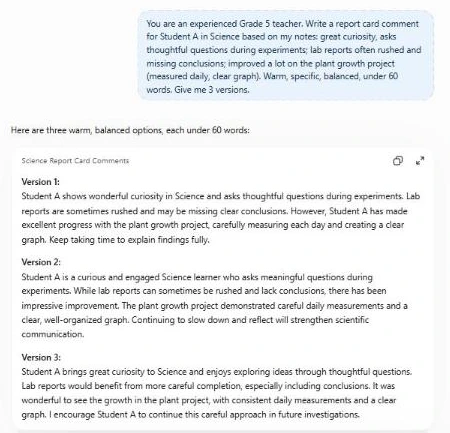
The comments are specific and balanced because the notes were specific. Generic notes produce generic comments, so always give one concrete example per student.
Tips for Better Results
- Always add context: grade, subject and your students’ needs make a huge difference.
- Give examples of your style: paste one comment you wrote and ask ChatGPT to match it.
- Ask for options: “give me 3 versions” is faster than rewriting.
- Check facts and tone: you are responsible for anything that goes to students or parents.
For the bigger picture, read our AI for teachers guide.
ChatGPT Prompts for Teachers by Subject
The prompts above work for any class. These extra ones are tuned to specific subjects. Add your grade level and class context from Step 0 for better results.
Math
- “Create 8 word problems on [topic] for [grade], set in situations my students know: [interests]. Show full worked solutions.”
- “List the 5 most common mistakes students make with [math skill] and give a short activity to fix each one.”
English and Language Arts
- “Write a 250-word reading passage on [topic] at [reading level], followed by 3 literal, 3 inference and 2 vocabulary questions.”
- “Give me a simple rubric for a [type of essay] with 4 criteria and 4 levels, written in student-friendly language.”
Science
- “Design a safe, low-cost classroom experiment on [concept] for [grade]. Include materials, steps, expected results and the science behind it.”
- “Explain [concept] with an everyday analogy, then list 3 misconceptions students often have about it.”
ESL and Foreign Languages
- “Write a short dialogue at [CEFR level] about [situation] with 8 useful phrases highlighted and a matching exercise.”
- “Create a 10-minute speaking warm-up for [level] students on [topic], with question cards and model answers.”
For speaking practice, students can paste any dialogue into our free English shadowing tool to listen and repeat. You can also compare assistants in ChatGPT vs Gemini for teachers.
Frequently Asked Questions
Do these prompts work in Gemini and Claude?
Yes. All 58 prompts work in Gemini and Claude. If your school uses Google Classroom, Gemini can also run many of these tasks directly inside Classroom. See ChatGPT vs Gemini for teachers.
Is it okay to use ChatGPT for report card comments?
Yes, as a drafting tool, if you use your own notes about each student, remove identifying details and review every comment. The judgments in the comment should always be yours.
How do I stop ChatGPT comments sounding the same?
Give one specific example for each student, ask for varied sentence openings, and use prompt 37 to spot repeated phrases.
Is ChatGPT free for teachers?
The free plan works for all of these prompts. Verified U.S. K-12 teachers can also use ChatGPT for Teachers free through June 2028.
Can I paste student work into ChatGPT?
Only without names or identifying details, and only if your school’s policy allows it. Prefer tools your school has approved for student data.
Final Thoughts
These 58 ChatGPT prompts for teachers cover the tasks that take the most time outside class: planning, assessment, feedback, reports and parent emails. Save your class context once, swap in your details, and review everything before it reaches students or families.
Looking for more step-by-step tutorials? Browse our AI Guides.
1 thought on “58 ChatGPT Prompts for Teachers (Lessons, Feedback, Report Comments, Parent Emails)”