To learn how to use DeepSeek, open chat.deepseek.com or the DeepSeek mobile app, sign in, and type your question. Switch on DeepThink when you want the model to reason step by step through math, code or logic, turn on Search for current information, and attach files when you need help with a document. Developers can also call DeepSeek models through a low-cost, pay-as-you-go API.
DeepSeek is powerful and free to chat with, but it raises real privacy questions. This guide on how to use DeepSeek covers setup, models, file uploads, API pricing, useful prompts, and what to think about before sharing sensitive data.
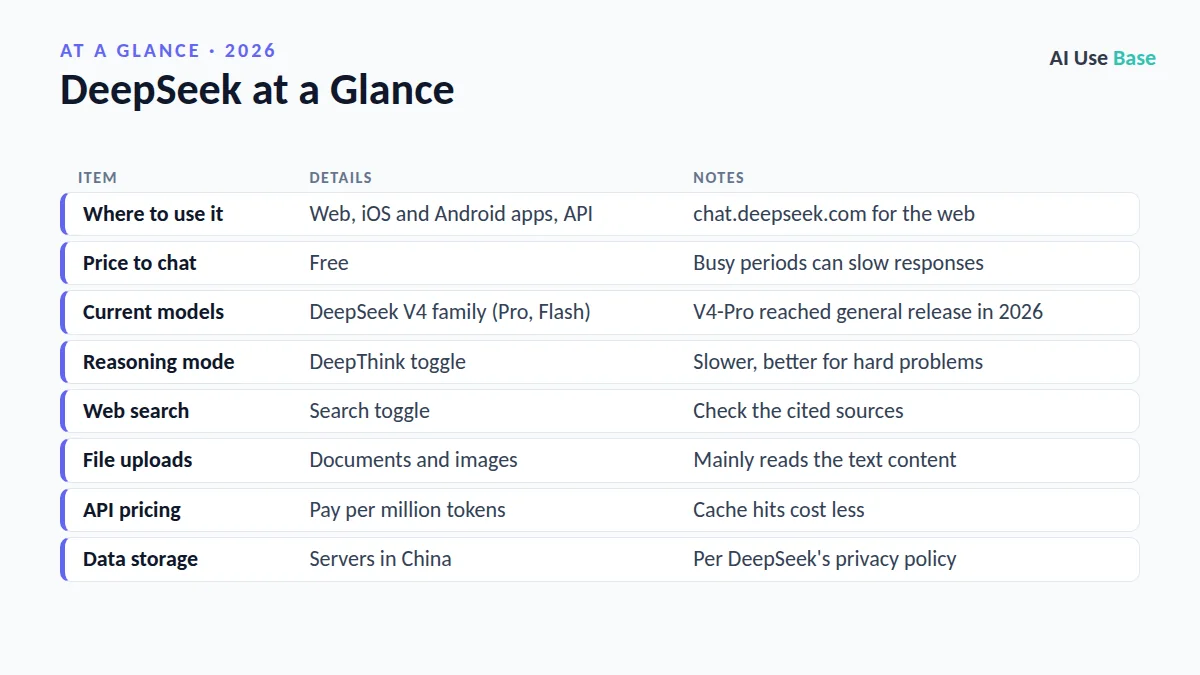
DeepSeek at a Glance
| Item | Details | Notes |
|---|---|---|
| Where to use it | Web, iOS and Android apps, API | chat.deepseek.com for the web |
| Price to chat | Free | Busy periods can slow responses |
| Current models | DeepSeek V4 family (Pro, Flash) | V4-Pro reached general release in 2026 |
| Reasoning mode | DeepThink toggle | Slower, better for hard problems |
| Web search | Search toggle | Check the cited sources |
| File uploads | Documents and images | Mainly reads the text content |
| API pricing | Pay per million tokens | Cache hits cost less |
| Data storage | Servers in China | Per DeepSeek’s privacy policy |
What Is DeepSeek?
DeepSeek is an AI assistant built by a Chinese AI company of the same name. It became famous for offering strong reasoning and coding performance at a fraction of the price of many rivals, and for releasing open model weights that anyone can download.
In 2026 the company moved to its V4 model family. DeepSeek announced the general release of DeepSeek-V4-Pro in August, alongside a faster V4-Flash model and an experimental vision version. To compare it with other assistants, see our list of the best AI tools.
How to Use DeepSeek: Getting Started
- Open DeepSeek. Go to chat.deepseek.com or download the official DeepSeek app from the App Store or Google Play. Avoid look-alike apps and sites.
- Create an account. Sign up with an email address, phone number or a supported login option.
- Start a chat. Type a question in the message box and press Enter.
- Pick a mode. Leave DeepThink off for quick answers, or turn it on for multi-step problems.
- Add context. Turn on Search for recent topics, or attach a file with the paperclip icon.
- Review settings. Open your account settings to manage chat history and data options.
Key Features and How to Use Them
Chat vs reasoning (DeepThink)
The first choice in how to use DeepSeek is which mode to run. Standard chat mode answers quickly and is fine for writing, summaries and general questions. DeepThink switches on reasoning, so the model works through the problem first and shows its thought process before the final answer. Use it for math, coding bugs, planning and tricky logic, and expect it to take longer.
Web search
DeepSeek’s training data has a cutoff, so turn on Search for news, prices or anything recent. Click through to the cited pages, because AI search summaries can misread sources.
File uploads
File uploads are a big part of how to use DeepSeek for study and work. Attach PDFs, Word files, spreadsheets, slides or images and ask questions about them. DeepSeek mainly extracts and reads the text, so charts and complex layouts may not be fully understood. For document-heavy work, our guide to AI PDF readers compares other options.
The DeepSeek API
For developers, how to use DeepSeek usually means the API. Create an account on the DeepSeek platform, add credit, generate an API key and call the models with an OpenAI-compatible format. That makes it easy to swap DeepSeek into existing apps and coding tools. The docs list current model names and both thinking and non-thinking modes.
Practical Uses With Example Prompts
Here are eight practical examples of how to use DeepSeek day to day. Replace the brackets with your own details.
- Explain a concept:
Explain [topic] to a first-year student in 5 short paragraphs with one real-world example. - Solve math (DeepThink):
Solve this step by step and check your answer: [problem] - Debug code:
This Python function returns the wrong total. Find the bug and explain the fix: [code] - Summarize a file:
Summarize the attached report in 7 bullet points and list any risks it mentions. - Draft an email:
Write a polite email asking my landlord to fix the heating, under 120 words. - Plan a project:
Create a 4-week plan to launch a small online shop, with weekly tasks. - Compare options:
Compare renting vs buying a car for a student in a table of pros and cons. - Write SQL:
Write a SQL query that returns the top 10 customers by total order value in 2026.
If coding is your main goal, see our roundup of AI coding tools as well.
DeepSeek Pricing: App vs API
Using the web chat and the mobile app is free, with no paid consumer subscription. The API is billed per million input and output tokens, with discounted rates when input hits the cache. DeepSeek’s API rates are among the lowest from a major AI lab, but they change with new model releases, so check the official DeepSeek API pricing page before you build.
| Option | Cost | Best for |
|---|---|---|
| Web and mobile app | Free | Everyday chat, study, writing |
| API (Flash models) | Low per-token pricing | High-volume, fast tasks |
| API (Pro models) | Higher per-token pricing | Complex reasoning and agents |
| Open weights | Free to download; you pay for hardware | Running models privately |
Privacy and Data Considerations
This is the most important part of learning how to use DeepSeek responsibly. According to DeepSeek’s privacy policy, data collected through its app and website, including your prompts and uploaded files, is stored on servers in the People’s Republic of China. Several governments and many organizations restrict DeepSeek on official devices for this reason.
- Do not share sensitive data. Avoid personal IDs, health records, passwords, client data or confidential work files.
- Check your employer’s policy. Many companies and schools ban or limit DeepSeek.
- Expect content filtering. DeepSeek’s hosted service avoids or restricts some political topics.
- Consider local models. Running open DeepSeek weights on your own hardware or a trusted cloud keeps data off DeepSeek’s servers.
Tips: How to Use DeepSeek Effectively
- Use DeepThink selectively. It is slower, so save it for problems that need careful reasoning.
- Give context and format. Say who the answer is for and how you want it laid out.
- Ask it to check itself. Add “verify your answer and list assumptions” to important prompts.
- Start new chats for new topics. Long, mixed conversations reduce answer quality.
- Verify facts. Like any AI, DeepSeek can state wrong information confidently.
Limitations
Learning how to use DeepSeek also means knowing where it falls short. DeepSeek’s servers can be busy, leading to slow replies or “server busy” messages at peak times. Image understanding is still more limited than text, and the app does not generate images. Its answers on sensitive political topics may be filtered or incomplete.
For a more familiar, fully featured assistant with image generation and voice, our ChatGPT beginner guide is a good next read.
Frequently Asked Questions
Is DeepSeek free to use?
Yes. The DeepSeek web chat and mobile apps are free to use. The API is paid on a pay-as-you-go basis, billed per million tokens, with rates listed on DeepSeek’s official pricing page.
Is DeepSeek safe to use?
DeepSeek’s privacy policy says user data is stored on servers in China, and several governments restrict it on official devices. It is reasonable for general questions, but avoid sharing personal, confidential or work data.
What is DeepThink in DeepSeek?
DeepThink is DeepSeek’s reasoning mode. When you turn it on, the model works through a problem step by step before answering, which helps with math, coding and logic but takes longer.
Can DeepSeek read PDFs and images?
Yes. You can attach documents such as PDFs, Word files and spreadsheets, plus images, and ask questions. It mainly reads the text content, so complex charts and layouts may not be fully understood.
How do I use DeepSeek offline or privately?
DeepSeek has released open model weights that you can run on your own hardware or a trusted cloud provider. Smaller versions can run locally with tools like Ollama, keeping your data off DeepSeek’s servers.
Final Thoughts
Knowing how to use DeepSeek gives you a free, capable assistant for reasoning, coding and study, plus one of the cheapest APIs from a major lab. Use DeepThink for hard problems, Search for recent topics, and keep sensitive information out of your chats.
Whatever you decide, how to use DeepSeek safely comes down to what you share. If privacy is a deal-breaker, look at running open DeepSeek weights locally or choose an assistant whose data policies fit your needs.