Is Perplexity Pro worth it? For most people who research online several times a day, yes: $20 a month buys far more Pro Searches, access to top models from OpenAI, Anthropic and Google, deeper research reports and file analysis. If you only look things up occasionally, the free plan is usually enough.
The $200-a-month Max plan is a different story. Whether Max is worth it is a separate question: it only makes sense for power users who hit Pro limits every week or want early access to new features. Below, I break down what each plan includes, who should pay, and cheaper options to consider first.
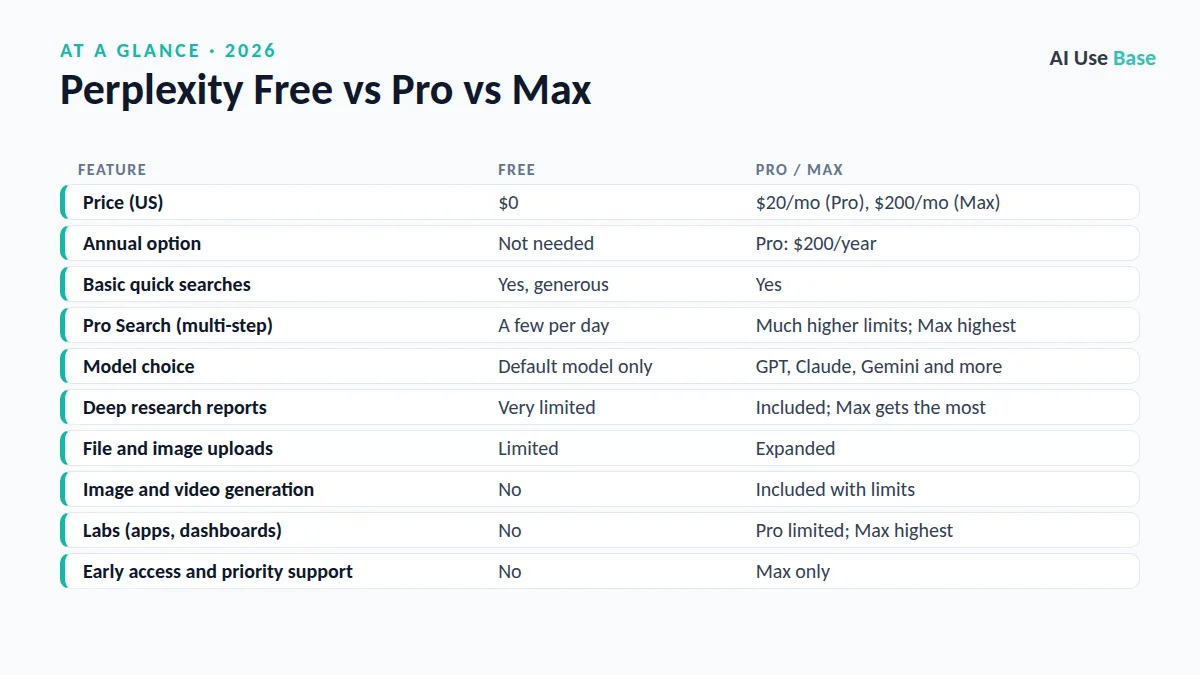
Perplexity Free vs Pro vs Max at a Glance
| Feature | Free | Pro / Max |
|---|---|---|
| Price (US) | $0 | $20/mo (Pro), $200/mo (Max) |
| Annual option | Not needed | Pro: $200/year |
| Basic quick searches | Yes, generous | Yes |
| Pro Search (multi-step) | A few per day | Much higher limits; Max highest |
| Model choice | Default model only | GPT, Claude, Gemini and more |
| Deep research reports | Very limited | Included; Max gets the most |
| File and image uploads | Limited | Expanded |
| Image and video generation | No | Included with limits |
| Labs (apps, dashboards) | No | Pro limited; Max highest |
| Early access and priority support | No | Max only |
Prices last checked October 2026. Is Perplexity Pro worth it at these prices? Read on for my take by user type. Perplexity adjusts usage limits often, so check the official Perplexity Pro page for the current numbers before you subscribe.
What Each Perplexity Plan Includes
Free: a strong AI search engine
The free plan gives you unlimited quick searches with cited sources, which is already better than a traditional search engine for many questions. You also get a small daily allowance of Pro Searches, the deeper multi-step mode that reads more sources before answering.
What you miss: choosing the model, serious file analysis, image generation and most research reports. For casual questions (“What time does the Super Bowl start?” or “Explain inflation simply”), you will rarely notice.
Pro: the plan most people consider
Pro costs $20 per month or $200 per year, which works out to about $16.67 a month. It raises your Pro Search allowance dramatically, lets you pick advanced models from OpenAI, Anthropic and Google, and unlocks Research mode for long, cited reports.
You can also upload PDFs, spreadsheets and images, generate images and short videos, and use Labs to build simple reports, dashboards and mini apps. Pro subscribers get more use of the AI assistant inside the Comet browser as well.
Max: built for heavy, daily power users
Max costs $200 per month. It offers the highest usage limits on Research and Labs, access to Perplexity’s most advanced model options, early access to new products and priority support. Think analysts, consultants and journalists who run research all day.
Business and education options
Teams can choose Enterprise Pro, which starts at $40 per seat per month and adds admin controls, a shared file repository and a promise that your data is not used for training. Perplexity also runs discounted education offers for verified students and educators, so check eligibility before paying full price.
Is Perplexity Pro Worth It for You?
The honest answer to “is Perplexity Pro worth it” depends on how often you research and how much your time is worth. Here is how I would think about it.
Who should pay for Pro
For these groups, is Perplexity Pro worth it? In my view, usually yes.
- Students and academics who need cited sources for papers and literature reviews. See our guide to the best AI tools for students for companions.
- Marketers and content creators who research trends, competitors and statistics every week.
- Professionals who summarize reports, compare products or analyze uploaded PDFs.
- Anyone who keeps hitting the free Pro Search limit before lunch.
- People who want several top models in one subscription instead of paying for ChatGPT, Claude and Gemini separately.
Who should stay on the free plan
- Casual users who ask a handful of questions a day.
- People who mainly need writing help rather than research. A general chatbot fits better.
- Anyone already paying for ChatGPT Plus or Gemini, since both include web search and deep research.
- Users on a tight budget who can live with slower, shallower answers.
Who should consider Max
Upgrade to Max only if you regularly exhaust Pro limits on Research or Labs and the work directly earns you money. For nearly everyone else, Max costs ten times as much as Pro without ten times the value. So if you are asking “is Perplexity Pro worth it, or should I go straight to Max?”, start with Pro.
Pros and Cons of Perplexity Pro
When readers ask me “is Perplexity Pro worth it,” I point them to these trade-offs first.
| Pros | Cons |
|---|---|
| Every answer comes with clickable sources | Usage limits change and are not always clear |
| Access to several leading AI models | Less polished for long creative writing |
| Research mode produces detailed reports fast | Sources still need manual checking |
| Annual plan lowers the monthly cost | Overlaps with ChatGPT and Gemini paid plans |
Cheaper Alternatives to Consider
Is Perplexity Pro worth it when free tools already search the web? Before you subscribe, compare Perplexity with tools you may already have. Many of these appear in our list of the best free AI tools.
- Perplexity Free: the obvious first step. Use it for two weeks and track how often you hit limits.
- ChatGPT Free or Go: includes web search and some deep research. Read how to use ChatGPT to get more from it.
- Google Gemini: strong free web answers tied to Google Search.
- Microsoft Copilot: free web search with citations inside the Copilot app.
If you want a wider view of the market, our roundup of the best AI tools compares research assistants alongside writing and productivity apps.
How to Get the Most From Perplexity Pro
If you decide Pro is right for you, these habits make the subscription earn its keep.
- Start with the monthly plan, then switch to annual billing once you know you will keep it.
- Use Pro Search for questions that need several sources, and quick search for simple facts to save your allowance.
- Try Research mode for reports, comparisons and literature scans, then verify the key citations yourself.
- Upload PDFs and ask targeted questions instead of reading them end to end.
- Read the Perplexity Help Center for current limits, and try the free Comet browser if you browse heavily.
Frequently Asked Questions
Is Perplexity Pro worth it for students?
Often yes, if you research regularly and value cited sources. Check whether you qualify for a discounted education offer first, and remember you still need to verify citations before using them in assignments.
What is the difference between Perplexity Pro and Max?
Pro costs $20 per month and covers most heavy users with higher search limits, model choice and research mode. Max costs $200 per month and adds the highest limits, the most advanced models, early access to new features and priority support.
Is Perplexity Pro better than ChatGPT Plus?
Perplexity Pro is stronger for sourced research and fact-finding, while ChatGPT Plus is more versatile for writing, coding and general tasks. Both cost about the same, so pick the one that matches what you do most.
Is Perplexity Pro worth it for casual users?
Usually not. The free plan offers unlimited quick searches with citations and a small daily number of Pro Searches. It is enough for casual users who do not need model choice or long research reports.
Is Perplexity Pro worth it compared with the free plan?
It is worth it if you regularly run out of Pro Searches or need file analysis and research reports. If you rarely hit limits, the free plan covers your needs.
Final Thoughts
So, is Perplexity Pro worth it? If research is part of your weekly routine, $20 a month is a fair price for cited answers, multiple top models and deep research in one place. Casual users should stick with the free plan, and only a small group of heavy professionals will get real value from Max.
My advice: use the free plan for two weeks, note every time you hit a wall, then decide. If those walls slow your work, Pro will likely pay for itself quickly.