In the Otter vs Fireflies matchup, Otter is the better pick for live, real-time transcription and simple note taking in English, while Fireflies is stronger for teams that want multilingual transcripts, deep integrations with CRMs and work apps, and searchable meeting history. Both offer free plans and paid upgrades.
Both tools send an AI assistant into your Zoom, Google Meet or Microsoft Teams calls, record the conversation, and produce a transcript, summary and action items. The Otter vs Fireflies choice comes down to where you work, which languages you speak, and what you do with your notes after the meeting.
Quick Verdict
- Choose Otter if you want live captions and notes during the meeting, a clean mobile app for lectures and interviews, and a generous free allowance of minutes.
- Choose Fireflies if you run sales, recruiting or client calls in several languages and want notes pushed automatically into tools like your CRM, Slack or Notion.
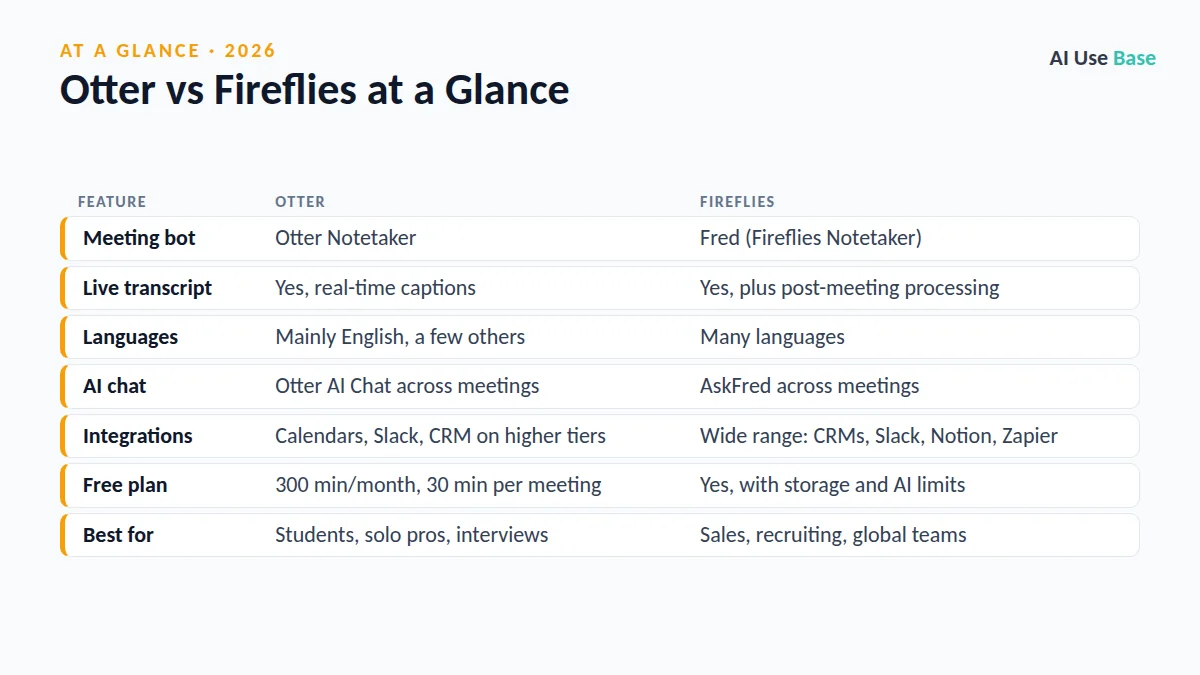
Otter vs Fireflies at a Glance
| Feature | Otter | Fireflies |
|---|---|---|
| Meeting bot | Otter Notetaker | Fred (Fireflies Notetaker) |
| Live transcript | Yes, real-time captions | Yes, plus post-meeting processing |
| Languages | Mainly English, a few others | Many languages |
| AI chat | Otter AI Chat across meetings | AskFred across meetings |
| Integrations | Calendars, Slack, CRM on higher tiers | Wide range: CRMs, Slack, Notion, Zapier |
| Free plan | 300 min/month, 30 min per meeting | Yes, with storage and AI limits |
| Best for | Students, solo pros, interviews | Sales, recruiting, global teams |
Prices last checked October 2026. Limits change often, so confirm details on the official pricing pages linked below.
Otter vs Fireflies: Transcription Accuracy
Both tools produce good transcripts when the audio is clear, speakers take turns and the microphone is close. Neither is perfect with heavy accents, crosstalk, names or jargon, so plan to review important notes before sharing them.
Otter’s strength is real-time transcription. You can watch the transcript appear during a call or lecture, highlight key moments and add comments as you go. In our editorial judgment, it is one of the smoothest experiences for English speakers, and its custom vocabulary helps with names and technical terms.
Fireflies focuses on accurate notes after the call and on language coverage. If your meetings switch between English, Spanish, French, German or other languages, Fireflies is the safer choice in the Otter vs Fireflies comparison, because Otter supports far fewer languages.
AI Summaries and Meeting Chat
Both tools generate summaries, outlines and action items automatically. Otter sends a recap after each meeting, and Otter AI Chat lets you ask questions such as “What did we decide about the launch date?” across one conversation or many.
Fireflies offers AskFred, which answers questions about a single meeting or your whole meeting library, and it can draft follow-up emails. Fireflies also adds conversation analytics, such as talk time and topic tracking, which sales and recruiting teams find useful.
Integrations: Otter vs Fireflies
This is the biggest gap in Otter vs Fireflies. Fireflies connects with a long list of apps, including popular CRMs, Slack, Notion, Asana and Zapier, and it can log call notes to the right deal or contact automatically. That saves a lot of copy and paste for customer-facing teams.
Otter covers the essentials well: Google and Microsoft calendars, Zoom, Google Meet, Microsoft Teams, Slack and a set of business integrations on higher plans. For a solo user or student, that is usually plenty.
Apps and Recording Outside Meetings
Otter’s mobile app is excellent for in-person use, such as recording a class, interview or team huddle. Fireflies also has mobile and desktop apps and can transcribe uploaded files, but its focus is online meetings. For in-person recording, Otter vs Fireflies tilts toward Otter.
Free Plans and Pricing
Free plans are a big part of the Otter vs Fireflies decision, because many people never need to upgrade.
| Plan | Otter | Fireflies |
|---|---|---|
| Free | Basic: 300 minutes per month, up to 30 minutes per conversation, limited file imports | Free: transcription and summaries with limited storage and AI credits |
| Individual paid | Pro: 1,200 minutes per month, up to 90 minutes per conversation | Pro: more storage, AI credits and integrations |
| Teams | Business and Enterprise plans with admin controls | Business and Enterprise plans with analytics and admin tools |
Both companies offer lower prices with annual billing. Check the Otter pricing page and the Fireflies pricing page for current rates in your currency.
Otter vs Fireflies: Privacy and Etiquette
Any AI meeting note taker records other people, so tell participants and follow your company’s rules. Both tools let you control when the bot joins automatically. Turn off auto-join for sensitive meetings, and review sharing settings so summaries do not go to people who should not see them.
Otter vs Fireflies: Which Should You Choose?
Choose Otter if…
- You want live captions and notes while the meeting is happening.
- You are a student recording lectures or a journalist recording interviews.
- You mainly work in English and want a generous free plan.
- You value a simple, polished mobile app.
Choose Fireflies if…
- Your meetings happen in multiple languages.
- You want notes synced automatically to a CRM, Slack or Notion.
- You manage a sales or recruiting team and want call analytics.
- You need a searchable library of every meeting across the company.
Students can find more study helpers in our list of the best AI tools for students, and busy teams should browse the best AI productivity tools and our pillar guide to the best AI tools.
Frequently Asked Questions
Which is more accurate, Otter or Fireflies?
Both are accurate with clear audio and turn-taking speakers. Otter is excellent for live English transcription, while Fireflies is the better choice for meetings in many languages. Always review important transcripts before sharing.
Is Otter free?
Yes. Otter’s free Basic plan includes 300 transcription minutes per month, with conversations capped at 30 minutes and a limited number of file imports. The Pro plan raises those limits.
Is Fireflies free?
Yes. Fireflies has a free plan that records and transcribes meetings and creates summaries, with limits on storage and AI features. Paid plans add more storage, AI credits and integrations.
Does Fireflies work with Zoom, Google Meet and Teams?
Yes. Fireflies and Otter both join Zoom, Google Meet and Microsoft Teams calls through a meeting bot connected to your calendar. You can also turn off auto-join for private meetings.
Is it legal to record meetings with an AI note taker?
Rules vary by location, and some places require consent from everyone on the call. Always tell participants you are recording and follow your organization’s policy.
Final Thoughts
Otter vs Fireflies is not about which AI is smarter; both take reliable notes. Otter is the better personal note taker with strong live transcription, while Fireflies is the better team tool thanks to its language support and integrations.
Start with both free plans for a week of real meetings. The one whose summaries you actually reuse is the one worth paying for.