The best Otter.ai alternatives in 2026 are Fireflies.ai, Fathom, tl;dv and Notta, plus the AI note-takers already built into Zoom, Google Meet and Microsoft Teams. If your company pays for one of those meeting platforms, you may already have a capable meeting assistant without buying another app.
Fathom is a strong pick for individuals who want a generous free plan, Fireflies suits teams that need integrations and search, and Notta is handy for uploaded recordings in many languages. Below is a quick comparison, a closer look at each tool and tips for choosing.
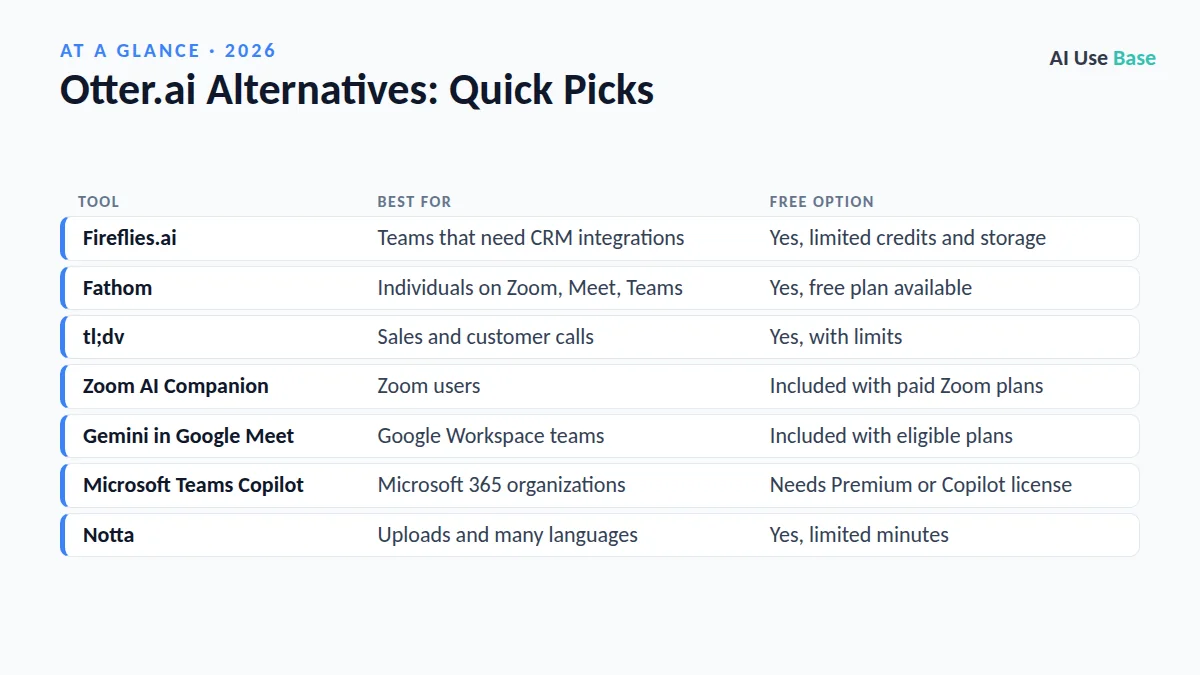
Otter.ai Alternatives: Quick Picks
| Tool | Best for | Free option |
|---|---|---|
| Fireflies.ai | Teams that need CRM integrations | Yes, limited credits and storage |
| Fathom | Individuals on Zoom, Meet, Teams | Yes, free plan available |
| tl;dv | Sales and customer calls | Yes, with limits |
| Zoom AI Companion | Zoom users | Included with paid Zoom plans |
| Gemini in Google Meet | Google Workspace teams | Included with eligible plans |
| Microsoft Teams Copilot | Microsoft 365 organizations | Needs Premium or Copilot license |
| Notta | Uploads and many languages | Yes, limited minutes |
Prices last checked October 2026. Free limits for meeting tools change often, so check each official pricing page before you sign up.
Why Look for Otter.ai Alternatives?
Otter is still a solid transcription tool. Its free Basic plan includes 300 transcription minutes per month with conversations capped at 30 minutes, according to Otter’s pricing page. For many people, that cap is the main reason to look elsewhere: a single one-hour meeting does not fit.
Other common reasons to compare Otter.ai alternatives include wanting a bot that joins every platform equally well, better CRM and project tool integrations, stronger support for languages other than English, or simply avoiding another subscription when Zoom, Google or Microsoft already include AI notes.
The 7 Best Otter.ai Alternatives
1. Fireflies.ai
Fireflies joins your Zoom, Google Meet or Teams calls as a bot, records them, and produces transcripts, summaries and action items. Its search across past meetings and its many integrations with CRMs and project tools make it popular with sales and operations teams.
- Free plan: Yes, with limited AI summaries and storage.
- Paid from: Pro, Business and Enterprise tiers; see Fireflies pricing.
- Best for: Teams that want meeting notes pushed into their CRM.
2. Fathom
Fathom is one of the most popular Otter.ai alternatives for individuals because its free plan is generous with recording and transcription. It works with Zoom, Google Meet and Microsoft Teams and creates summaries you can copy into email or Slack.
- Free plan: Yes, with some AI features limited each month.
- Paid from: Premium and team plans; see Fathom pricing.
- Best for: Freelancers, consultants and anyone with many calls.
3. tl;dv
tl;dv records Google Meet, Zoom and Teams calls, timestamps key moments and writes AI meeting notes. It leans toward sales and customer-facing teams, with templates for discovery calls and CRM syncing on paid plans.
- Free plan: Yes, with limits on AI notes and features.
- Paid from: Pro and Business plans; see tl;dv pricing.
- Best for: Sales, customer success and user research calls.
4. Zoom AI Companion
If your meetings happen on Zoom, check what you already pay for. Zoom AI Companion can summarize meetings, answer questions about what was said and draft next steps, and it is included at no additional cost with paid Zoom Workplace plans.
- Free plan: Not on free Zoom accounts.
- Paid from: Included with paid Zoom plans.
- Best for: Teams that run nearly every meeting on Zoom.
5. Gemini in Google Meet (“Take notes for me”)
Google Meet’s Gemini feature, called “Take notes for me,” writes meeting notes into a Google Doc and shares them with attendees. No bot joins the call, which many participants prefer.
- Free plan: No; requires an eligible Google Workspace or Google AI plan.
- Paid from: Eligible paid Google plans.
- Best for: Schools and businesses on Google Workspace.
New to Google’s assistant? Our how to use Gemini guide covers the basics.
6. Microsoft Teams with Copilot
In Teams, intelligent meeting recap and Copilot can summarize discussions, list action items and answer questions about a meeting. These features require a Teams Premium or Microsoft 365 Copilot license, so they suit organizations already in the Microsoft ecosystem.
- Without add-ons: Standard Teams transcription, but no AI recap.
- Paid from: Teams Premium or Microsoft 365 Copilot add-on.
- Best for: Companies that standardize on Microsoft 365.
7. Notta
Notta rounds out our list of Otter.ai alternatives. It transcribes live meetings and uploaded audio or video files, and it supports transcription in dozens of languages. It also offers translation and AI summaries, which makes it useful for international teams and researchers.
- Free plan: Yes, with limited monthly minutes and short recordings.
- Paid from: Pro, Business and Enterprise plans; see Notta pricing.
- Best for: Multilingual meetings and uploaded recordings.
How to Choose Among Otter.ai Alternatives
- Start with what you already pay for. Zoom, Google Workspace and Microsoft 365 may include AI notes at no extra cost.
- Check meeting length. If your meetings run past 30 minutes, compare free plan caps carefully.
- Decide on bot or no bot. Built-in tools avoid a visible bot; Fireflies, tl;dv and Fathom join as participants.
- Look at integrations. Sales teams should prioritize CRM sync; students care more about search and export.
- Respect consent. Always tell participants you are recording, and follow your local laws and company policy.
For students recording lectures, our best AI tools for students list has more ideas, and our best AI productivity tools roundup covers the wider workflow.
Limitations to Keep in Mind
All Otter.ai alternatives make mistakes with names, numbers, accents and cross-talk. AI summaries can miss nuance or attribute a point to the wrong person, so review notes before sending them to clients.
Privacy matters too. Meeting bots store recordings in the cloud, so check data retention settings and whether your organization allows third-party recorders. For more options, see our guide to the best AI tools.
Frequently Asked Questions
What is the best free alternative to Otter.ai?
Fathom is a popular free alternative because its free plan is generous with recording and transcription across Zoom, Google Meet and Teams. Fireflies, tl;dv and Notta also have free plans, but with tighter limits on minutes, storage or AI summaries.
Is Fireflies better than Otter?
Fireflies is often a better fit for teams that need CRM and project tool integrations and searchable meeting history. Otter remains strong for live transcription. Try both free plans on your own meetings to compare accuracy.
Does Zoom have a built-in AI note-taker?
Yes. Zoom AI Companion can summarize meetings and list next steps, and it is included at no additional cost with paid Zoom Workplace plans. It is not available on free Zoom accounts.
Can Google Meet take notes automatically?
Yes. The Gemini feature called Take notes for me writes meeting notes into a Google Doc. It requires an eligible Google Workspace or Google AI plan.
Is it legal to record meetings with an AI note-taker?
Rules vary by country and state, and some require consent from everyone on the call. Always tell participants you are recording and follow your organization’s policy.
Final Thoughts
The best Otter.ai alternatives depend on where your meetings happen. If you use Zoom, Google Meet or Teams through a paid plan, try the built-in assistant first. If you need one tool across every platform, Fathom is the easy free starting point and Fireflies is the stronger team option.
Test two Otter.ai alternatives on real meetings for a week, compare the summaries side by side, and keep the one your team actually reads.