AI website builders can create a first draft of a full site, with pages, layout, images and copy, from a short description of your business. For most small businesses, Wix and Squarespace are the safest all-round choices, Hostinger is the budget pick, and Framer or Webflow suit people who care about custom design.
We compare eight options below, with free plans and starting prices (prices last checked October 2026; many builders show lower prices for long annual terms).
Quick Picks: Best AI Website Builders
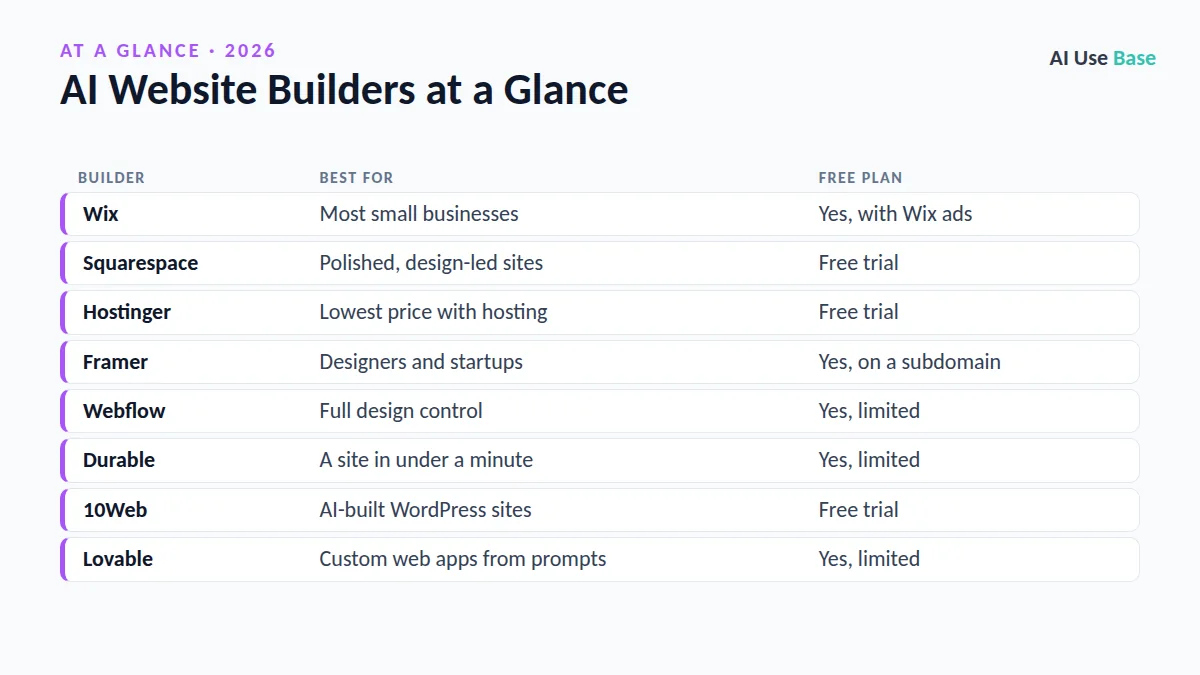
| Builder | Best for | Free plan |
|---|---|---|
| Wix | Most small businesses | Yes, with Wix ads |
| Squarespace | Polished, design-led sites | Free trial |
| Hostinger | Lowest price with hosting | Free trial |
| Framer | Designers and startups | Yes, on a subdomain |
| Webflow | Full design control | Yes, limited |
| Durable | A site in under a minute | Yes, limited |
| 10Web | AI-built WordPress sites | Free trial |
| Lovable | Custom web apps from prompts | Yes, limited |
How We Chose These AI Website Builders
We compared what the AI actually builds, how easy it is to edit afterward, hosting and domain options, ecommerce features and cost. We used official product pages and current pricing. Rankings are editorial judgment, not paid placements.
All-Round AI Website Builders
1. Wix
- Best for: small businesses that want everything in one place
- Free plan: yes, on a Wix subdomain with ads
- Paid from: about $17/month billed yearly
- Standout: a chat-style AI builder, plus booking, ecommerce and marketing tools
Answer a few questions and Wix generates a full site you can edit by drag and drop. See Wix AI Website Builder.
2. Squarespace
- Best for: portfolios, restaurants and brands that want a polished look
- Free plan: no, 14-day free trial
- Paid from: about $16/month billed yearly
- Standout: design-focused AI that picks layouts, fonts and colors that work together
Squarespace asks about your goals and style, then builds a site you refine step by step. Its templates are among the most elegant, though the editor offers less freedom than Webflow. Check current plans on Squarespace pricing.
3. Hostinger Website Builder
- Best for: the lowest cost, including hosting and a domain
- Free plan: no, free trial available
- Paid from: a few dollars a month on long prepaid terms
- Standout: AI site generator plus AI writer, logo maker and image tools
Read the renewal price carefully: low introductory prices usually rise when the term ends.
AI Website Builders for Designers
4. Framer
- Best for: designers, startups and landing pages
- Free plan: yes, on a Framer subdomain
- Paid from: about $10/month for a small site
- Standout: AI layouts with smooth animations and a Figma-like editor
5. Webflow
- Best for: custom designs and content-heavy sites
- Free plan: yes, limited Starter plan
- Paid from: site plans from about $14 to $18/month
- Standout: professional design control, CMS and an AI assistant
Webflow has a steeper learning curve than Wix but more control. Plans are on Webflow pricing.
Fast and Specialist Builders
6. Durable
- Best for: service businesses that need a simple site today
- Free plan: yes, limited
- Paid from: about $12/month billed yearly
- Standout: generates a complete small-business site in seconds, plus simple CRM and invoicing
Durable is ideal for plumbers, cleaners, coaches and other local services that need a credible page quickly. Design options are simpler than on Wix, so growing businesses may outgrow it.
7. 10Web
- Best for: people who want a WordPress site built by AI
- Free plan: free trial
- Paid from: about $10/month
- Standout: builds WordPress sites and can recreate a layout from an existing URL
8. Lovable
- Best for: custom web apps, tools and prototypes
- Free plan: yes, with daily credits
- Paid from: about $25/month
- Standout: describe an app in plain English and get working code you can export
Lovable is an app builder rather than a classic website builder, so it fits projects that need logins, databases or custom features. See Lovable pricing and our list of AI coding tools.
How to Choose Between AI Website Builders
- Define the job. Brochure site, online store, portfolio or web app? Pick a builder strong in that area.
- Try two free versions. Generate the same site in two AI website builders and compare which draft needs less editing.
- Check the total cost. Include domain, email, ecommerce fees and renewal price, not only the first-year deal.
- Test editing. The AI draft is only the start. Make sure you are comfortable editing text, images and menus yourself.
- Plan for SEO. Check custom page titles, meta descriptions, fast loading and clean URLs.
- Rewrite AI copy. Add real details, photos and customer reviews. Generic AI text does not convert or rank well.
Running a small business? See our picks for AI tools for small business, our guide to AI for marketing, and the full best AI tools list.
Frequently Asked Questions
What is the best AI website builder for beginners?
Wix is the easiest all-round choice for most beginners because the AI builds a full site and the editor is simple. Squarespace is a good alternative if design matters most.
Are there free AI website builders?
Yes. Wix, Framer, Webflow, Durable and Lovable offer free plans with limits, usually a branded subdomain and ads or reduced features. A custom domain normally needs a paid plan.
Can AI build a whole website for me?
AI website builders can create pages, layout, images and draft text in minutes. You still need to edit the copy, add real photos and check details like contact information and prices.
Are AI-built websites good for SEO?
They can be, if you rewrite generic text, set page titles and descriptions, add useful content and keep the site fast. AI drafts alone rarely rank well.
Should I use WordPress or an AI website builder?
AI website builders are faster and simpler for small sites. WordPress offers more control and plugins but takes more setup and maintenance.
Final Thoughts
AI website builders remove the blank-page problem: in minutes you get a full draft instead of an empty template. Choose Wix or Squarespace for an easy all-in-one site, Hostinger for budget, Framer or Webflow for design freedom, and Lovable when you need an app. Then spend your time on what AI cannot write for you: real photos, real offers and real proof that customers trust you.