The short answer on free vs paid AI tools: free plans are good enough for occasional questions, quick writing help and light research. Paid plans, usually around $20 a month, mainly buy you higher limits, stronger models, bigger file uploads and extra features like deep research. If you hit limits every week, paying is often worth it; if you rarely do, it usually is not.
Below we break down what free plans really include, what paid plans add, and a simple test to help you decide.
Free vs Paid AI Tools: Popular Plans Compared
| Tool | Free plan | Main paid plan |
|---|---|---|
| ChatGPT | Yes, with usage limits | Plus, $20/month |
| Claude | Yes, with usage limits | Pro, $20/month ($17 yearly) |
| Gemini | Yes | Google AI Pro, $19.99/month |
| Perplexity | Yes, limited Pro searches | Pro, $20/month |
| Microsoft Copilot | Yes | Microsoft 365 Personal, $9.99/month |
| GitHub Copilot | Yes, monthly limits | Pro, $10/month |
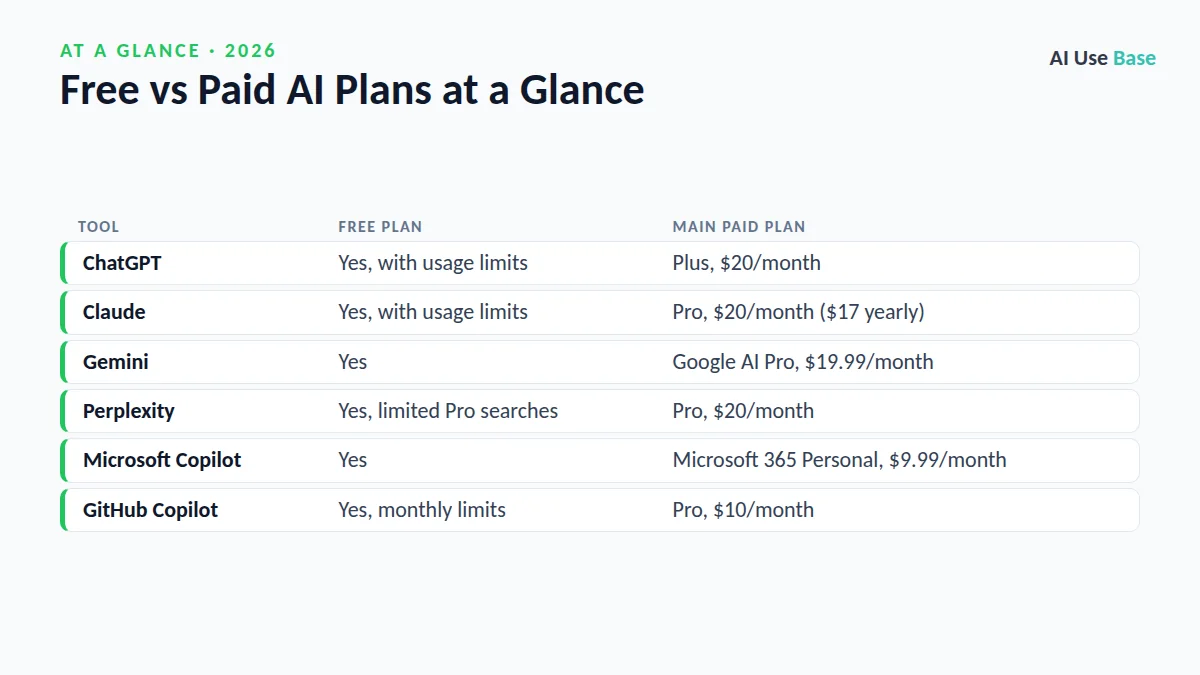
Prices last checked October 2026 on official pages such as ChatGPT pricing, Claude pricing and Google AI plans. Some services also offer cheaper tiers or regional prices.
Free vs Paid AI Tools by Use Case
The value of paying depends on what you use AI for. Here is how free vs paid AI tools compare for common jobs.
| Use case | Free is enough? | When paying helps |
|---|---|---|
| Homework help and explanations | Usually yes | Long study sessions every day |
| Emails and short writing | Yes | Rarely needed |
| Long reports and books | Sometimes | Large uploads and long context |
| Coding | For learning, yes | Daily professional work |
| Research with sources | For quick checks | Deep research reports |
| Images and video | For a few tries | Regular content creation |
In short, free vs paid AI tools differ less in quality for simple tasks and more in how much you can do before hitting a wall. If your work is light, a free plan is not a compromise. If your work is heavy, limits quickly become the main cost.
What Free AI Plans Usually Include
- Access to a capable model, often with a cap on how many messages you can send to the best one before you are moved to a lighter model.
- Basic file uploads such as PDFs and images, with lower limits.
- Web search in most chat assistants.
- Limited image generation in some tools.
- Organization features like ChatGPT Projects, which are now available on the free plan with smaller file limits.
For many students and casual users, that is plenty. Our list of the best free AI tools shows how far you can get without paying.
What Paid AI Plans Add
When you compare free vs paid AI tools feature by feature, four upgrades stand out.
Higher limits
This is the biggest difference between free vs paid AI tools. Paid users can send many more messages to top models before slowing down, which matters if you work with AI for hours each day.
Stronger models and reasoning
Paid plans usually unlock the most capable models and longer thinking modes. You notice the difference on hard tasks: complex coding, long documents and multi-step analysis.
Research and agent features
Deep research reports, longer context windows, agents that complete tasks and more video or image generation are typically paid or heavily limited on free plans.
Work features
Integrations such as Copilot in Word and Excel, Gemini in Gmail and Docs, or Claude for Microsoft 365 are mostly paid. Business plans add admin controls and stronger data protections.
Who Should Pay for AI
- You hit usage limits several times a week.
- You use AI for paid work, where saving an hour easily covers $20.
- You regularly analyze long files, spreadsheets or code.
- You need a specific paid feature, such as AI inside Excel or Gmail.
Who Should Stay on Free Plans
- You use AI a few times a week for questions and short writing.
- You are a student whose school already provides AI tools.
- You can rotate between several free assistants when one hits a limit.
Rotating works well: our guide to free ChatGPT alternatives lists strong options.
A Simple Test Before You Pay
- Track one week. Write down every time a free plan blocked or slowed you.
- Price your time. If paid access would save two hours a month and your time is worth more than $10 an hour, it pays for itself.
- Pay for one, not five. Pick the assistant you use most and cancel anything you have not opened in a month.
- Use monthly billing first. Switch to yearly only after three months of real use.
Which Paid AI Plan Is Best Value?
If you already pay for Microsoft 365 or Google One storage, check what AI is already included before adding another subscription. For a direct comparison of the two most popular $20 plans, read ChatGPT Plus vs Claude Pro, and for one plan in depth, see is ChatGPT Plus worth it. Our best AI tools guide covers other categories.
Frequently Asked Questions
Are free AI tools good enough?
For everyday questions, short writing and light research, yes. Free plans become frustrating mainly when you need long sessions, large files or the strongest models.
Is ChatGPT Plus better than the free version?
Plus gives higher limits, stronger models and more features such as deep research and more file analysis. Whether it is worth $20 a month depends on how often you use it.
What is the cheapest paid AI plan?
Some services offer lower-cost tiers, such as ChatGPT Go or Microsoft 365 Personal with Copilot, but features and prices vary by country. Check the official pricing page for your region.
Do paid AI plans protect my data better?
Business and Enterprise plans usually offer stronger data protections and admin controls. Personal paid plans mostly add features and limits, so check each service’s data settings.
Should I pay for more than one AI tool?
Most people only need one paid plan. When comparing free vs paid AI tools, start with the assistant you use most and rely on free plans for the rest.
Final Thoughts
The free vs paid AI tools decision is mostly about how often you hit limits. Free plans are genuinely useful in 2026, and most people can start there. Upgrade when the limits cost you real time, choose one subscription that fits your main work, and review it every few months.