The best free AI voice generators in 2026 are ElevenLabs for the most lifelike voices, Google AI Studio for expressive multi-speaker audio, Microsoft Clipchamp for free voiceovers you can export, CapCut and Canva for quick social videos, Speechify for listening to text, and Murf for polished narration in a studio editor.
“Free” means different things here. Some tools let you download audio and use it in videos, while others only let you preview voices or require attribution. Below we explain what each free plan covers, who it suits, and what to check before you publish anything.
Quick Picks: Best Free AI Voice Generators
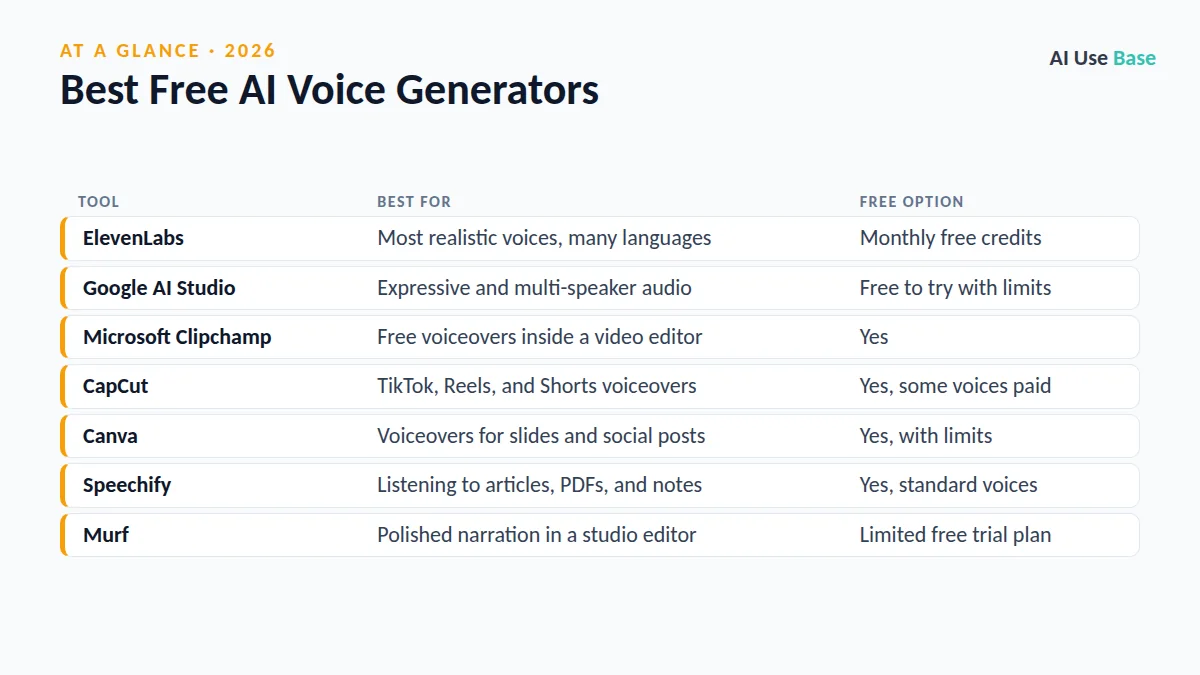
| Tool | Best for | Free option |
|---|---|---|
| ElevenLabs | Most realistic voices, many languages | Monthly free credits |
| Google AI Studio | Expressive and multi-speaker audio | Free to try with limits |
| Microsoft Clipchamp | Free voiceovers inside a video editor | Yes |
| CapCut | TikTok, Reels, and Shorts voiceovers | Yes, some voices paid |
| Canva | Voiceovers for slides and social posts | Yes, with limits |
| Speechify | Listening to articles, PDFs, and notes | Yes, standard voices |
| Murf | Polished narration in a studio editor | Limited free trial plan |
How We Chose the Best Free AI Voice Generators
We reviewed official product pages, help docs, and pricing pages rather than making personal testing claims. Prices last checked October 2026; free limits change often, so confirm on each official page before you rely on them. We looked at:
- Voice quality: Natural pacing, emotion, and pronunciation.
- Free plan value: Whether you can download audio, and how much.
- Usage rights: Whether free output can be used commercially or needs attribution.
- Ease of use: How quickly a beginner can go from script to audio file.
The 7 Best Free AI Voice Generators in 2026
1. ElevenLabs
ElevenLabs is widely seen as the quality leader among the best free AI voice generators. Its voices handle emotion, pauses, and many languages well, and a large voice library lets you pick a style for audiobooks, ads, or explainer videos. The free plan gives you a small monthly credit allowance to try it.
- Best for: Creators who want the most natural-sounding audio
- Free plan: Yes, monthly credits; commercial use needs a paid plan
- Paid from: Starter plan, with higher creator and business tiers
- Standout: Lifelike delivery and voice cloning on paid plans
Plans: ElevenLabs pricing.
2. Google AI Studio (Gemini text-to-speech)
Google AI Studio lets you try Gemini’s speech generation in the browser. You can describe the tone you want in plain language, such as “cheerful and fast,” and create two-speaker dialogues for podcast-style clips. It is aimed at developers, but anyone with a Google account can experiment.
- Best for: Tinkerers, developers, and dialogue-style audio
- Free plan: Free to try, with usage limits
- Paid from: Pay-as-you-go API pricing
- Standout: Style control with natural-language instructions
Try it: Google AI Studio.
3. Microsoft Clipchamp and Edge Read Aloud
Microsoft offers two of the best free AI voice generators for everyday use. Clipchamp, Microsoft’s video editor, includes a text-to-speech tool with many voices and languages that you can add straight to a video timeline. If you only want to listen, Edge’s Read Aloud reads web pages and PDFs in natural voices at no cost.
- Best for: Windows users, students, and simple video voiceovers
- Free plan: Yes
- Paid from: Clipchamp Premium for extra features
- Standout: Free voiceovers inside a full video editor
Learn more: Clipchamp text to speech.
4. CapCut
CapCut is one of the best free AI voice generators for short-form video, and its text-to-speech feature turns captions into voiceovers in a couple of taps. Many voices are free, though some premium voices and effects require CapCut Pro. Read the terms carefully if you plan to use output in client or commercial work.
- Best for: TikTok, Instagram Reels, and YouTube Shorts
- Free plan: Yes, with some voices behind Pro
- Paid from: CapCut Pro
- Standout: Voice, captions, and editing in one app
Get it: CapCut.
5. Canva
Canva lets you add AI voiceovers to presentations, videos, and social posts through text-to-speech apps in its editor. It is not the most advanced option, but it is one of the best free AI voice generators for convenience if you already design in Canva. Some voice apps and higher limits require Canva Pro.
- Best for: Teachers, marketers, and quick social content
- Free plan: Yes, with limits
- Paid from: Canva Pro
- Standout: Voice and design in the same workspace
Plans: Canva pricing.
6. Speechify
Unlike the other best free AI voice generators here, Speechify is built for listening rather than producing voiceovers. It reads web pages, PDFs, emails, and documents aloud on your phone, browser, or computer, which helps students, commuters, and people with dyslexia. The free tier uses standard voices, while premium voices and faster speeds are paid.
- Best for: Listening to reading material on the go
- Free plan: Yes, standard voices
- Paid from: Speechify Premium
- Standout: Apps and extensions across devices
Plans: Speechify pricing.
7. Murf
Murf is a studio-style tool for e-learning, training videos, and presentations. You can adjust pitch, speed, and emphasis line by line and sync narration with slides or video. The free plan is best treated as a trial, since downloads and commercial rights are mainly on paid plans.
- Best for: Course creators and corporate training
- Free plan: Limited trial plan
- Paid from: Creator and business plans
- Standout: Fine control over emphasis and timing
Plans: Murf pricing.
What Free Plans Usually Leave Out
Even the best free AI voice generators hold back a few things to encourage upgrades. Watch for these limits before you build a project around one tool:
- Commercial rights: Free output may be personal use only or need attribution.
- Downloads: Some plans let you preview but not export audio.
- Voice cloning: Usually paid, and it requires the speaker’s permission.
- Monthly limits: Credits or minutes reset monthly and rarely roll over.
How to Choose Among the Best Free AI Voice Generators
- Start with your output. Video voiceover, podcast clip, audiobook, or just listening to text.
- Check usage rights. If the audio goes in ads or client work, confirm commercial use is allowed.
- Test your actual script. Try names, numbers, and jargon, since pronunciation varies by tool.
- Consider your workflow. If you already edit in Canva, CapCut, or Clipchamp, the built-in voice may be enough.
- Be ethical with voices. Never clone or imitate a real person’s voice without clear consent.
Want more free options? See our list of the best free AI tools, our guide to AI for marketing, our Canva AI vs Microsoft Designer comparison, and the complete roundup of the best AI tools.
Frequently Asked Questions
What is the best free AI voice generator?
ElevenLabs is often considered the most realistic, but its free plan has small monthly credits and limits on commercial use. For free voiceovers you can export into videos, Microsoft Clipchamp and CapCut are practical choices, and Google AI Studio is great for experimenting.
Can I use free AI voices for YouTube videos?
Sometimes. It depends on each tool’s terms for its free plan. Some allow personal use only or require attribution, so check the licensing or terms page before monetizing a video with free AI audio.
Is there a free AI voice generator with no sign-up?
A few tools let you test short clips without an account, but most of the best free AI voice generators ask you to sign in before you can download audio. Edge’s Read Aloud works in the browser for listening without a separate account.
Is AI voice cloning legal?
Cloning your own voice is generally fine on platforms that allow it. Cloning someone else’s voice without permission can break platform rules and, in some places, laws on likeness and fraud. Always get clear consent.
Which free AI voice generator sounds most human?
Many users rank ElevenLabs and Google’s Gemini speech models among the most natural sounding. Results vary by language and script, so test a few lines of your own text in two or three tools before choosing.
Final Thoughts
The best free AI voice generators are good enough today for social videos, class presentations, and first drafts of narration. ElevenLabs leads on realism, Clipchamp and CapCut are the easiest free choices for video, and Speechify is the pick if you mainly want to listen.
Start free, test your own script, and read the usage terms before publishing. If you outgrow the limits, upgrade only the tool that matches the way you actually work.