In the Grammarly vs QuillBot comparison, Grammarly is the better everyday writing assistant for catching grammar mistakes, fixing tone and writing with AI inside almost any app, while QuillBot is the better paraphrasing tool, with a low-cost bundle of rewriting, summarizing and citation tools. Both have free versions worth trying.
The short answer to Grammarly vs QuillBot: professionals who write emails, reports and documents all day usually get more from Grammarly, and students who paraphrase sources, summarize readings and build citations often prefer QuillBot. Below we compare grammar checking, paraphrasing, AI writing, plagiarism checks and pricing.
Quick Verdict
- Choose Grammarly for the most polished grammar, clarity and tone suggestions everywhere you type, plus built-in generative AI.
- Choose QuillBot for flexible paraphrasing modes, summaries and citations at a lower price.
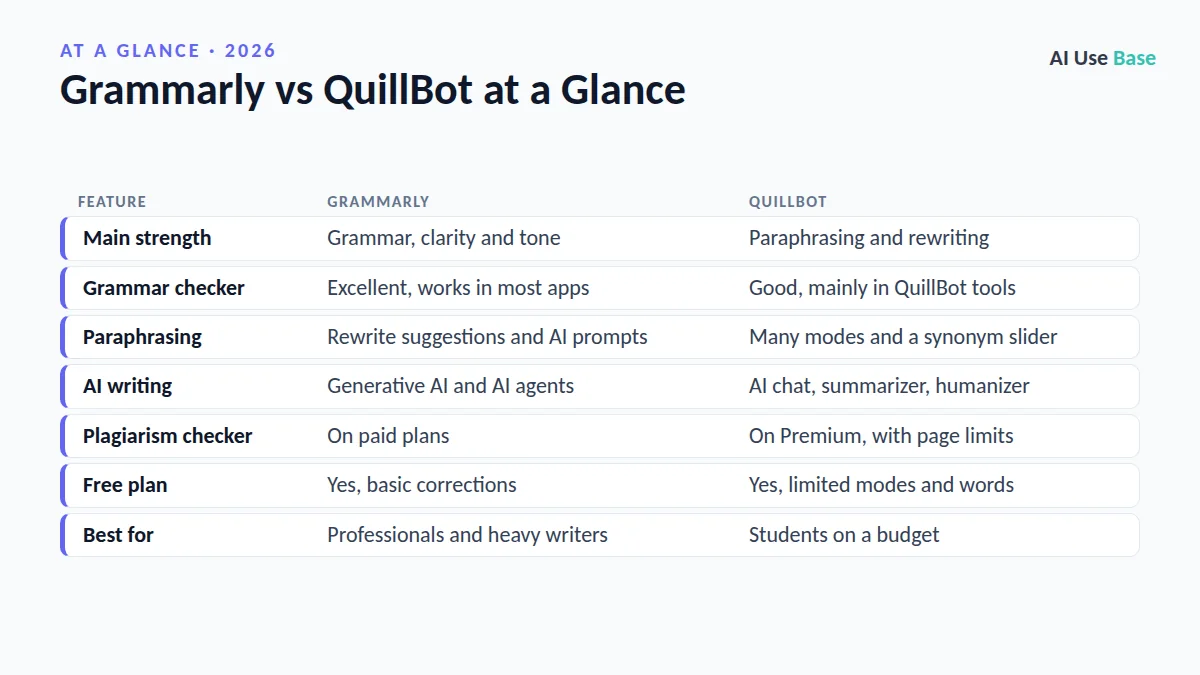
Grammarly vs QuillBot at a Glance
| Feature | Grammarly | QuillBot |
|---|---|---|
| Main strength | Grammar, clarity and tone | Paraphrasing and rewriting |
| Grammar checker | Excellent, works in most apps | Good, mainly in QuillBot tools |
| Paraphrasing | Rewrite suggestions and AI prompts | Many modes and a synonym slider |
| AI writing | Generative AI and AI agents | AI chat, summarizer, humanizer |
| Plagiarism checker | On paid plans | On Premium, with page limits |
| Free plan | Yes, basic corrections | Yes, limited modes and words |
| Best for | Professionals and heavy writers | Students on a budget |
Prices last checked October 2026. Note that Grammarly’s parent company rebranded as Superhuman in late 2025, but the Grammarly writing assistant keeps its name.
Grammarly vs QuillBot: Grammar and Spelling
Grammarly is the stronger grammar checker. It catches spelling, punctuation and grammar errors, and paid plans add suggestions for clarity, conciseness, word choice, tone and formality. Its browser extension and desktop app work in Gmail, Google Docs, Word, Slack, LinkedIn and many other places, so you get help wherever you type.
QuillBot has a solid free grammar checker that fixes common mistakes, and it also offers a Chrome extension and Word and Google Docs add-ons. In our editorial judgment, its suggestions are useful but less detailed than Grammarly’s, especially for tone and style in professional writing.
Grammarly vs QuillBot for Paraphrasing
This round of Grammarly vs QuillBot goes to QuillBot. Paraphrasing is its core feature: paste text, choose a mode such as Standard, Fluency, Formal, Academic, Simple, Creative or Shorten, and adjust a synonym slider to control how much the wording changes. You can also add a custom mode with your own instructions. The free version limits the number of words and modes; Premium unlocks all modes and longer passages.
Grammarly can rewrite sentences for clarity and tone, and its generative AI can rephrase full paragraphs on request, for example “make this more concise” or “sound more confident.” It works well for polishing your own drafts, but it does not offer QuillBot’s fine-grained paraphrasing controls.
A note for students
Paraphrasing tools do not replace understanding or citing your sources. Rewording someone else’s ideas without credit is still plagiarism, and many schools have rules on AI use. Use these tools to improve your own writing, then cite properly.
AI Writing Features in Grammarly vs QuillBot
Grammarly includes generative AI that can draft emails, outline documents, rewrite text and reply to messages using a prompt. It also offers specialized AI agents, such as a reader reactions agent, a citation finder and a proofreader, in its docs experience. Its Authorship feature helps students show how a document was written, which can help if a teacher questions AI use.
QuillBot bundles a summarizer, an AI chat, a translator, an AI detector, an AI humanizer and a citation generator. The summarizer and citation generator are especially handy for coursework. For more writing tools, see our roundup of the best AI writing tools.
Grammarly vs QuillBot: Plagiarism and AI Detection
Both tools check text against web pages and academic sources on paid plans. Grammarly’s plagiarism checker is included in its paid plan, and it also offers an AI detector. QuillBot’s plagiarism checker is part of Premium with a monthly page limit, and its AI detector is free to try.
Treat every AI detector result as a hint, not proof. These tools can flag human writing as AI and miss AI-written text, so never base academic or hiring decisions on a detector score alone.
Grammarly vs QuillBot Pricing
| Plan | Grammarly | QuillBot |
|---|---|---|
| Free | Spelling, grammar and punctuation, plus a limited number of AI prompts | Paraphraser with limited modes and words, grammar checker, summarizer, citation tool |
| Individual paid | Grammarly Pro: advanced suggestions, more AI, plagiarism checker | QuillBot Premium: unlimited paraphrasing, all modes, plagiarism checks |
| Teams | Business and Enterprise plans | Team plans available |
| Typical value | Higher price, broader writing help | Lower price, especially with annual billing |
On price alone, Grammarly vs QuillBot usually favors QuillBot. Both offer discounts for annual billing. Check current rates on the Grammarly plans page and the QuillBot Premium page before you subscribe.
Grammarly vs QuillBot: Which Should You Choose?
Choose Grammarly if…
- You write emails, reports and messages every day and want error-free, professional text.
- You want help inside every app, not just one editor.
- You care about tone, clarity and consistency.
- You want generative AI and a plagiarism checker in one plan.
Choose QuillBot if…
- You are a student who summarizes readings and builds citations.
- You often need to rephrase text for different audiences.
- You want many writing tools for a lower price.
- You write in other languages and want a built-in translator.
Some writers use both: QuillBot to rework a passage and Grammarly for the final proofread. Students can explore more options in our list of the best AI tools for students, and everyone can compare more apps in our guide to the best AI tools.
Frequently Asked Questions
Is QuillBot better than Grammarly?
QuillBot is better for paraphrasing, summarizing and citations, often at a lower price. Grammarly is better for grammar, tone and writing help inside almost every app. The right choice depends on whether you mostly reword or mostly proofread.
Is Grammarly or QuillBot better for students?
QuillBot suits students who summarize readings, paraphrase and build citations on a budget. Grammarly suits students who want strong proofreading and its Authorship feature to show how they wrote a paper. Always follow your school’s AI rules.
Does QuillBot have a plagiarism checker?
Yes. QuillBot’s plagiarism checker is included with Premium and has a monthly page limit. Grammarly also includes a plagiarism checker on its paid plan.
Is using QuillBot considered cheating?
Using a paraphraser to improve your own writing is usually allowed, but rewording someone else’s work without citing it is plagiarism. Many schools also have specific AI policies, so check them before using any AI writing tool on assignments.
Can I use Grammarly and QuillBot together?
Yes. Many writers use QuillBot to rephrase or shorten a passage and then run Grammarly as a final proofreading pass. Running two browser extensions on the same page can cause conflicts, so turn one off while using the other.
Final Thoughts
Grammarly vs QuillBot is a contest between a proofreader and a rewriter. Grammarly is the better choice for clean, confident writing across every app, and QuillBot is the better choice for paraphrasing, summarizing and citations on a budget.
Start with both free versions on a real assignment or email. If you mostly fix mistakes, pick Grammarly; if you mostly reword and condense, pick QuillBot.