The best free Grammarly alternatives in 2026 are LanguageTool, QuillBot’s grammar checker, ProWritingAid’s free plan, Hemingway Editor, the Editor tools built into Microsoft Word, Google Docs’ own grammar checks and AI chatbots like ChatGPT. Each one catches spelling and grammar mistakes at no cost, and several go further than Grammarly’s free tier in specific areas.
No single option replaces everything Grammarly does. LanguageTool is the closest all-rounder, Hemingway is best for clear and simple writing, and ChatGPT is best for rewriting whole paragraphs. Below, you will find a quick comparison, what each free plan includes and how to pick the right one.
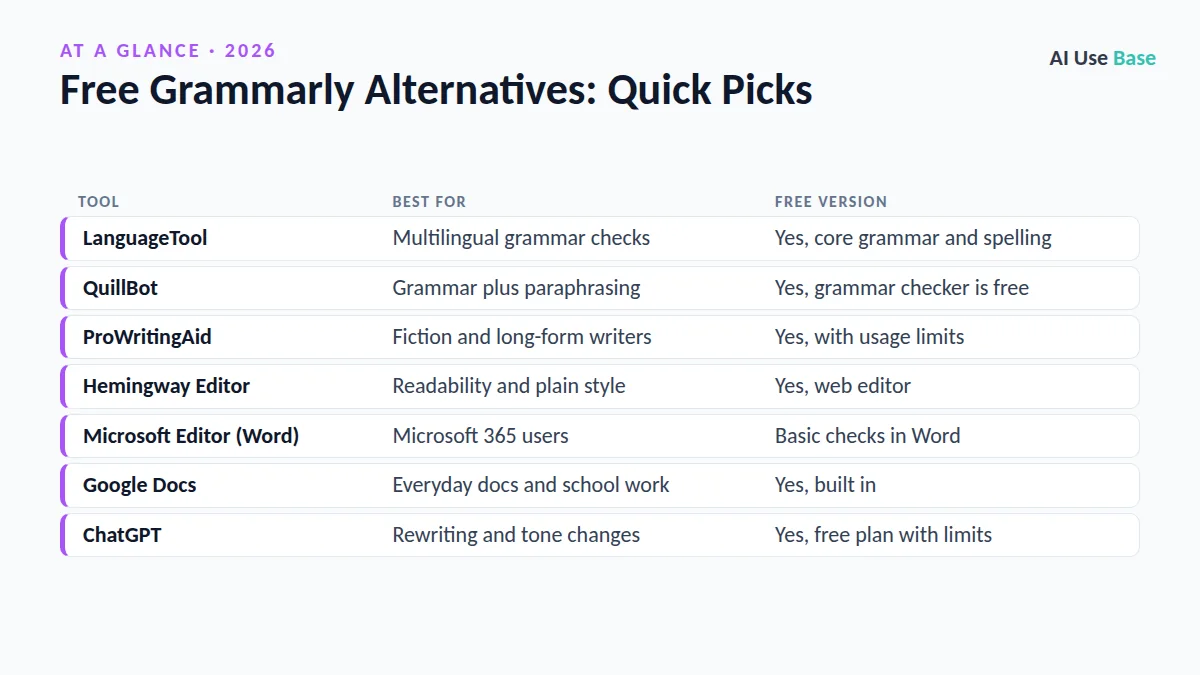
Free Grammarly Alternatives: Quick Picks
| Tool | Best for | Free version |
|---|---|---|
| LanguageTool | Multilingual grammar checks | Yes, core grammar and spelling |
| QuillBot | Grammar plus paraphrasing | Yes, grammar checker is free |
| ProWritingAid | Fiction and long-form writers | Yes, with usage limits |
| Hemingway Editor | Readability and plain style | Yes, web editor |
| Microsoft Editor (Word) | Microsoft 365 users | Basic checks in Word |
| Google Docs | Everyday docs and school work | Yes, built in |
| ChatGPT | Rewriting and tone changes | Yes, free plan with limits |
Prices last checked October 2026. Free plan limits change often, so confirm details on each official page before you commit.
Why Look for Free Grammarly Alternatives?
Grammarly is now part of the company Superhuman, and its free plan still covers basic spelling, grammar and punctuation. The catch is that many of its best features, such as full-sentence rewrites, tone adjustments and plagiarism checks, sit behind a paid plan.
People usually search for free Grammarly alternatives for one of four reasons: they write in a language other than English, they want deeper style feedback without paying, they dislike installing a browser extension that reads everything they type, or they already pay for a tool (like Microsoft 365 or ChatGPT) that can do the job.
The 7 Best Free Grammarly Alternatives
1. LanguageTool
Of all the free Grammarly alternatives, LanguageTool is the closest match. It works as a browser extension, desktop app and add-in for Word and Google Docs, and it checks grammar, spelling and punctuation in more than 30 languages, which Grammarly does not.
- Free plan: Core grammar, spelling and punctuation checks with a per-check character limit.
- Paid from: A Premium plan adds style suggestions, rephrasing and longer texts.
- Best for: Multilingual writers, students and anyone who wants a direct swap.
Learn more on the official LanguageTool plans page.
2. QuillBot Grammar Checker
QuillBot is best known for paraphrasing, but its grammar checker is free to use. You paste text, click “Fix All Errors” and review the changes.
- Free plan: Grammar checker plus limited paraphrasing modes and summarizer.
- Paid from: QuillBot Premium unlocks all paraphrasing modes and plagiarism checks.
- Best for: Students and bloggers who also want to reword sentences.
3. ProWritingAid
ProWritingAid is a style coach as much as a grammar checker. It produces reports on overused words, sentence length, pacing and readability, which is why novelists and long-form writers like it.
- Free plan: Grammar checks and writing reports, with limits on usage and AI features.
- Paid from: Premium plans remove the limits; see the ProWritingAid pricing page.
- Best for: Fiction writers, bloggers and anyone editing long documents.
4. Hemingway Editor
Among free Grammarly alternatives focused on style, the free web version of Hemingway Editor highlights long, hard-to-read sentences, passive voice, adverbs and complex words. It gives you a readability grade so you can aim for clear, simple prose.
- Free plan: The full web editor at no cost, with no sign-up required.
- Paid from: A paid desktop app and an AI-powered Plus plan are optional.
- Best for: Marketers, bloggers and anyone writing for busy readers.
Hemingway does not catch every grammar mistake, so pair it with LanguageTool or Google Docs.
5. Microsoft Editor in Word and Outlook
Microsoft Editor is still built into Word and Outlook, where it flags spelling and grammar issues as you type. Note that Microsoft has retired the Editor browser extensions for Edge and Chrome, so it is no longer a web-wide Grammarly replacement.
- Free plan: Basic spelling and grammar in Word for the web and Outlook.
- Paid from: Advanced refinements come with a Microsoft 365 subscription.
- Best for: People who already write most documents in Word.
6. Google Docs Spelling and Grammar
If you write in Google Docs, you may not need to install any free Grammarly alternatives at all, because a capable checker is already built in. Open Tools, then Spelling and grammar, to see suggestions underlined in red and blue. Paid Google Workspace and Google AI plans add Gemini for rewriting and tone help.
- Free plan: Built-in spelling and grammar suggestions in every Google account.
- Paid from: Gemini features come with paid Google plans.
- Best for: Students and teams who live in Google Docs.
7. ChatGPT (and Other AI Chatbots)
AI chatbots are among the most flexible free Grammarly alternatives because they can rewrite, not just correct. Paste your text into ChatGPT with a prompt like Fix grammar and spelling only. Keep my wording and list every change you made. Claude and Gemini work the same way.
- Free plan: Free ChatGPT with usage limits on advanced models.
- Paid from: ChatGPT Go and Plus raise limits.
- Best for: Rewriting paragraphs, changing tone and explaining errors.
The trade-off is that chatbots do not underline errors as you type, and they sometimes change more than you asked. Our ChatGPT vs Claude for writing guide compares the two for editing work.
How to Choose Between Free Grammarly Alternatives
- Decide where you write. Browser everywhere: LanguageTool. Word: Microsoft Editor. Google Docs: the built-in checker.
- Check your language needs. If you write in German, French, Spanish or other languages, LanguageTool is the clear pick.
- Choose correction or coaching. For simple fixes, QuillBot or Google Docs is enough. For style feedback, try ProWritingAid or Hemingway.
- Consider privacy. Extensions read what you type. Avoid pasting confidential work into any free tool unless your organization approves it.
- Combine two tools. Many writers use one checker for grammar and Hemingway or ChatGPT for clarity.
Students can find more options in our best AI tools for students roundup, and writers should see the full list of best AI writing tools.
Limitations of Free Grammar Checkers
Every free tool, including Grammarly’s own free plan, misses some errors and occasionally suggests wrong fixes. Free tiers usually cap text length, rewrite suggestions or daily usage, and none of them replace a careful human read before you hit send.
Treat free Grammarly alternatives as a second pair of eyes, not an autopilot. Accept suggestions only when you understand why they are better.
For more no-cost options beyond grammar, browse our best free AI tools list or the pillar guide to the best AI tools.
Frequently Asked Questions
What is the best free alternative to Grammarly?
LanguageTool is the closest free alternative because it works as a browser extension and in Word and Google Docs. It also supports more than 30 languages. If you mainly want clearer sentences, Hemingway Editor is a strong second choice.
Is QuillBot better than Grammarly?
QuillBot is better for paraphrasing and its grammar checker is free, but Grammarly is more polished as a real-time checker that works across websites. Many students use QuillBot for rewording and another tool for live grammar checks.
Can ChatGPT replace Grammarly?
For editing finished text, often yes. ChatGPT can fix grammar, adjust tone and explain mistakes. It does not underline errors as you type, though, and it may change more than you asked, so tell it to keep your wording.
Is Microsoft Editor still free?
Basic spelling and grammar checks are still available in Word and Outlook. However, Microsoft retired the Editor browser extensions for Edge and Chrome, so it no longer checks text across the web.
Are free grammar checkers safe to use?
Reputable tools are generally safe for everyday writing, but browser extensions can read what you type. Avoid pasting confidential or client data into free tools unless your school or employer approves them.
Final Thoughts
The right free Grammarly alternatives depend on how you write. LanguageTool is the best direct replacement, Hemingway is the best for clarity, and ChatGPT is the best for rewriting whole passages. If you already use Word or Google Docs, start with the checker you have.
Try two of these free Grammarly alternatives for a week on your real emails and essays. Keep the one that catches the most mistakes without slowing you down.