To learn how to use Microsoft Copilot, start with the free Copilot app at copilot.microsoft.com or on Windows, Mac, iPhone or Android, and simply type or speak a request. To get Copilot inside Word, Excel, PowerPoint and Outlook, you need a paid Microsoft 365 plan that includes it, after which a Copilot button appears in each app.
The confusing part is that “Copilot” covers several products. This guide explains the free app versus Microsoft 365 Copilot, shows how to use it in each Office app with example prompts, and compares the plans and prices.
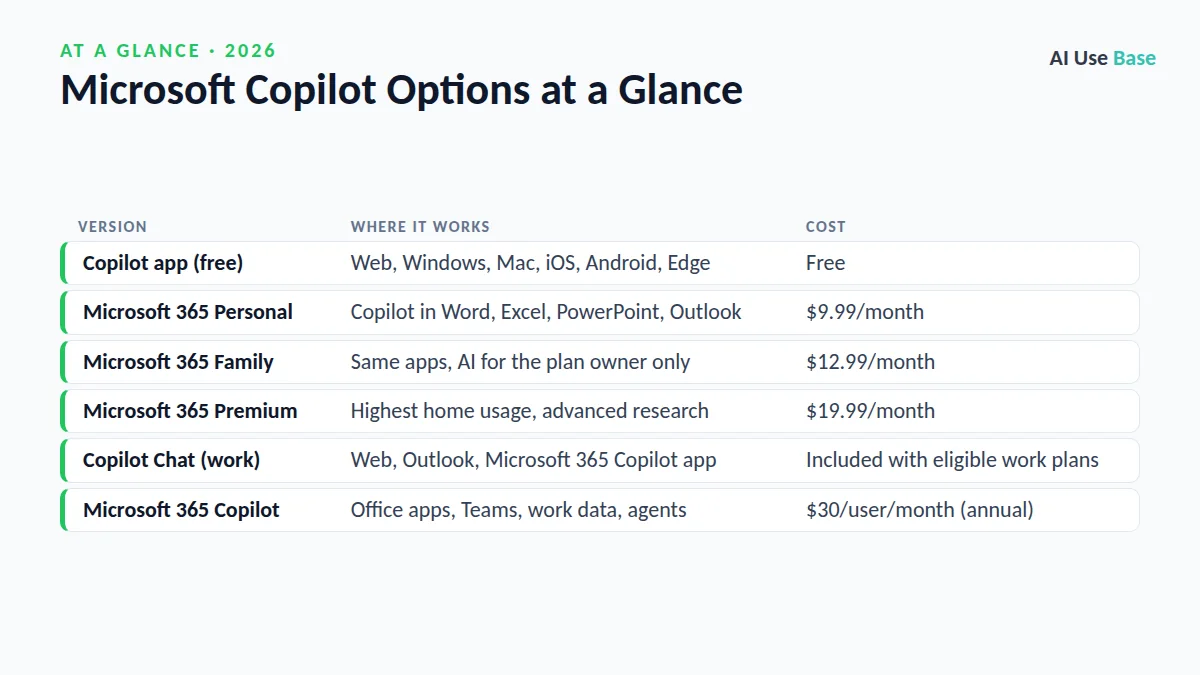
Microsoft Copilot Options at a Glance
| Version | Where it works | Cost |
|---|---|---|
| Copilot app (free) | Web, Windows, Mac, iOS, Android, Edge | Free |
| Microsoft 365 Personal | Copilot in Word, Excel, PowerPoint, Outlook | $9.99/month |
| Microsoft 365 Family | Same apps, AI for the plan owner only | $12.99/month |
| Microsoft 365 Premium | Highest home usage, advanced research | $19.99/month |
| Copilot Chat (work) | Web, Outlook, Microsoft 365 Copilot app | Included with eligible work plans |
| Microsoft 365 Copilot | Office apps, Teams, work data, agents | $30/user/month (annual) |
Free Copilot vs Microsoft 365 Copilot
Which version you have shapes how to use Microsoft Copilot. The free Copilot app is a general AI assistant. It answers questions, writes and rewrites text, searches the web with sources, creates images, talks with you by voice and can remember details you choose to share. You need to be at least 18, or meet your country’s minimum age.
Microsoft 365 Copilot is the version built into Office apps. At home it comes with Microsoft 365 Personal, Family or Premium. At work, a company license connects Copilot to your emails, files, meetings and chats, so it can answer questions such as “What did my team decide about the budget?”
How to Use Microsoft Copilot: Getting Started
- Open Copilot. Go to copilot.microsoft.com, open the Copilot app on Windows, or install it on your phone.
- Sign in. Use a personal Microsoft account for home use, or your work or school account for business features.
- Type or speak a prompt. Tap the microphone to talk, or add an image so Copilot can see what you mean.
- Refine the result. Ask follow-ups like “make it more formal” or “turn this into a table.”
- Use it in Office. With an eligible plan, open Word, Excel, PowerPoint or Outlook and click the Copilot icon on the ribbon or beside your text.
How to Use Microsoft Copilot in Office Apps
Copilot in Word
Word is the easiest place to learn how to use Microsoft Copilot in Office. Use it to draft from scratch, rewrite a paragraph or summarize a long document. Select text and choose the Copilot icon to rewrite it, or open the Copilot pane to ask questions about the whole file. Try: Draft a one-page project proposal for [project] with goals, timeline and budget sections.
Copilot in Excel
Copilot helps you create formulas, spot trends and build charts. It works best with data formatted as a table with clear headers. Try: Add a column that calculates profit margin, then highlight the top 5 products.
Copilot in PowerPoint
Copilot can turn a prompt or a Word document into a draft deck, add slides and summarize a long presentation. Try: Create a 10-slide presentation from [file] for a non-technical audience. Our guide on how to convert Word to PowerPoint with AI covers this in more detail.
Copilot in Outlook
Copilot summarizes long email threads and drafts replies in the tone you choose. Try: Summarize this thread and list the action items with owners. or Draft a polite reply declining the meeting and suggesting next Tuesday.
8 Useful Prompts for Everyday Tasks
These prompts work in the free app and show how to use Microsoft Copilot for daily work.
Rewrite this email to sound friendlier and shorter: [paste].Explain [topic] in simple terms with one real-world example.Plan a weekly meal prep for two people on a $[amount] budget.Compare [product A] and [product B] in a table and cite sources.Create an image of [scene] in a flat illustration style.Give me an Excel formula that counts cells containing "[text]".Turn these meeting notes into a summary with decisions and next steps.Write a LinkedIn post announcing [news] in under 120 words.
Microsoft Copilot Plans and Pricing
You can learn how to use Microsoft Copilot for free, but Office features need a paid plan. Prices below are US list prices from Microsoft’s plan comparison and Copilot business pricing pages (prices last checked October 2026).
| Plan | Price | Copilot features |
|---|---|---|
| Copilot app | Free | Chat, voice, image creation, web answers with standard limits |
| Microsoft 365 Personal | $9.99/month or $99.99/year | Copilot in desktop Word, Excel, PowerPoint, Outlook and OneNote; higher usage |
| Microsoft 365 Family | $12.99/month or $129.99/year | Up to six people get the apps; Copilot is for the subscription owner only |
| Microsoft 365 Premium | $19.99/month or $199.99/year | Extensive usage, agentic research and analysis features |
| Microsoft 365 Copilot Business (add-on) | $21/user/month annual ($18 promo through Dec 2026) | Copilot in apps and Teams, Researcher and Analyst agents |
| Microsoft 365 Copilot (enterprise) | $30/user/month annual | Work data grounding, agents, analytics |
One change to know: since April 2026, business users without a Copilot license no longer get Copilot Chat inside Word, Excel, PowerPoint and OneNote. They can still use it in Outlook and the Microsoft 365 Copilot app.
Tips on How to Use Microsoft Copilot Well
- Give context. Mention the audience, goal and length you want.
- Reference files. In Microsoft 365, point Copilot to a specific document so it works from the right source.
- Format your data. In Excel, convert ranges to tables first.
- Iterate. Treat the first draft as a starting point and refine it.
- Review everything. Check numbers, names and dates before sending.
For more options, see our lists of the best AI productivity tools and the best AI tools overall.
Limitations
Knowing how to use Microsoft Copilot also means knowing its limits.
- Different products, different features. The free app cannot edit your Office files directly.
- Usage limits. Lower-priced plans have tighter limits on advanced chat, images and voice.
- Accuracy. Copilot can misread data or invent details, so verify important output.
- Family sharing. On Microsoft 365 Family, only the owner gets Copilot features.
Frequently Asked Questions
Is Microsoft Copilot free?
Yes, and the free app is a good place to learn how to use Microsoft Copilot. The Copilot app is free on the web, Windows, Mac, iOS and Android. Using Copilot inside Word, Excel, PowerPoint and Outlook requires a paid Microsoft 365 plan that includes it, such as Personal, Family or Premium at home.
How do I turn on Copilot in Word?
Sign in to Word with the account that has an eligible Microsoft 365 plan, make sure the app is updated, and look for the Copilot icon on the Home ribbon or beside your text. If it does not appear, check your subscription or ask your IT admin.
What is the difference between Copilot and Microsoft 365 Copilot?
Copilot is the free consumer assistant for chat, web answers and images. Microsoft 365 Copilot works inside Office apps and, with a work license, can use your emails, files and meetings for context.
Can Copilot make PowerPoint presentations?
Yes. With an eligible plan, Copilot in PowerPoint can create a draft deck from a prompt or a document, add slides and summarize a presentation. You should still edit the design and check the facts.
How do I use Microsoft Copilot in Excel?
Format your data as a table with clear headers, open Copilot from the ribbon, and ask for formulas, charts or trends in plain English. Learning how to use Microsoft Copilot this way saves time on routine analysis.
Final Thoughts
The simplest way to learn how to use Microsoft Copilot is to start with the free app for questions, writing and images, then decide whether you need it inside your Office apps. If you live in Word, Excel and Outlook, Microsoft 365 Personal is the most affordable way in.
At work, ask your IT team which Copilot license you have before paying for anything yourself.