Is Microsoft Copilot free? Yes. The Copilot app on the web, Windows, iPhone and Android is free with a Microsoft account, and it handles chat, web answers with sources, image creation and voice. What costs money is Copilot inside Word, Excel, PowerPoint and Outlook, plus higher usage limits and advanced agents.
So the real question is which Copilot you need. Home users can get Copilot in the Office apps through Microsoft 365 Personal, Family or Premium, while businesses pay for Microsoft 365 Copilot licenses. Here is how the free and paid versions compare.
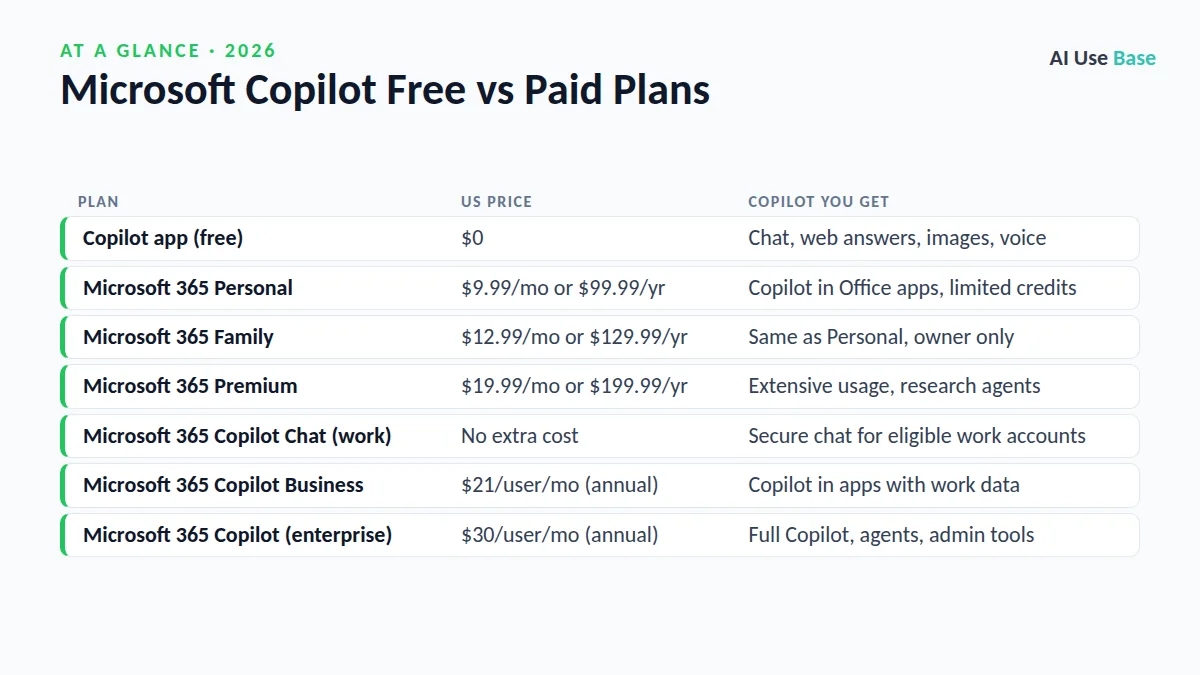
Is Microsoft Copilot Free? Plans at a Glance
| Plan | US price | Copilot you get |
|---|---|---|
| Copilot app (free) | $0 | Chat, web answers, images, voice |
| Microsoft 365 Personal | $9.99/mo or $99.99/yr | Copilot in Office apps, limited credits |
| Microsoft 365 Family | $12.99/mo or $129.99/yr | Same as Personal, owner only |
| Microsoft 365 Premium | $19.99/mo or $199.99/yr | Extensive usage, research agents |
| Microsoft 365 Copilot Chat (work) | No extra cost | Secure chat for eligible work accounts |
| Microsoft 365 Copilot Business | $21/user/mo (annual) | Copilot in apps with work data |
| Microsoft 365 Copilot (enterprise) | $30/user/mo (annual) | Full Copilot, agents, admin tools |
Prices last checked October 2026 on Microsoft’s Microsoft 365 plan comparison and Microsoft 365 Copilot pricing pages. Business plans require a qualifying Microsoft 365 subscription, and promotional prices may apply for a limited time.
Is Microsoft Copilot Free for Personal Use?
For everyday personal use, the answer is yes. Go to copilot.microsoft.com, open the Copilot app in Windows, or download it on your phone. Sign in with a free Microsoft account and you can start chatting immediately.
What the free Copilot app includes
- Chat powered by OpenAI-based and Microsoft models, with answers grounded in Bing web results and citations.
- Image creation from text prompts.
- Copilot Voice for spoken conversations.
- Vision features that let Copilot see your screen or camera on supported devices.
- Help with writing, summarizing, planning and brainstorming.
Limits of the free version
Microsoft says “usage limits apply” and paid subscribers get higher caps. During busy periods, free users may get slower responses or hit limits on image creation and advanced features. The free app also does not work inside the desktop versions of Word, Excel or PowerPoint.
Copilot in Microsoft 365 Personal and Family
Microsoft 365 Personal ($9.99 a month) and Family ($12.99 a month) now include Copilot in Word, Excel, PowerPoint, Outlook and OneNote. You can draft documents, summarize long emails, build slides from a prompt and analyze spreadsheet data.
There are two catches. First, AI features use a monthly allowance of AI credits; Microsoft’s AI credits support page lists 60 credits per month for Personal and Family. Second, on Family, only the subscription owner gets the AI features. Other family members keep the apps and storage but not Copilot.
Microsoft 365 Premium: The Old Copilot Pro
Microsoft replaced the standalone Copilot Pro subscription with Microsoft 365 Premium, priced at $19.99 a month or $199.99 a year. It bundles everything in Family (up to six people, 1 TB each) with the highest consumer Copilot usage.
Premium adds what Microsoft calls “extensive usage” for Copilot chat, image creation and Office features, plus agentic tools such as Researcher and Analyst for deeper research and data work. As with Family, the AI benefits belong to the subscription owner.
Copilot for Work: Business and Enterprise Plans
At work, the picture changes. Is Microsoft Copilot free for employees? It depends on your license. Microsoft 365 Copilot Chat is available at no additional cost to users with an eligible Microsoft 365 work or school account. It offers secure web-grounded chat with enterprise data protection.
Full Microsoft 365 Copilot, which can read your work emails, files, meetings and chats, is a paid add-on. Copilot Business for smaller organizations is listed at $21 per user per month on an annual plan, and the enterprise Microsoft 365 Copilot license costs $30 per user per month paid yearly. Microsoft also sells Business Standard and Business Premium bundles with Copilot included.
In 2026 Microsoft also scaled back free Copilot Chat inside Word, Excel and PowerPoint for some business customers, so check with your IT team before assuming in-app access at work.
Who Should Pay for Copilot?
Once you know the answer to “is Microsoft Copilot free” for your situation, the choice comes down to how often you work in Office apps.
Stay on the free Copilot app if you
- Mostly ask questions, brainstorm or write short text.
- Already use another assistant such as ChatGPT. See how to use ChatGPT to compare workflows.
- Do not use Word, Excel or PowerPoint often.
Choose Personal or Family if you
- Already need Office apps and 1 TB of OneDrive storage.
- Want occasional Copilot help in documents and email.
Choose Premium if you
- Use Copilot daily in Office and keep running out of credits.
- Want Researcher and Analyst for deep research or spreadsheet analysis.
Choose a business license if you
- Need Copilot to work across company email, Teams and SharePoint with admin controls.
Free Alternatives to Microsoft Copilot
If you asked “is Microsoft Copilot free” because you want to avoid another subscription, there are good options. If Copilot’s free tier feels limited, ChatGPT, Gemini and Claude all offer capable free plans. Our list of the best free AI tools compares them, and the best AI productivity tools guide covers options for documents and email. For image work, see Canva AI vs Microsoft Designer.
For a broader overview, start with our pick of the best AI tools across every category.
Frequently Asked Questions
Is Microsoft Copilot free to use?
Yes. The Copilot app on the web, Windows and mobile is free with a Microsoft account and includes chat, web answers, image creation and voice. Usage limits apply, and Copilot inside the Office desktop apps requires a paid Microsoft 365 plan.
Is Microsoft Copilot free in Word and Excel?
Not for home users. Copilot in Word, Excel, PowerPoint and Outlook comes with Microsoft 365 Personal, Family or Premium. Personal and Family include a limited monthly AI credit allowance for the subscription owner.
What happened to Copilot Pro?
Microsoft replaced the standalone Copilot Pro subscription with Microsoft 365 Premium. Premium costs $19.99 per month and combines the Family plan with the highest consumer Copilot usage and research agents.
Is Microsoft Copilot free for business users?
Microsoft 365 Copilot Chat is available at no additional cost for users with an eligible Microsoft 365 work account. Full Microsoft 365 Copilot with access to work data is a paid license, from $21 per user per month for Copilot Business and $30 for enterprise.
Is Microsoft Copilot free on Windows 11?
Yes. The Copilot app comes with Windows 11 and is free to use with a Microsoft account. Paid Microsoft 365 plans raise usage limits and add Copilot in the Office apps.
Final Thoughts
Is Microsoft Copilot free? The core Copilot app is, and it is good enough for most everyday questions, writing help and image ideas. You only need to pay when you want Copilot inside Word, Excel, PowerPoint and Outlook, or when you need higher limits and research agents.
For most home users, Microsoft 365 Personal is the sensible paid step. Upgrade to Premium only if you use Copilot heavily every day, and leave business licenses to teams that need Copilot connected to company data.