In the Gamma vs Canva debate, Gamma is the faster choice when you want AI to turn an idea, outline or document into a finished deck in minutes, while Canva is better when you need full design control, brand consistency and a huge template library. Both have free plans, and both sell paid upgrades that unlock more AI usage.
The simplest way to settle Gamma vs Canva: Gamma is a writing-first tool that designs for you, and Canva is a design tool that now writes for you. Below we compare AI generation, design control, templates, export, collaboration and pricing, then give a clear verdict.
Quick Verdict
- Choose Gamma if speed matters most and you mainly build pitch decks, lessons, reports or one-page web docs from text.
- Choose Canva if looks matter most, you work with a brand kit, or your presentation is one part of a bigger set of social posts, videos and print designs.
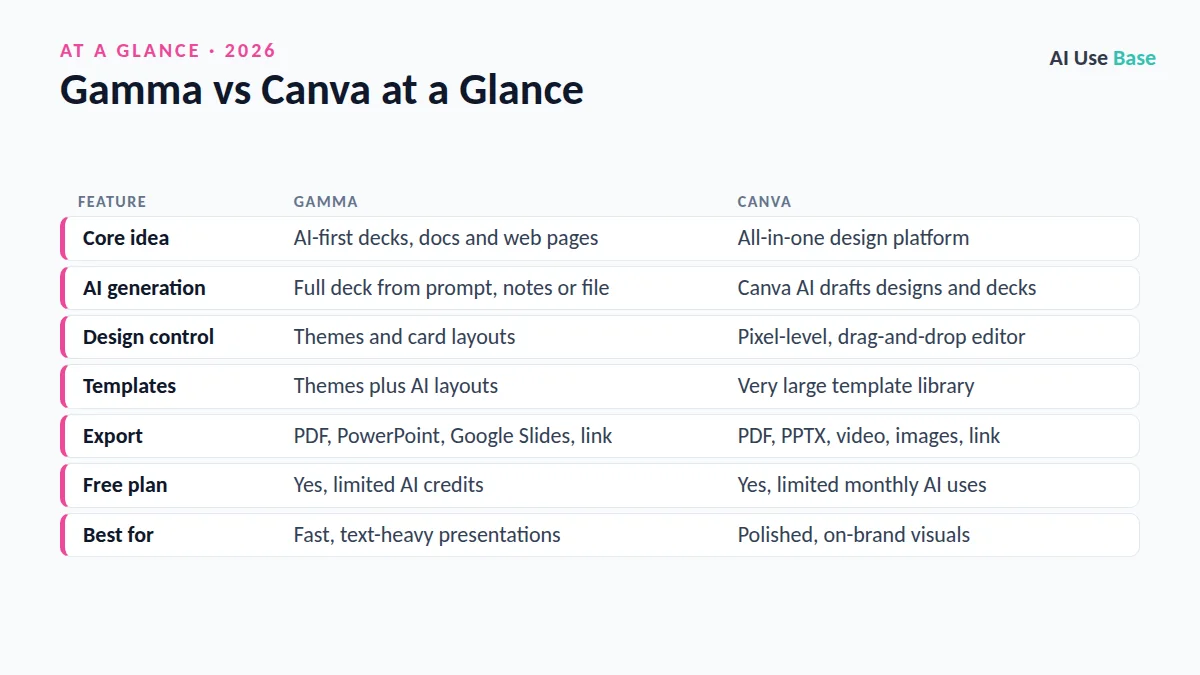
Gamma vs Canva at a Glance
| Feature | Gamma | Canva |
|---|---|---|
| Core idea | AI-first decks, docs and web pages | All-in-one design platform |
| AI generation | Full deck from prompt, notes or file | Canva AI drafts designs and decks |
| Design control | Themes and card layouts | Pixel-level, drag-and-drop editor |
| Templates | Themes plus AI layouts | Very large template library |
| Export | PDF, PowerPoint, Google Slides, link | PDF, PPTX, video, images, link |
| Free plan | Yes, limited AI credits | Yes, limited monthly AI uses |
| Best for | Fast, text-heavy presentations | Polished, on-brand visuals |
Prices last checked October 2026. Plan details change often, so confirm on the official pages linked below.
Gamma vs Canva: AI Generation
Gamma was built around AI from day one. You type a topic, paste notes or import a document, review an editable outline, pick a theme and let Gamma generate the whole presentation with text, layouts and images. You can then ask its AI to rewrite a card, shorten text, change the tone or add a new section. Gamma also creates documents, simple websites and social posts with the same flow.
Canva added AI to an existing design tool. With Canva AI, you describe the deck you need and Canva builds a first draft from its templates, which you then refine in chat or by hand. Magic Write handles slide text, and image tools can generate or edit visuals. Our guide on Canva AI vs Microsoft Designer covers these tools in more depth.
In our editorial judgment, Gamma wins this round. Its first drafts are usually more complete and better structured, because the tool thinks in terms of content and story. Canva’s drafts look good but often need more manual work to get the narrative right.
Gamma vs Canva: Design Control and Customization
This is where the Gamma vs Canva comparison flips. Canva gives you a true design canvas: move any element anywhere, layer images, add animations, use thousands of fonts and graphics, and lock in brand colors and logos with a brand kit on paid plans.
Gamma uses flexible “cards” instead of fixed slides. You control themes, fonts, colors, layouts and image placement, but you work within Gamma’s system. That keeps decks clean and consistent with little effort, yet designers who want exact placement can feel boxed in.
Templates
Canva’s template library is one of its biggest strengths, covering presentations, reports, social posts, flyers and much more. Gamma offers a smaller set of themes and leans on AI to create the layout for you. If you love starting from a template, Canva is the safer bet.
Export and Sharing in Gamma vs Canva
Both tools let you present directly in the browser and share a live link. Gamma can export to PDF, PowerPoint and Google Slides, which is handy if your school or company standardizes on Office or Google. Some complex layouts may shift slightly after export, so check the file before you present.
Canva exports to PDF, PPTX, images and video, and it can also turn a presentation into a recorded talk. Because Canva handles video, print and social formats too, it is easier to reuse one deck across many channels. If you often start from Word files, see our guide to converting Word to PowerPoint with AI.
Collaboration
On teamwork, Gamma vs Canva is closer. Both support real-time collaboration, comments and shared workspaces. Gamma includes built-in analytics on shared decks on paid plans, so you can see who viewed your work. Canva has stronger team features for larger organizations, including brand controls, approvals and content planning.
Gamma vs Canva Pricing
Both tools use a free tier plus paid plans with more AI usage. For most readers, Gamma vs Canva pricing comes down to how much else you design. Exact prices and credit amounts change often, so we describe them below and link to the official pages.
| Plan type | Gamma | Canva |
|---|---|---|
| Free | Free plan with a starting pool of AI credits and Gamma branding | Free plan with core editor and limited monthly AI uses |
| Individual paid | Plus and Pro tiers with more AI, no branding, advanced features | Canva Pro for one person, with a larger AI allowance and premium content |
| Teams | Team workspaces on paid plans | Business and Enterprise plans |
| Students and teachers | Standard plans | Free Canva for Education for eligible schools |
See the current numbers on the Gamma pricing page and the Canva pricing page. A key point: Canva Pro bundles far more than presentations, so it is often better value if you also design social posts, videos or print materials.
Which Should You Choose: Gamma vs Canva?
Choose Gamma if…
- You need a solid deck fast from notes, a report or a rough idea.
- Your presentations are text-heavy, such as lessons, proposals or training.
- You want decks that also work as scrollable web pages.
- You are not a designer and want good defaults without effort.
Choose Canva if…
- You want full creative control over every element.
- You follow strict brand guidelines with logos, fonts and colors.
- You also create social graphics, videos, flyers or print.
- You are a student or teacher who can use Canva for Education free.
You do not have to settle Gamma vs Canva for good. Many people use both: Gamma to draft the structure and story, then Canva or PowerPoint for final polish. Teachers can find more ideas in our guide to AI for teachers, and you can compare more options in our list of the best AI tools.
Frequently Asked Questions
Is Gamma better than Canva for presentations?
Gamma is better if you want AI to build a complete, well-structured deck quickly from text. Canva is better if you want detailed design control, brand kits and a large template library. Many people draft in Gamma and polish in Canva.
Is Gamma free to use?
Yes. Gamma has a free plan with a limited pool of AI credits, and free decks carry Gamma branding. Paid plans add more AI usage, remove branding and unlock advanced features.
Can I export Gamma presentations to PowerPoint?
Yes. Gamma exports to PowerPoint, Google Slides and PDF. Check the exported file before presenting, because some layouts can shift slightly.
Does Canva have an AI presentation maker?
Yes. Canva AI can generate a presentation draft from a prompt using Canva templates, and Magic Write helps with slide text. You can then edit everything in the Canva editor.
Which is better for students, Gamma or Canva?
Canva is often the better value for students because eligible schools can get Canva for Education free. Gamma is great for quickly turning notes into a clean class presentation on its free plan.
Final Thoughts
Gamma vs Canva is really speed versus control. Gamma is the better AI presentation maker for turning content into a clean deck quickly, while Canva is the better design platform when visuals, branding and versatility matter.
Try both free plans with the same topic. If you keep fixing layouts in Gamma, go with Canva; if you keep wishing Canva would just write the deck for you, Gamma is your tool.