The best AI coding tools for beginners explain code in plain language, help you fix errors and nudge you toward the answer instead of writing everything for you. Most of the tools below have free plans, so you can start learning today without paying.
One warning before the list: if AI writes all your code, you will not learn to program. Use these tools as a patient tutor, not a shortcut.
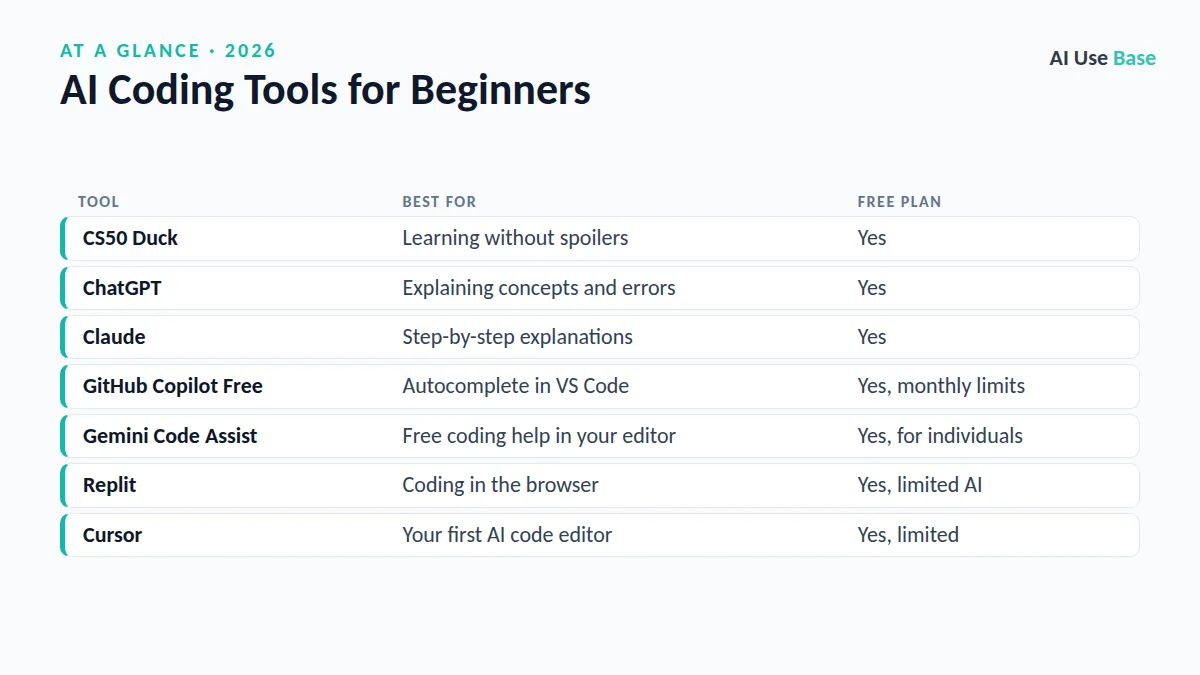
Quick Picks: AI Coding Tools for Beginners
| Tool | Best for | Free plan |
|---|---|---|
| CS50 Duck | Learning without spoilers | Yes |
| ChatGPT | Explaining concepts and errors | Yes |
| Claude | Step-by-step explanations | Yes |
| GitHub Copilot Free | Autocomplete in VS Code | Yes, monthly limits |
| Gemini Code Assist | Free coding help in your editor | Yes, for individuals |
| Replit | Coding in the browser | Yes, limited AI |
| Cursor | Your first AI code editor | Yes, limited |
How We Chose These Tools
We focused on what matters when you are new: clear explanations, a free way to start, easy setup and features that support learning rather than replacing it. We checked each tool’s official pages for plans and limits. This is editorial judgment, not a benchmark score.
What to Look For in AI Coding Tools for Beginners
- Clear explanations: good AI coding tools for beginners explain why code works, not just what to type.
- A useful free plan: you should be able to practise every day without hitting a paywall in the first week.
- Easy setup: browser-based tools or a single VS Code extension are easier than complex installs.
- Learning modes: the option to get hints, quizzes or step-by-step guidance instead of full answers.
- Honest limits: no tool is always right, so pick one that shows its reasoning and lets you ask follow-up questions.
Best AI Coding Tools for Beginners: Tutors
1. CS50 Duck (CS50.ai)
- Best for: students who want hints, not answers
- Free plan: yes
- Paid from: free
- Standout: designed by Harvard’s CS50 team to guide you like a teaching assistant
The duck asks questions and points you in the right direction instead of handing over finished code. It pairs well with the free CS50 courses. Try it at CS50.ai.
2. ChatGPT
- Best for: explaining concepts, error messages and small examples
- Free plan: yes
- Paid from: $20/month for Plus
- Standout: can run Python in the chat to show results
A good learning prompt: “I am learning Python. Explain what a for loop does, give one example, then give me a small exercise and do not show the answer until I ask.”
3. Claude
- Best for: patient, structured explanations of longer code
- Free plan: yes
- Paid from: $20/month for Pro
- Standout: can show small web apps as live previews you can click
Paste your code and ask: “Explain this line by line as if I am a beginner, then suggest one improvement.” Our guide on how to use Claude covers the basics.
Editor-Based AI Coding Tools for Beginners
4. GitHub Copilot Free
- Best for: autocomplete and chat inside VS Code
- Free plan: yes, about 2,000 code completions and 50 chat requests a month
- Paid from: $10/month for Pro
- Standout: verified students can get extra free access through GitHub Education
See GitHub Copilot plans for current limits. Tip for learners: try writing the code yourself first, then compare with Copilot’s suggestion.
5. Gemini Code Assist
- Best for: free AI help in VS Code or JetBrains
- Free plan: yes, for individual developers
- Paid from: business editions available
- Standout: generous free limits from Google
Details are on Gemini Code Assist.
6. Replit
- Best for: coding in the browser with nothing to install
- Free plan: yes, with limited AI use
- Paid from: paid plans add more AI usage
- Standout: write, run and share projects from any computer, including a school Chromebook
7. Cursor
- Best for: beginners ready for a real AI code editor
- Free plan: yes, limited (Hobby)
- Paid from: paid plans for heavier use
- Standout: chat with your whole project and ask why something works
Comparing editors? Read Cursor vs GitHub Copilot.
How to Learn With AI Without Becoming Dependent
- Ask for hints first. Add “give me a hint, not the solution” to your prompts.
- Type the code yourself. Copying teaches far less than typing and running.
- Explain it back. Ask the AI to quiz you: “Ask me 3 questions to check I understand this function.”
- Read the error first. Try to fix it for five minutes before asking AI.
- Build small projects. A calculator, a to-do list or a quiz game teaches more than tutorials alone.
- Follow your school’s rules. Many courses limit AI use on graded work.
Which Should You Start With?
If you are comparing AI coding tools for beginners and still unsure, here is a simple rule. Complete beginner taking a course: start with the CS50 Duck plus ChatGPT or Claude for explanations. Ready to install an editor: add GitHub Copilot Free or Gemini Code Assist in VS Code. No computer of your own: use Replit in the browser.
Once you are more confident, our full list of the best AI coding tools covers agents and professional editors, and our AI tools for students guide covers study tools beyond coding. For everything else, see the best AI tools hub.
Frequently Asked Questions
What is the best free AI for learning to code?
For pure learning, the CS50 Duck is excellent because it gives hints instead of answers. ChatGPT and Claude free plans are great for explanations, and GitHub Copilot Free adds autocomplete in VS Code.
Should beginners use AI coding tools?
Yes, if you use them to understand code rather than copy it. Ask for explanations and hints, type the code yourself and make sure you can explain every line.
Is GitHub Copilot free for students?
Verified students can get free Copilot access through GitHub Education, and anyone can use the Copilot Free plan with monthly limits.
Which programming language should I learn with AI?
Python is the usual first choice because it is readable and widely used. JavaScript is a good alternative if you want to build websites.
Can AI coding tools for beginners make mistakes?
Yes. AI can suggest code that looks right but has bugs or outdated methods. Always run the code, test it with different inputs and ask the AI to explain anything you do not understand.
Final Thoughts
The best AI coding tools for beginners act like a tutor who never gets tired of your questions. Pick one chat assistant and one editor tool, use them to understand code rather than to skip it, and you will learn faster than you would alone.